Field and community research
Collect responses in settings where participants may not have a suitable device or internet access. Your team uploads the scans when it is back online.
Design printable questionnaires, scan completed responses, and export reviewed data to Excel, CSV, SPSS, or R. PaperSurvey reads marked answers and handwriting, with the original scans available for your team to check.
For academic researchers, study coordinators, and research assistants collecting structured questionnaires on paper.
Use your office printer and document scanner. Review the results before you export.
Use PaperSurvey when your study calls for structured questionnaires completed on paper. Build the data collection around your protocol and test the full route from printed form to exported variables.
Collect responses in settings where participants may not have a suitable device or internet access. Your team uploads the scans when it is back online.
Distribute the same questionnaire to a group in one session. Keep study-group or session labels with the responses so the dataset can be filtered and checked.
Use participant codes and collection-round labels where your protocol requires matching responses over time. Check the exported identifiers and handle the matching in your analysis workflow.
Agree on the instrument and data structure before printing. A short pilot helps the whole team follow the same process when full collection begins.
Explore the help centerCreate questions in PaperSurvey or import them from Word, PDF, or text. Check wording, response scales, variable names, and page layout against your study instrument before generating printable copies.
Plan participant codes, group labels, and collection rounds. Use prefilled forms where appropriate, and test that the identifiers are correct. Participants complete the paper questionnaire with a pen.
Upload completed forms for mark and handwriting recognition. Review uncertain answers against their scanned images, and spot-check accepted answers according to your team’s quality process. Keep missing answers distinct from invalid marks.
Select your export format and answer coding. Confirm response counts, variable labels, group information, and missing-value handling in the tool your analysts use. Resolve discrepancies while the source scans are available.
This is the printable Demographic Questionnaire from our template library. It shows how participant background questions, answer bubbles, and spaces for handwritten responses appear on the paper form you hand out.
The sample covers age, education, employment, household, and background questions. Keep only the questions your study needs and adapt the categories and wording to your participants. You can also import your own research instrument.
Actual printable paper questionnaire
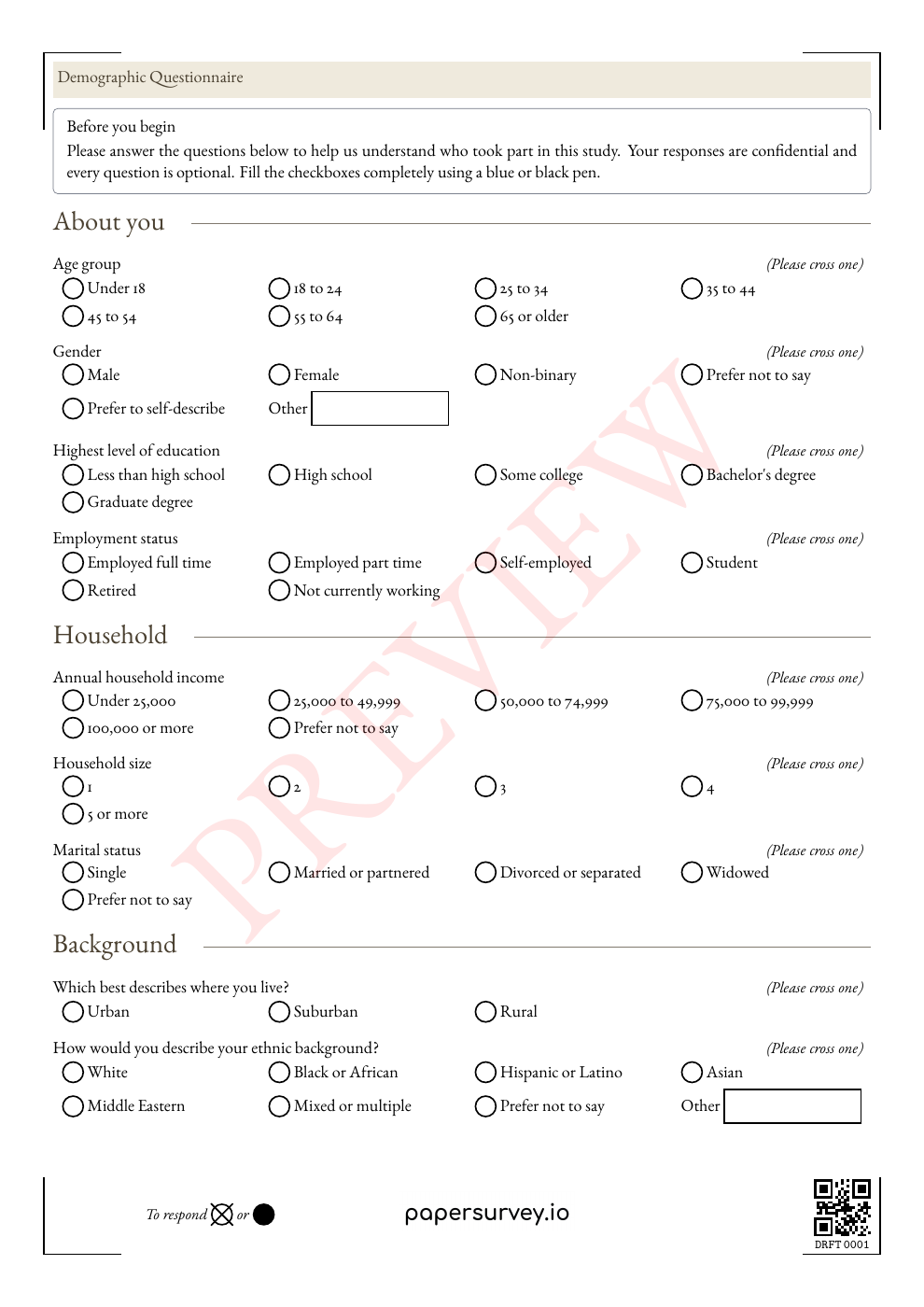
Customize the template in your account, print your forms, collect answers on paper, then scan the completed sheets.
Import questions from Word, PDF, or text, then review the editable survey. Generate a new print-ready version with the identifiers needed for scanning.
Process marked answers and handwritten comments, then check uncertain responses against the scan. Keep response IDs and group tags with the data you export.
Export to Excel, CSV, SPSS, or R. For repeated collection rounds, use participant codes and prefilled forms to support matching responses in your study workflow.
The work does not end when a scanner reads a checkbox. Your team needs consistent variables, clear identifiers, and a way to resolve answers that do not match the source.
Review recognized values alongside the scanned answer. Correct transcription errors and distinguish a blank response from a mark that cannot be interpreted.
Use participant codes for matching and response tags for groups or rounds. Check those fields in a pilot export, and manage any identifying information according to your protocol.
Export to Excel, CSV, SPSS, or R during an active trial or subscription. Choose answer labels or recoded values and configure missing and invalid value codes for your analysis.
Explore 18 fictional responses across three training sessions and two trainers, with paper and web collection, rating questions, multiple selections, and written comments.
Synthetic example, not customer results. These files illustrate data structure and review decisions. They were prepared from fictional responses, not recognized from completed scans, and do not measure accuracy or processing speed.
Inspect the response columns in Excel.
Download XLSXImport the response values into your preferred tool.
Download CSVInspect variables, labels, and missing values in SPSS.
Download SPSS .savOpen the training questionnaire preview below to see the questions behind this dataset. Use the codebook to interpret the fields, then compare the intended answers with the illustrative review log to explore corrections, missing answers, and invalid marks. The questionnaire pictured earlier on this page is a separate template.
No account is needed for these downloads. The PDF is marked PREVIEW; generate your own live forms in PaperSurvey before collecting responses and check a pilot export against your analysis requirements. Read the export guide.
Bring one blank instrument and an outline of the dataset you need. Request a demo and a quote for setup help so your study coordinator and analyst can check the workflow together.
Include your collection dates, expected participants, pages per form, and preferred analysis format. We can discuss the pilot scope and access your team needs before full collection starts.
Request a research pilot quoteComplete the short enquiry form. We’ll reply by email and agree on scope and pricing before setup begins.
Prefer to start yourself?
Start a free 14-day Standard trialNo credit card required for the trial. Team and multilingual features depend on your plan. Compare plans.
PaperSurvey reads completed forms generated by PaperSurvey. You can import the questions from an existing document, but completed forms from another system cannot be scanned through this workflow.
Start before your next collection round, and test a few printed copies first.
Check how data is stored and processed, and request a Data Processing Agreement when your organization needs one.
Yes. Import questions from Word, PDF, or text into an editable PaperSurvey survey, check the layout, and generate new printable forms before collecting responses.
Yes. Prefill forms with your participant codes and export those identifiers with responses. Your team decides how to manage the identifying information and match study rounds.
Yes. Institutional plans provide shared capacity and access for multiple users. Start with a team pilot, or visit university pricing to discuss a wider rollout.
No. Your research team remains responsible for the questionnaire, sampling, consent, study approvals, and analysis. PaperSurvey provides form design, response capture, review, and export tools.
Yes. Review transcribed comments against the scanned responses and correct them where needed. Include handwriting styles, abbreviations, and expected languages in your pilot rather than assuming every comment will be read correctly.
Yes. A survey can collect both paper and web responses in one dataset. Plan how you will identify collection mode and handle repeated submissions as part of your study workflow.