Program and workshop feedback
Ask whether a session was useful, what participants found difficult, and what they would change. Combine rating questions with space for handwritten feedback.
Create printed questionnaires, collect feedback in the field, and scan completed forms into a dataset. PaperSurvey reads marked answers and handwritten comments so your team can review results without typing every response into a spreadsheet.
For monitoring and evaluation teams, program managers, and community organizations running their next round of participant feedback.
Use your office printer and document scanner. Review the results before you export.
Use paper where it fits the way you meet participants: at a workshop, a service location, or a community visit. Your team designs the questions and decides how the findings will inform the program.
Ask whether a session was useful, what participants found difficult, and what they would change. Combine rating questions with space for handwritten feedback.
Collect feedback on opening hours, travel, information, and the experience of using a service. Label responses by location so local issues remain visible.
Use consistent questions across collection rounds. Where your evaluation needs paired responses, plan participant codes and matching in advance; a change in survey scores alone does not establish program impact.
PaperSurvey handles form design and response capture. Your team keeps control of the evaluation questions, fieldwork, review, and interpretation.
Explore the help centerBuild your survey or import questions from a blank document. Add ratings, multiple-choice items, and comment areas. Review the print layout and test a few copies before sending forms to your program sites.
Print the forms generated by PaperSurvey and let participants answer with a pen. They do not need a device or internet connection. Plan site and round labels before collection so batches can be organized consistently.
Upload scans when your team is online. PaperSurvey recognizes marked answers and transcribes handwriting. Check unclear marks and comments against the scanned pages, then correct them before using the results.
Filter by site or collection round, explore charts, and export ratings and comments. Use the dataset in Excel or your analysis tools to prepare the comparisons and narrative your evaluation requires.
This is the printable Program Evaluation Survey from our template library. Participants mark the rating boxes and write their comments directly on paper. Your team scans the completed sheets into PaperSurvey to capture the answers.
The full template also covers facilitators, skills before and after the program, application at work, and future participation. Adapt those sections to your participants and evaluation goals.
Actual printable paper questionnaire
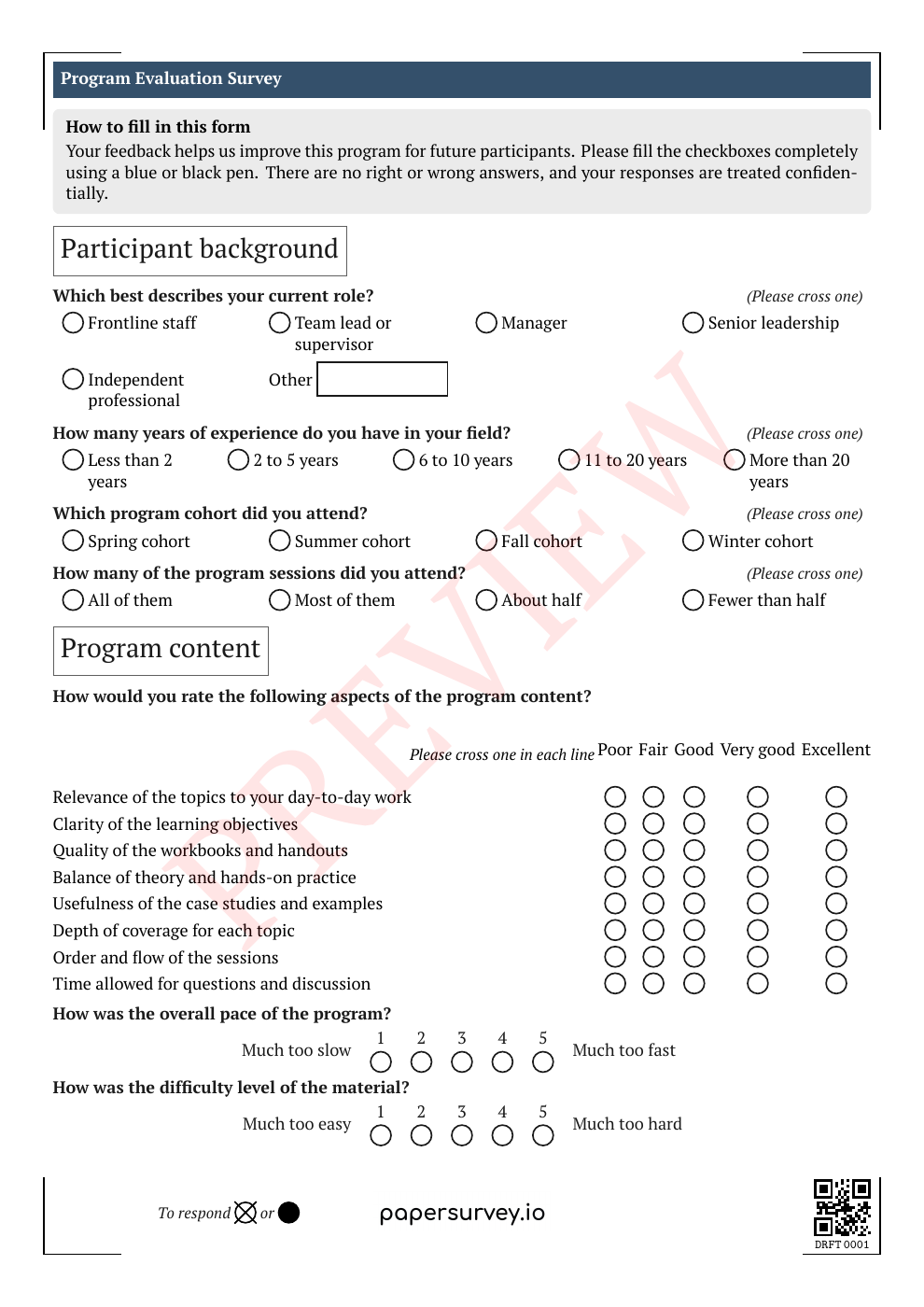
Customize the template in your account, print your forms, collect answers on paper, then scan the completed sheets.
Hand out forms at program sites or community sessions. Participants can respond without a device or internet connection. Upload the scans when your team is online.
Use tags to identify a site or survey round. On a plan with multilingual surveys, print language versions of one questionnaire and collect the answers in the same dataset.
Transcribe handwritten feedback and review unclear answers alongside the scanned response. Export data for a donor report or explore it with built-in charts.
An overall rating can hide a problem at one location. Keep site labels and written feedback with the responses so the evaluation team can examine the differences before writing its conclusions.
Use response tags to filter locations or collection periods. Keep the questions and scales consistent when you intend to compare them.
Review transcribed feedback against the scan. Take participants’ own explanations into the analysis instead of relying only on an average score.
Export responses to a spreadsheet or statistical format during an active trial or subscription. Choose answer labels or numeric codes and check how missing and invalid answers will appear.
Bring one blank questionnaire, your collection dates, and an estimate of the number of forms. Request a demo and a quote for help setting up a small pilot with your team’s reporting needs in mind.
In your request, include the languages, number of sites, and expected pages per form. We can then discuss the setup work and a suitable plan before you commit to a wider collection.
Request an evaluation setup quoteComplete the short enquiry form. We’ll reply by email and agree on scope and pricing before setup begins.
Prefer to start yourself?
Start a free 14-day Standard trialNo credit card required for the trial. Team and multilingual features depend on your plan. Compare plans.
PaperSurvey reads completed forms generated by PaperSurvey. You can import the questions from an existing document, but completed forms from another system cannot be scanned through this workflow.
Start before your next collection round, and test a few printed copies first.
Check how data is stored and processed, and request a Data Processing Agreement when your organization needs one.
PaperSurvey is software for creating questionnaires and processing responses. Your organization chooses the indicators, sampling approach, and evaluation design, and interprets the findings. A setup pilot focuses on getting your forms and data workflow ready.
Yes. Participants fill in printed forms without internet access. Your team needs an internet connection to design the survey, upload scans, and work with the results.
Multilingual surveys are available on supported paid plans. The free trial is on Standard; contact us to discuss a pilot if you need multilingual collection or several team members.
Yes. The same survey can collect paper and web responses in one dataset. You can offer a web link where that works better for participants.
This workflow reads forms generated by PaperSurvey. You can import questions from an existing document, but must generate new printable forms before participants complete them. Plan the setup before your next collection round.
Estimate forms multiplied by pages per form, and confirm the team access, languages, and export formats you need. Use a small test batch to assess print quality, recognition, and review time with your own questionnaire.
Running an academic study? See PaperSurvey for research teams.