Conference and session feedback
Ask about individual sessions or the whole conference. Keep session labels with each collection batch to avoid mixing feedback from different rooms.
Hand out printed feedback forms at the end of a session or before attendees leave. Scan the completed sheets into PaperSurvey to capture ratings and written suggestions for your next event.
For conference organizers, workshop hosts, training providers, and teams running recurring in-person events.
Use your office printer and document scanner. Review the results before you export.
Use a paper questionnaire when you can build a short feedback moment into the event. Keep it focused on decisions the organizing team can act on.
Ask about individual sessions or the whole conference. Keep session labels with each collection batch to avoid mixing feedback from different rooms.
Collect ratings on the content, facilitation, and usefulness of a session. Include space for suggestions about what participants need next.
Reuse key questions across event dates. Ask about the venue, organization, and experience to identify improvements for the next gathering.
A short print-and-scan rehearsal helps organizers get the form length, print layout, and collection process right before attendees arrive.
Explore the help centerStart with the event template or import your own questions. Adjust the wording and comment areas to the decisions you need to make after the event.
Generate forms for the expected attendance. Give staff clear instructions on when to distribute them, where to collect them, and how to keep session batches separate.
Upload scans of completed PaperSurvey forms. Review unclear marks and handwritten feedback against the scanned pages before working with the results.
Organize responses by event date or session, inspect the ratings and comments, and export data for your review meeting or report.
This is the printable Event Satisfaction Survey from our template library. It includes event ratings, questions about what attendees liked or disliked, suggestions, and a recommendation question.
Keep the form short enough for the time available. For a multi-session event, decide whether you need a separate session questionnaire or one form covering the whole experience.
Actual printable paper questionnaire
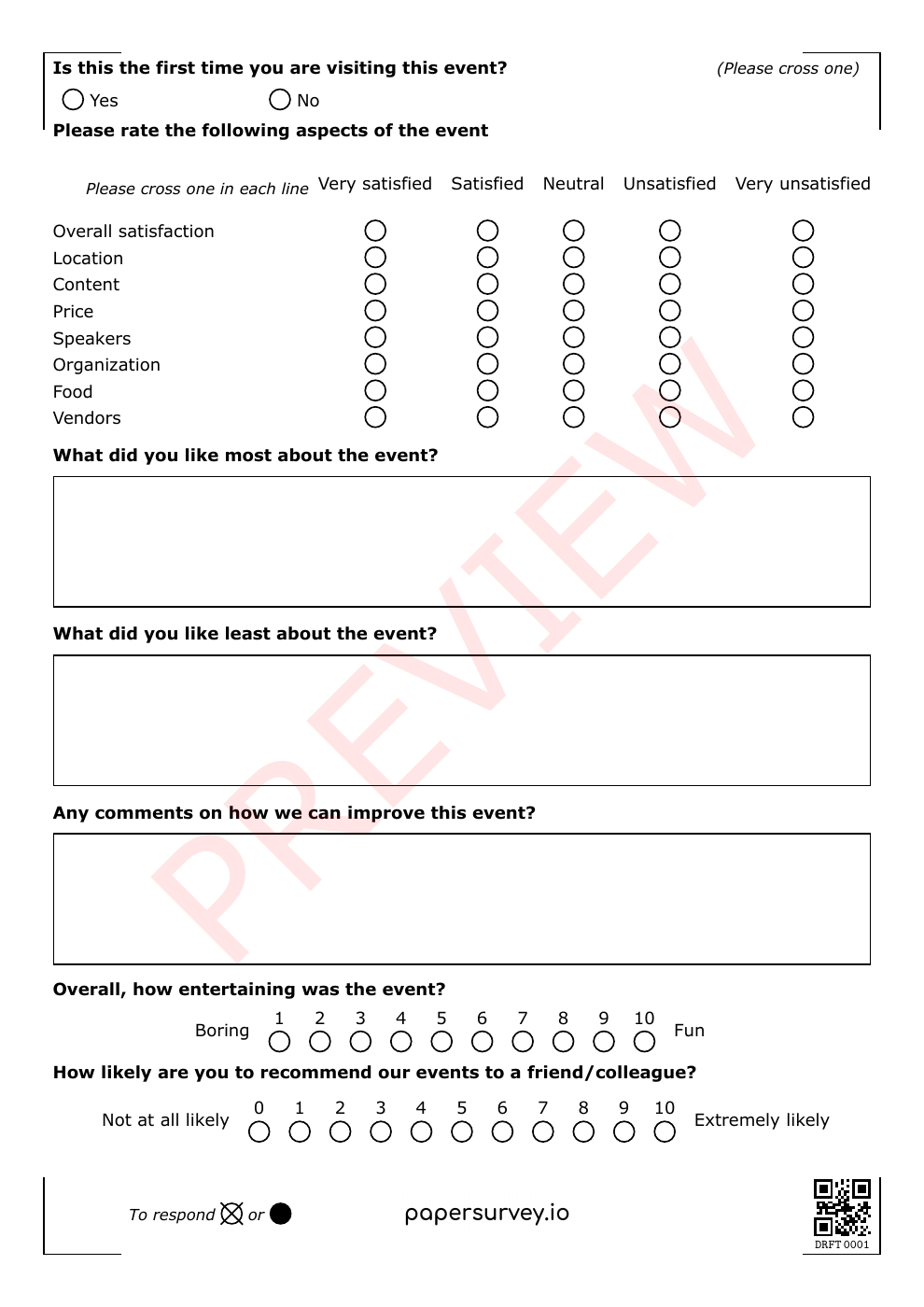
Customize the template in your account, print your forms, collect answers on paper, then scan the completed sheets.
Participants respond with a pen. Paper collection works in meeting rooms and venues without asking people to open a link on their phones.
Capture structured answers and written feedback from the same form. Review the comments that explain a low score or point to a useful change.
Keep useful questions across recurring events and label each collection. Adapt the remaining questions to the venue, format, or session.
Organize the feedback around the sessions or event dates you need to review. Check the captured data before drawing conclusions or sharing findings.
Use response tags to separate event dates or sessions. Confirm that each batch carries the right labels before comparing results.
Review transcribed comments alongside ratings. Use the specific examples attendees give when discussing improvements to content or logistics.
Download reviewed data to a spreadsheet or statistical format during an active trial or subscription. Prepare your own summary for organizers, speakers, or stakeholders.
Bring one blank questionnaire, the event date, and expected attendance. Request a demo and a setup quote so you can test the complete process before printing the full batch.
Include the number of sessions, expected forms, languages, and your deadline for preparing the print files. We can discuss setup scope and the plan that fits your collection.
Request an event feedback setupComplete the short enquiry form. We’ll reply by email and agree on scope and pricing before setup begins.
Prefer to start yourself?
Start a free 14-day Standard trialNo credit card required for the trial. Team and multilingual features depend on your plan. Compare plans.
PaperSurvey reads completed forms generated by PaperSurvey. You can import the questions from an existing document, but completed forms from another system cannot be scanned through this workflow.
Start before your next collection round, and test a few printed copies first.
Check how data is stored and processed, and request a Data Processing Agreement when your organization needs one.
No. Attendees fill in the printed form with a pen. The markings printed on the form help PaperSurvey identify pages when your team scans them later.
Yes. Plan session tags and keep collection batches organized. Test the labels in an export before the event so the reporting team knows how sessions will appear.
Yes. Reuse the questionnaire where appropriate and tag the event date or collection round. Keep core questions consistent when you want to compare events.
Yes. Copy the template into your account and edit it, or import questions from your own document. Generate your new printable forms before collecting responses.
You can use an ordinary document scanner. Run a small test with your printer and scanner before the event, and make sure the entire page and its markings remain visible.
Yes. The same survey can collect paper and web responses. Plan how to communicate the options and handle people who might respond through both.
Evaluating a taught course? Explore paper course evaluations.