Regular pulse checks
Ask a short, consistent set of questions about workload, support, and recognition. Label collection rounds so the team can review changes over time.
Reach employees on the shop floor, across shifts, or at different sites with printed questionnaires. Scan the completed forms into PaperSurvey to capture ratings and handwritten comments for your HR team to review.
For HR and people teams in manufacturing, retail, hospitality, and other workplaces where staff do not all work at a computer.
Use your office printer and document scanner. Review the results before you export.
A paper form gives staff a way to respond during a planned feedback session. Agree on the collection process and explain who will read the responses before handing it out.
Ask a short, consistent set of questions about workload, support, and recognition. Label collection rounds so the team can review changes over time.
Collect feedback across locations or shifts using the same questionnaire. Choose group labels that are useful for action without creating unnecessarily small reporting groups.
Ask staff about new equipment, schedules, or processes. Include space for written examples so ratings have enough context to guide a discussion.
Start with one location or shift. Check the questionnaire, return process, scan quality, and reporting approach before expanding collection.
Explore the help centerUse a template or import your questions. Adjust the introduction to accurately describe confidentiality, who has access, and how the results will be shared.
Generate your printable forms and arrange time for staff to complete them. Set up a return process that fits the privacy commitments you have made.
Upload the forms when your team is online. PaperSurvey recognizes marks and handwriting; review unclear responses against the original scans.
Use site or collection-round tags to organize responses, then export the data. Your team decides how to combine small groups, summarize comments, and communicate next steps.
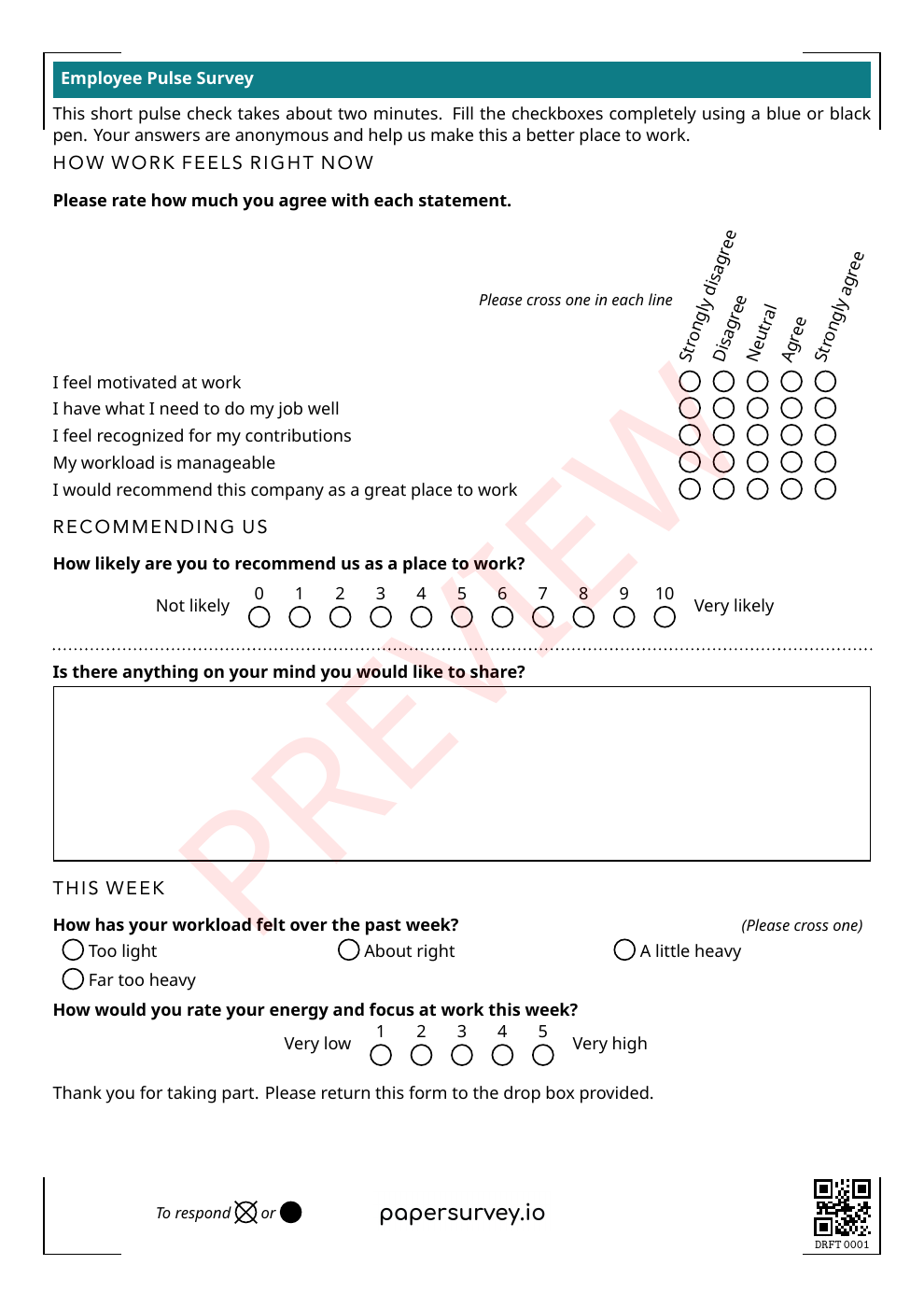
This is the printable Employee Pulse Survey from our template library. It combines agreement scales, questions about workload and workplace experience, and space for handwritten feedback.
The sample introduction describes anonymous collection. Adapt that wording to the process you will actually use. Keep only the questions and group labels you need for this feedback round.
Actual printable paper questionnaire
Customize the template in your account, print your forms, collect answers on paper, then scan the completed sheets.
Participants answer on paper. They do not need an account, a company computer, or access to a personal phone during their shift.
Use consistent wording and scales across sites. On supported paid plans, multilingual surveys let teams print language versions of one questionnaire.
Transcribe handwritten comments and check them against the scan. Take specific suggestions into the review alongside the ratings.
Keep collection labels with the responses and review the data before reporting. Decide in advance how to present results from small teams and potentially identifying comments.
Filter responses by the tags you planned for collection. Interpret differences alongside response counts and the context of each workplace.
Check handwriting transcription against the scanned form. Decide which comments can be shared and which need summarizing before wider reporting.
Export reviewed responses to a spreadsheet or statistical format during an active trial or subscription. Your HR team controls the analysis, reporting groups, and action plan.
Bring one blank questionnaire and a plan for distributing and collecting forms. Request a demo and a setup quote to test the workflow with a manageable first group.
Include the number of employees, sites and shifts, languages, and intended collection dates. Tell us who needs access to review the responses.
Request an employee survey pilotComplete the short enquiry form. We’ll reply by email and agree on scope and pricing before setup begins.
Prefer to start yourself?
Start a free 14-day Standard trialNo credit card required for the trial. Team and multilingual features depend on your plan. Compare plans.
PaperSurvey reads completed forms generated by PaperSurvey. You can import the questions from an existing document, but completed forms from another system cannot be scanned through this workflow.
Start before your next collection round, and test a few printed copies first.
Check how data is stored and processed, and request a Data Processing Agreement when your organization needs one.
No. Employees fill in printed forms with a pen. Your survey team needs an account to prepare the questionnaire and process the completed forms.
No. Identifying questions, small reporting groups, handwriting, or the way forms are distributed can identify a respondent. Plan collection, access, and reporting around the commitments you make to employees.
Yes. Use response tags for relevant groups and confirm them during the pilot. Your team decides the minimum group size for reporting and how to combine smaller groups.
Multilingual surveys are available on supported paid plans. Discuss the languages you need when planning your pilot.
Yes. Reuse the questionnaire where appropriate and label each collection round. Keep questions and scales consistent when comparing results over time.
This workflow reads forms generated by PaperSurvey. Import the questions and generate new printable forms before your next collection round.
Collecting participant feedback on a program? Explore NGO evaluation.