Prefill Forms can turn every row of a spreadsheet into a personal web survey link. Each link opens your web survey with that row's data already applied: matched answer fields pre-filled, {{placeholders}} in the text replaced, and any Prefill Data values attached invisibly to the response. If you are new to Prefill Forms, start with the complete guide.
Before you start
- Enable web surveys for the survey in its settings.
- Unique Page Marking must be active for the survey, since each link is tied to a uniquely identified copy.
- Upload your spreadsheet to Prefill Forms if you have not already: one row per link, column headers named after the survey fields they should fill.
Generating the links
- Open your prefill list and select the rows you want links for.
- Open the menu next to the Print button and choose Generate links to web survey.
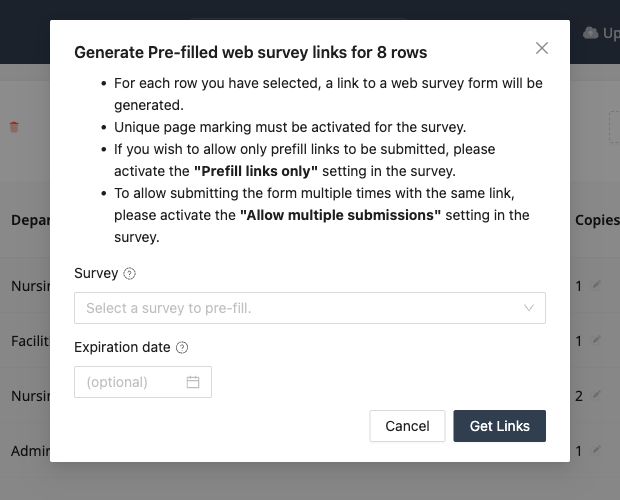
- Pick the survey to pre-fill and, optionally, an expiration date after which the links stop accepting responses.
- Press Get Links. A spreadsheet downloads with one personal URL per selected row, alongside the row's data, ready to drop into a mail merge.
If you would rather PaperSurvey sent the invitations for you, choose Send by email instead in the same dialog. On Enterprise plans PaperSurvey can email each person their own link through your own email provider, and remind the people who have not responded. See Emailing Survey Invitations and Reminders.
Controlling how links behave
Two survey settings decide what the links allow:
- Prefill links only. Only the generated links can submit the survey. Anyone visiting the plain survey address is turned away, which keeps uninvited responses out of a closed panel.
- Allow multiple submissions. By default each link accepts one submission. Enable this when the same link should be usable repeatedly, for example a site-level link filled in weekly.
Distributing the links
The downloaded spreadsheet works anywhere URLs work: individual emails, a mail merge with the respondent's name from the same row, QR codes on printed invitations, or SMS. Because the paper copies and the web links come from the same list, responses from both channels land in one dataset with identical attached data.
On Enterprise plans you can skip the mail merge entirely and have PaperSurvey send the invitations and any reminders through your own email provider. See Emailing Survey Invitations and Reminders.