You can share analysis dashboards with anyone, even if they do not have a PaperSurvey account. Shared views are read-only and display only the charts you have added to the dashboard.
Generating a share link
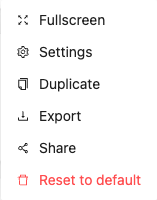
- Open the analysis view you want to share
- Click the menu button and select Share from the dropdown
- Turn on the Public sharing switch
- Copy the generated link
Anyone with the link can view the dashboard. No login is required.
What is included in shared views
Shared analysis views display only aggregate statistics from your dashboard, such as charts, averages, and counts. For privacy, widgets that could expose individual response data (such as response tables and open-ended response lists) are automatically excluded, even if they are part of the dashboard.
Managing shared access
You can disable sharing at any time by turning the Public sharing switch off. This immediately revokes access for anyone using the link. If you re-enable sharing, the same link becomes active again. To invalidate a link permanently, use the Regenerate Link button, which creates a new link and stops the old one from working.
Sharing with team members
Team members with access to the survey can view all analysis dashboards directly within PaperSurvey. The share link feature is primarily designed for sharing with external stakeholders who do not have an account.