
A training coordinator prints eighty evaluation forms for next week's sessions. Every form is identical, so every attendee starts by writing their name, their department, and the session date on the first three lines. A quarter of them skip those lines, a few write something illegible, and when the forms come back nobody can say which session the anonymous ones belong to. The data the coordinator already had in a spreadsheet on Monday has to be recovered, by hand, from handwriting on Friday.
Prefill Forms remove that whole loop. You upload the spreadsheet you already have, PaperSurvey prints a personalized copy of the survey for each row, and when the scanned forms come back every response already carries its row's data. It is mail merge for paper surveys, with the return journey handled too.
This guide walks through the whole feature: what it can do, what your survey needs, and how each step looks in practice.
What Prefill Forms can do
A prefill list is a small spreadsheet that lives next to your surveys: rows are people, sites, assets, or visits, and columns are whatever you know about them in advance. From that list, PaperSurvey can do four things:
- Fill answer fields before printing. A column whose name matches a question gets its value printed straight into that question's answer boxes. The respondent never re-enters what you already know.
- Insert values into question text. Write
{{Name}}or{{Session date}}anywhere in a question or description, and each printed copy carries that row's value in the sentence itself: "How useful was the {{Session date}} session for you?" - Attach invisible data. A Prefill Data question never appears on the form at all, but its value rides along with every response from that copy, ready for filtering, cross tabs, and exports. Ideal for IDs, cohorts, or anything respondents should not see.
- Generate personal web links. The same list can produce one pre-filled web survey link per row, so the paper and online versions of a campaign share a single source of truth.
What you need
Two things: a survey and a prefill list. The link between them is simply the name. When you print, PaperSurvey compares each column label against the survey's fillable question names, ignoring case, spaces, and punctuation, so a column called "Session date" matches a question named "Session Date". The print dialog shows how many fields matched for each survey version before you commit, so a wiring mistake is visible before a single page prints.
Step 1: Build the prefill list
Create a list under Prefill Forms and import your spreadsheet (CSV or Excel), or start from a blank list and add rows in the browser. Columns come straight from your file's header row.
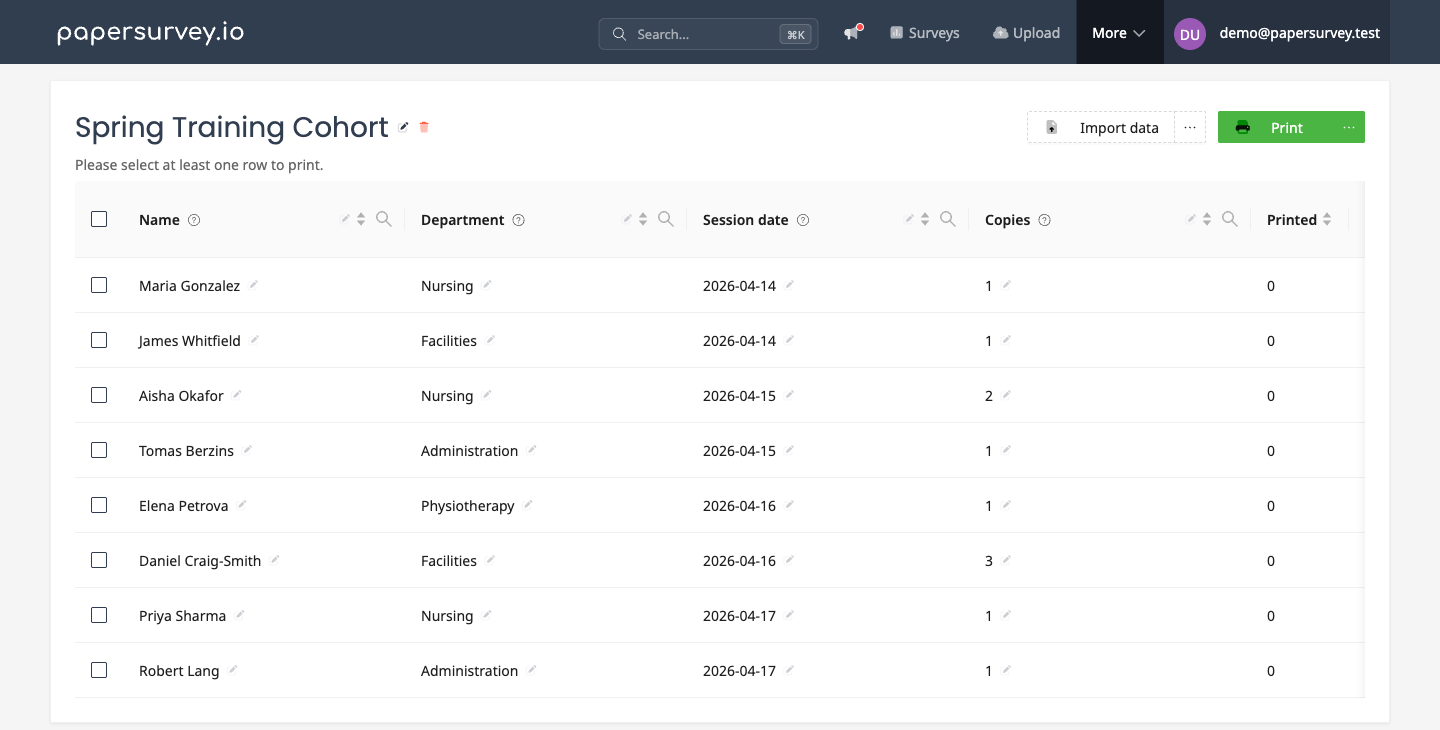
Every cell is editable in place, click it, type, press Enter, so last-minute changes do not require re-importing anything. You can add columns later too: a common pattern is a "Copies" column that controls how many forms each row gets, one per attendee for most sessions, three for the big Tuesday group.
Step 2: Wire the survey
There is nothing special to install in the survey. Decide, per piece of data, how it should appear:
- Printed into an answer field: name the question to match the column. A short text question called "Name" receives the Name column's value in its answer box on paper.
- Inside the wording: put
{{Column name}}in any question or description text. - Hidden from respondents: add a Prefill Data question named after the column. It is invisible on the printed and web form, but its value is attached to every response.
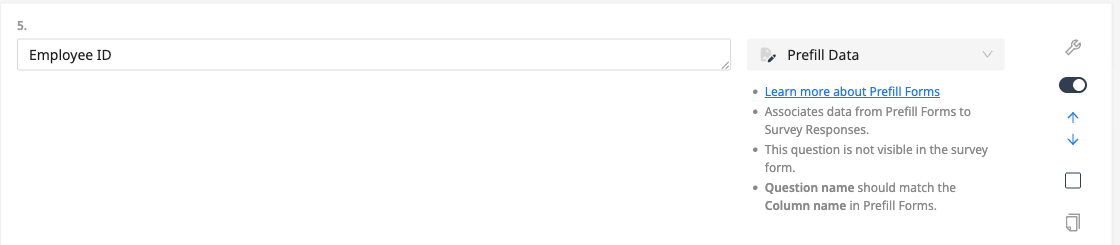
The Prefill Data route deserves emphasis for anonymous-feeling surveys: the respondent sees a completely generic form, while your analysis still knows the department, site, or cohort every sheet came from.
Step 3: Print personalized copies
Select the rows to print, or all of them, and press Print. The dialog asks which survey version to use and shows how many of your columns matched its fields, then how many copies each row should get: the same number for every row, or a per-row number from a column.
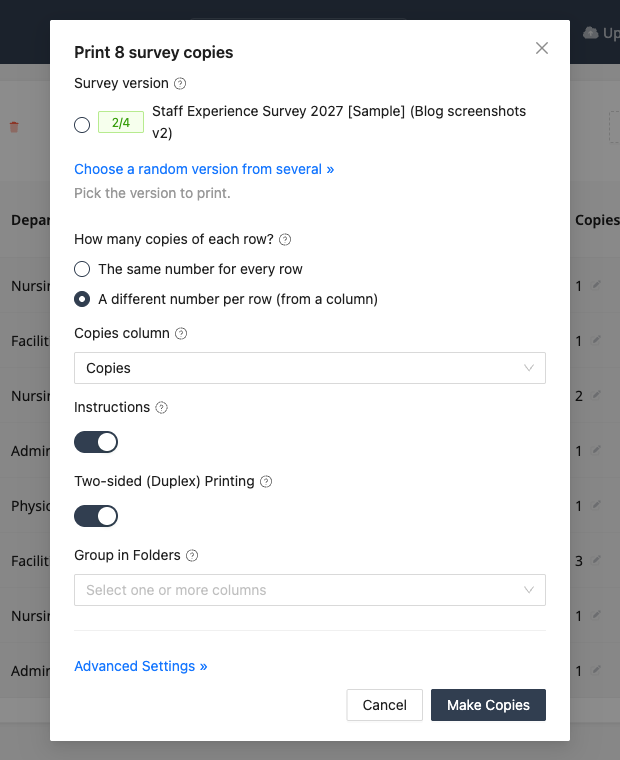
Under advanced settings you can pick a column as the identifier (useful when rows already have stable IDs), group the generated PDFs into folders by any column, add an instructions page, and enable duplex printing. The result is one print-ready PDF batch where every form is unique.
When the completed forms come back, scan them as usual. Recognition reads the answers, the prefilled values are already attached, and the Printed column in the list shows which rows have returned, so chasing non-responders is a filter, not a spreadsheet reconciliation.
The web version: one link per row
The same list generates pre-filled web survey links, one per row, exported as a spreadsheet you can drop into a mail merge.
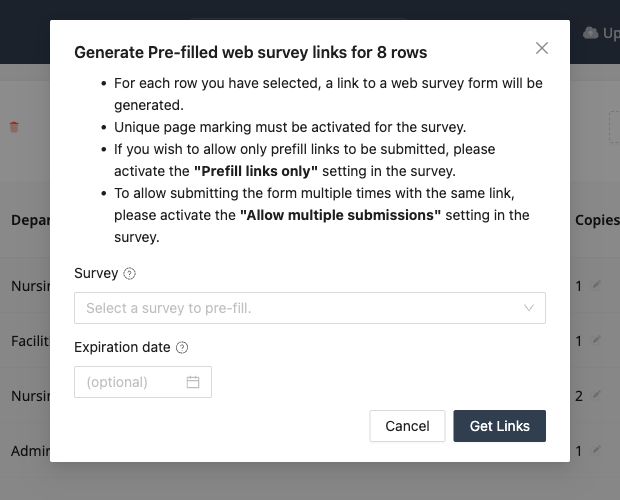
Two survey settings matter here: "Prefill links only" restricts submissions to the links you generated, and "Allow multiple submissions" controls whether one link can be used repeatedly. An optional expiration date closes the window automatically. Because paper copies and web links come from the same rows, both channels land in one dataset with identical attached data.
Where teams use it
- Training and events: one form per registered attendee, session details prefilled, completion tracked against the roster.
- Healthcare: patient identifiers attached invisibly, so clinical questionnaires stay clean while every sheet stays traceable.
- Longitudinal research: wave after wave printed from the same participant list, with IDs that survive every round trip.
- Field inspections: one form per site or asset, location details already filled, counts of forms per site driven by a column.
- Schools: one form per student sent home, class and student prefilled, returns tracked per classroom.
The Bottom Line
Any survey where you already know something about the respondents is a prefill candidate. Uploading a spreadsheet takes a minute; hand-copying that spreadsheet's contents from handwriting takes days and introduces the exact transcription errors scanning was supposed to remove. Prefill once, print personalized, and let every scanned sheet come home carrying its own context.
Start your free trial and print your first personalized survey batch today.