Average Star Rating Calculator
Work out your average star rating. Enter the number of 1★, 2★, 3★, 4★ and 5★ ratings, separated by commas.
Learn how to calculate it yourselfEnter your values
Results update as you type.
How to enter your data
In the box for each star level, from 1 star up to 5 stars, type how many people gave that rating. If you would rather list the ratings one by one, type each score (a whole number from 1 to 5) and press comma or Enter after each one.
Average rating
Check your inputs
Enter valid values to see your result. Use the field hints or open the data guide for help.
The Average Star Rating Calculator works out the average (mean) score from a batch of star ratings, such as a set of 1 to 5 star reviews or survey answers. You tell it how many people gave each rating, and it adds up all the stars and divides by the number of people to produce one overall number, usually between 1 and 5. That single number shows you at a glance how happy people were overall.
Calculate it yourself
For ten ratings, suppose the counts at 1, 2, 3, 4 and 5 stars are 0, 1, 1, 2 and 6.
Follow this worked example, then repeat the steps with your own numbers.
Count all ratings
0 + 1 + 1 + 2 + 6 = 10 ratings.Multiply each star value by its count
(1 × 0) + (2 × 1) + (3 × 1) + (4 × 2) + (5 × 6) = 43 stars.Divide by the number of ratings
Average = 43 ÷ 10 = 4.3 stars.This is a weighted mean: each rating counts once, even when the star categories have different numbers of responses.
Built into PaperSurvey.io
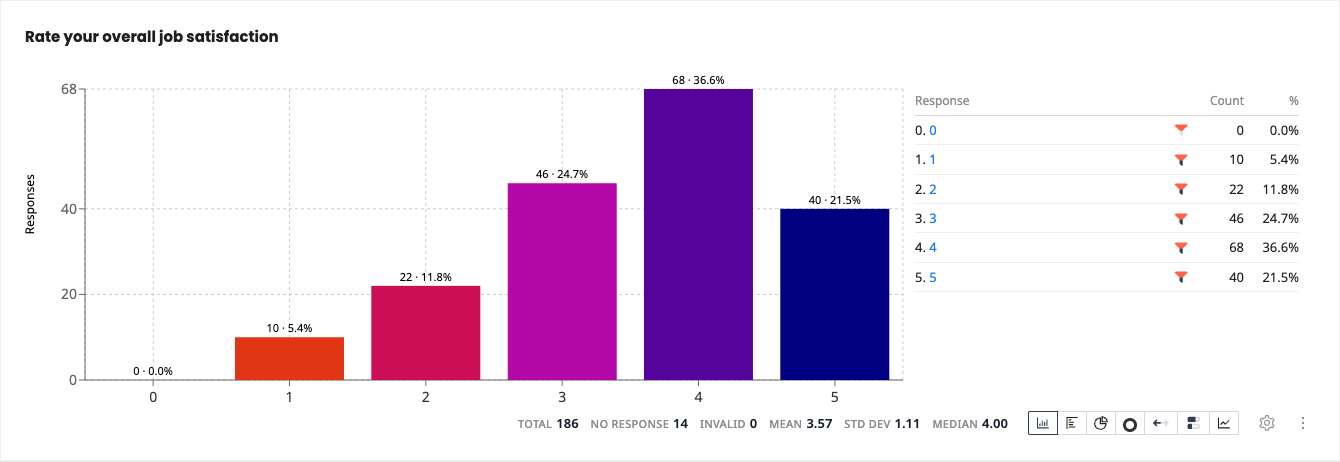
Collect ratings on a 1-to-5 scale to see their distribution and average directly on the Results tab.
Where it is used
- Small-business owners: A cafe owner adds up the star ratings left on customer feedback cards to see how the past month went.
- Event organisers: A conference organiser checks the average rating from a post-event feedback form to judge whether attendees enjoyed it.
- Teachers and trainers: A workshop leader averages the star ratings students gave a session to decide what to improve next time.
How the average is calculated
The average star rating is a weighted average: each star value is multiplied by how many people gave it, summed, then divided by the total number of ratings.
When should you use it?
Use it whenever you have a group of star ratings and want one clear number that sums them up. That might be reviews on a feedback card, star scores from a survey, or ratings people gave a product, event, or service. It is handy when you have too many ratings to add up in your head, or when you want to compare one month, class, or location against another. If you only have written comments and no star scores, this tool is not the right one for the job.
What does the result mean?
The result is the average star rating, a single number that usually sits between 1 and 5. A higher number means people were happier overall. For example, 4.6 means most people gave near the top score, while 2.5 means opinions were low or mixed. As a rough guide, many people treat 4 stars and above as good, and grow wary below about 3 stars. Treat this as a general expectation, not a strict pass or fail mark, because what counts as good varies from one field to another.
Mistakes to avoid
Do not mix different rating scales. If some scores are out of 5 and others out of 10, convert them first or the average will be wrong. Enter the count of people for each star level, not the star number itself, so the 5-star box should hold how many people chose 5, not the number 5. Watch out for blank or skipped answers; leaving them in as zeros drags the average down unfairly. Finally, remember that a small number of ratings can swing the result a lot.
How to use this calculator
- Gather your ratings and count how many people gave 1 star, 2 stars, and so on up to 5 stars.
- Type each of those counts into the matching star box, or list every individual rating separated by a comma or Enter.
- Check that your totals match the number of people who replied, so nothing is missed.
- Read the average star rating shown, usually a number between 1 and 5, as your overall score.
Worked example
Say 10 people rated a cafe: two gave 5 stars, five gave 4 stars, two gave 3 stars, and one gave 2 stars. That adds up to 10 + 20 + 6 + 2 = 38 stars in total, shared between 10 people. Dividing 38 by 10 gives an average of 3.8 stars.
Frequently asked questions
What do I type in each box?
In each star box, type how many people gave that many stars. So if seven people gave 5 stars, put 7 in the 5-star box.
Where do I get these numbers?
From your reviews, feedback cards, or survey results. Count how many people chose each star level, or let PaperSurvey tally them from your scanned forms.
What does the final number mean?
It is the average score, usually between 1 and 5. The higher it is, the happier people were overall.
What is a good average star rating?
There is no fixed rule, but 4 stars and above is widely seen as good. Below about 3 stars usually signals a problem worth looking into.
Do I need every single rating?
No. You just need how many people gave each star level. You do not have to enter each review one by one unless you prefer to.
Get Started with PaperSurvey.io Software
Start your 14-day free trial now, no credit card required.