Geometric Mean Calculator
Calculate the geometric mean, useful for rates, ratios and growth figures. Paste positive numbers only.
Learn how to calculate it yourselfEnter your values
Results update as you type.
How to enter your data
Type or paste your numbers into the box, separating each one with a comma, a space, or a new line (for example: 2, 4, 8). Use only positive numbers that are greater than zero, because the geometric mean cannot handle zeros or negative numbers.
Geometric mean
Check your inputs
Enter valid values to see your result. Use the field hints or open the data guide for help.
The Geometric Mean Calculator works out a special kind of average for a set of numbers. Instead of adding the numbers and dividing them (the everyday average), it multiplies them all together and then takes a matching root. This gives a fairer middle value when your numbers are growth rates, ratios, or percentages that build on each other over time.
Calculate it yourself
Find the geometric mean of the positive values 2 and 8.
Follow this worked example, then repeat the steps with your own numbers.
Count the values
n = 2.Multiply the values together
2 × 8 = 16.Take the nth root
Geometric mean = 16^(1/2) = √16 = 4.With three values take a cube root; with n values take the power 1/n.
All values must be positive. For growth rates, first convert each rate to a growth factor, such as 10% to 1.10; subtract 1 from the final geometric mean to recover a growth rate.
Check your answer in the calculatorBuilt into PaperSurvey.io
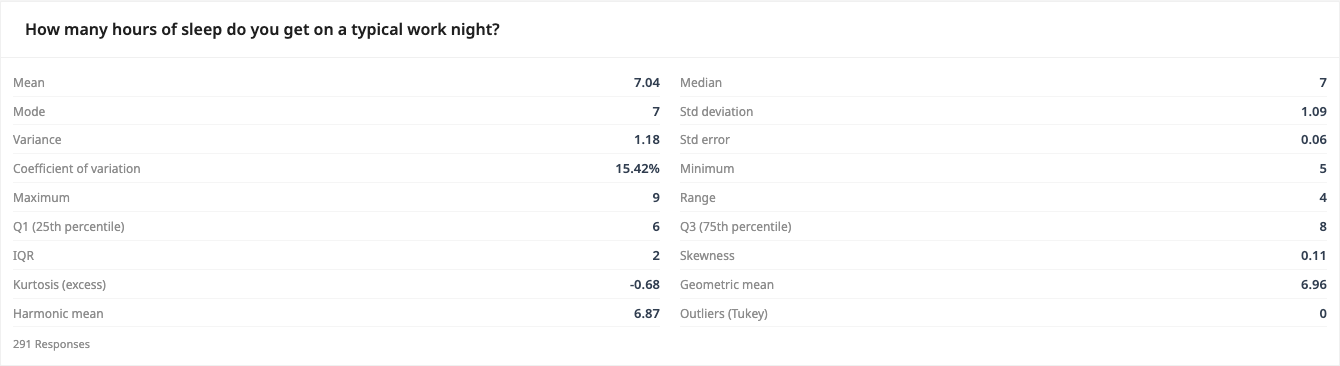
Use Descriptive Statistics to calculate a geometric mean for a question with strictly positive numeric answers.
Where it is used
- Small-business owners: Working out the average yearly growth in sales when each year grew by a different amount.
- Students: Finding the average growth factor in a science experiment where a value doubled or tripled each day.
- Market researchers: Combining several ratio-based or index scores into one fair overall average.
When to use the geometric mean
The geometric mean is the right average for values that multiply, such as growth rates or index numbers. It requires all values to be positive.
When should you use it?
Use the geometric mean when your numbers multiply or build on each other, such as growth rates, interest, ratios, percentages, or index scores. It gives a fairer middle value than a plain average whenever numbers compound over time, like average yearly sales growth. Do not use it for straightforward amounts such as test marks, ages, or prices in pounds, where the ordinary average works better. Remember that every number you enter must be greater than zero, or the calculation will not work.
What does the result mean?
The result is a single value that sits in the middle of your numbers. When your numbers are growth factors, it is the steady rate that would produce the same overall change from start to finish. There is no fixed good or bad figure, because a sensible result depends entirely on your own data and what you are measuring. One useful fact to know: the geometric mean is always equal to or a little lower than the everyday average of the same numbers, and never higher.
Mistakes to avoid
The biggest mistake is including a zero or a negative number, which makes the geometric mean impossible to work out, so remove those first. Do not mix different units in one list, such as pounds and percentages together. Avoid using it for plain amounts where an ordinary average is clearer and easier to explain. If you are averaging percentage growth, turn each percentage into a multiplier first. For example, five percent growth becomes 1.05, not 5.
How to use this calculator
- Type or paste your numbers into the box, separating each one with a comma, a space, or a new line.
- Check that every number is greater than zero, and remove any zeros or negative numbers.
- Let the calculator multiply the numbers together and take the matching root for you automatically.
- Read the single result shown, which is the geometric mean of the numbers you entered.
Worked example
Suppose a small shop's sales grew to 2 times, then 4 times, then 8 times over three years. Enter 2, 4, 8. The calculator multiplies them (2 times 4 times 8 equals 64) and takes the cube root, giving 4. So on average, sales grew about 4 times each year.
Frequently asked questions
What do I type in the box?
Type the numbers you want to average, separating each one with a comma, a space, or a new line. That is all the calculator needs.
Where do I get these numbers?
They come from your own records, such as sales figures, growth rates, ratings, or ratios. Enter whichever set of numbers you want to find the average of.
Can I use zero or negative numbers?
No. The geometric mean only works with positive numbers. Remove any zeros or negative numbers before you calculate.
How is this different from a normal average?
A normal average adds the numbers and divides. The geometric mean multiplies them and takes a root instead, which suits rates and ratios better and always gives a slightly lower figure.
What does the answer actually tell me?
It gives one middle value for your set of numbers. If your numbers are growth factors, it is the steady rate that would give the same total change overall.
Get Started with PaperSurvey.io Software
Start your 14-day free trial now, no credit card required.