Not every survey needs a full-size sheet of paper. Short questionnaires, feedback forms, and quick polls often work better on smaller formats. PaperSurvey supports multiple paper sizes so you can match the format to the complexity of your survey.
Your team uses one paper size at a time, so all of its surveys share the same paper format. Changing the paper size applies to every survey in the team.
Available paper formats
PaperSurvey offers the following paper size options:
- A4 (210 x 297 mm) for the standard international size
- A5 (148 x 210 mm), which is half of A4 and ideal for brief surveys
- A3 (297 x 420 mm), double A4 size, suited for complex surveys
- Letter (8.5 x 11 inches) for the standard US size
- Legal (8.5 x 14 inches), the extended US format for longer forms
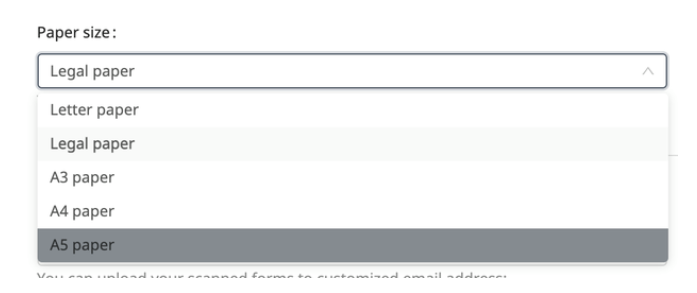
Setting up a different paper size
- Go to Settings. If you work on your own, stay on Personal; on a team with more than one member, open My Team.
- Choose the format in Paper size.
- Click Update. The change applies to all surveys in the team.
- Open each survey's Preview to check that all questions still fit.
- To print in the new size, create a new version on the survey's Print tab. Versions you created earlier keep their old size.
Only the team owner and managers can change the paper size.
Choose a paper size that gives respondents enough room to answer comfortably while keeping your survey concise and easy to handle.