Margin of Error Calculator
Work out how accurate your survey results are. Enter your sample size, population and confidence level to get the margin of error in percentage points.
Learn how to calculate it yourselfEnter your values
Results update as you type.
How to enter your data
This calculator uses three separate boxes rather than a pasted list. Type one whole number for the sample size, meaning how many people actually replied, and type one whole number for the population size if you know it, or leave the population box blank when the group is very large or unknown. Choose your confidence level from the dropdown, where 95% is the usual choice.
Margin of error
at a 95% confidence level
The Margin of Error Calculator tells you how far your survey results might be from the true opinion of the whole group you are studying. You enter how many people replied, roughly how big the whole group is, and how sure you want to be, and it gives you a plus-or-minus percentage. A result of plus or minus 5%, for example, means that if 60% of people chose an answer, the real figure for everyone is very likely between 55% and 65%.
Calculate it yourself
Example: estimate the margin of error for 100 responses at 95% confidence, with a large or unknown population.
Follow this worked example, then repeat the steps with your own numbers.
Choose the response proportion
p = 0.50; 1 − p = 0.50When you do not know the expected proportion, 50% gives the largest margin of error.
Find the standard error
SE = √[p(1 − p) ÷ n] = √(0.50 × 0.50 ÷ 100) = 0.05Here n is the number of responses.
Use the confidence multiplier
Margin = z × SE ≈ 1.96 × 0.05 = 0.098A standard normal table gives z ≈ 1.96 for a two-sided 95% confidence level.
Convert to percentage points
0.098 × 100 = ±9.8 percentage points
For a random sample taken without replacement from a known population N greater than n, multiply the margin by √[(N − n) ÷ (N − 1)]. This measures sampling uncertainty, not bias from who responds.
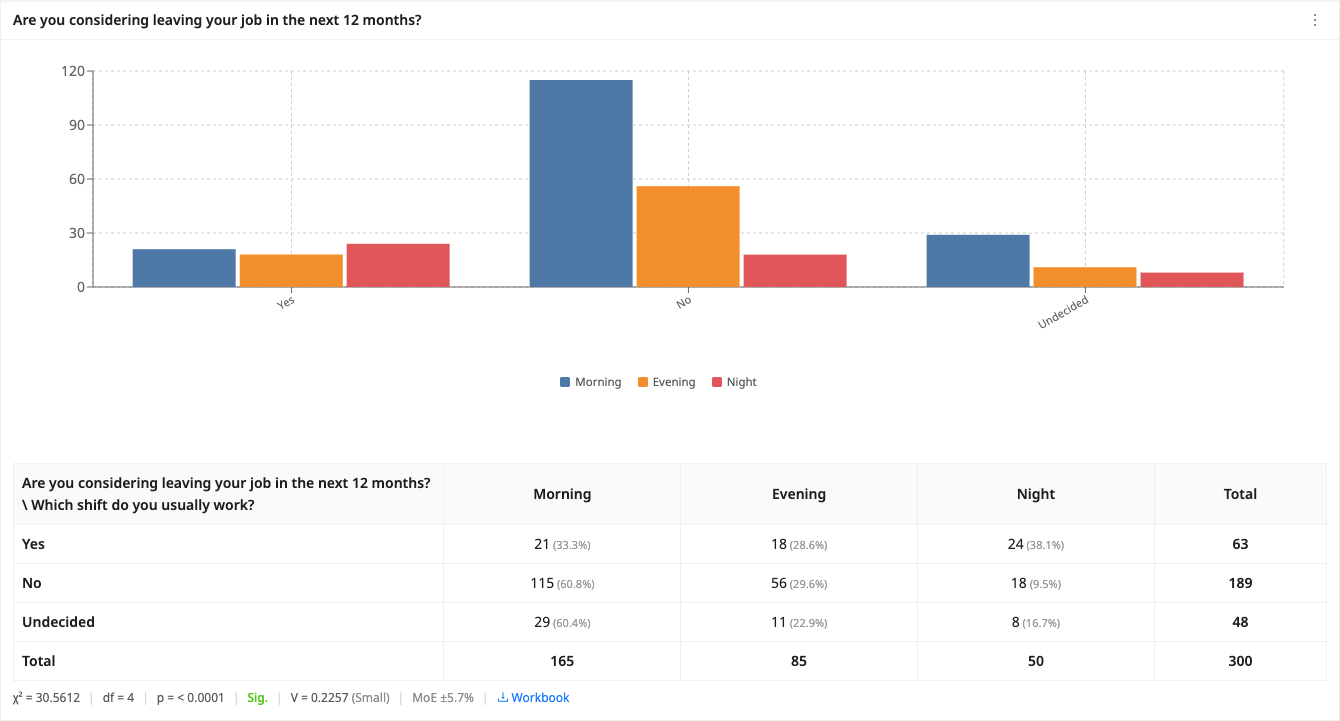
Check your answer in the calculatorBuilt into PaperSurvey.io
Check the precision of a comparison in Advanced mode, or track survey-wide precision with a Response plan.
Where it is used
- Teachers and school staff: A teacher surveys 200 of the 900 students in a school about a new lunch menu and checks how reliable those results are before sharing them.
- Small-business owners: A cafe owner collects 150 feedback cards from customers and wants to know how much to trust the ratings before changing the menu.
- Event organisers: After a conference with 2,000 attendees, 300 people fill in the feedback form and the organiser checks the margin of error on the satisfaction scores.
What is margin of error?
The margin of error tells you how far your survey results may differ from the opinion of the whole population. A margin of error of ±5% means that if 60% of respondents chose an answer, the true figure for the whole population is very likely between 55% and 65%. A smaller margin of error means more precise results, which usually requires a larger sample.
How it is calculated
Margin of error = z × √[p(1 − p) / n], with a finite population correction of √[(N − n) / (N − 1)] when a population size is supplied. Here z is the z-score for your confidence level (1.96 for 95%), p is the response distribution (0.5 for the most conservative estimate), n is the sample size and N is the population.
When should you use it?
Use it after you have collected survey answers and want to know how much to trust the results. It works for any survey where people pick from set answers, such as yes or no, or a rating. It is most useful just before you make a decision or share your findings, so you can say how close your numbers are to the views of the whole group. If you have not collected responses yet, use a sample size calculator instead to plan how many replies you need to aim for.
What does the result mean?
The result is a plus-or-minus percentage, for example plus or minus 5%. It means your survey figures could be about that much higher or lower than the true opinion of the whole group. So if 60% liked something and the margin is plus or minus 5%, the real figure is very likely between 55% and 65%. A smaller number means more precise results. For most surveys plus or minus 5% or less is considered acceptable, and professional market or academic research often aims for plus or minus 3%.
Mistakes to avoid
Do not put the number of people you invited in the sample size box. Sample size is the number who actually replied, not how many you contacted. Do not guess the population; if you are unsure or it is very large, leave that box blank and the tool will handle it. Do not treat a small margin of error as proof your results are perfect. It only covers random chance from sampling, not bias from a leading question or from only certain kinds of people choosing to answer.
How to use this calculator
- In the sample size box, type the number of people who actually completed your survey.
- In the population size box, type the total number of people in the group, or leave it blank if that group is very large or unknown.
- Choose a confidence level from the dropdown, usually 95%.
- Read the result: it shows a plus-or-minus percentage, such as plus or minus 5%. The smaller it is, the more precise your survey.
Worked example
A school has 900 students and 200 of them answer a survey about a new lunch menu. Type 200 as the sample size, 900 as the population size, and leave the confidence level at 95%. The calculator shows about plus or minus 6.1%. So if 70% of the 200 said they liked the menu, the true figure for all 900 students is very likely between roughly 64% and 76%.
Frequently asked questions
What is a good margin of error?
For most surveys a margin of error of ±5% or lower is considered acceptable. Academic and market research often aim for ±3%.
How do I reduce the margin of error?
Collect more responses. Because the margin of error shrinks with the square root of the sample size, quadrupling responses roughly halves the margin of error.
What do I type in each box?
Type how many people replied in the sample size box, and the total size of the group in the population box, or leave it blank. Then pick a confidence level from the dropdown.
Where do I get the population number?
It is the total number of people you could have surveyed, such as all students in a school or every customer on your list. If you do not know it or it is very large, just leave the box empty.
What counts as the sample size?
It is the number of people who actually completed your survey, not the number you invited. If 200 people replied, type 200.
Which confidence level should I choose?
95% is the standard choice for most surveys and is fine if you are unsure. A higher level like 99% gives a wider, more cautious margin of error.
What is a good margin of error?
For most surveys plus or minus 5% or lower is considered acceptable, and professional research often aims for plus or minus 3%. To make the number smaller, collect more responses.
Get Started with PaperSurvey.io Software
Start your 14-day free trial now, no credit card required.