If you no longer need your PaperSurvey account, you can close it from your account settings. Closing the account cannot be undone.
Steps to delete your account
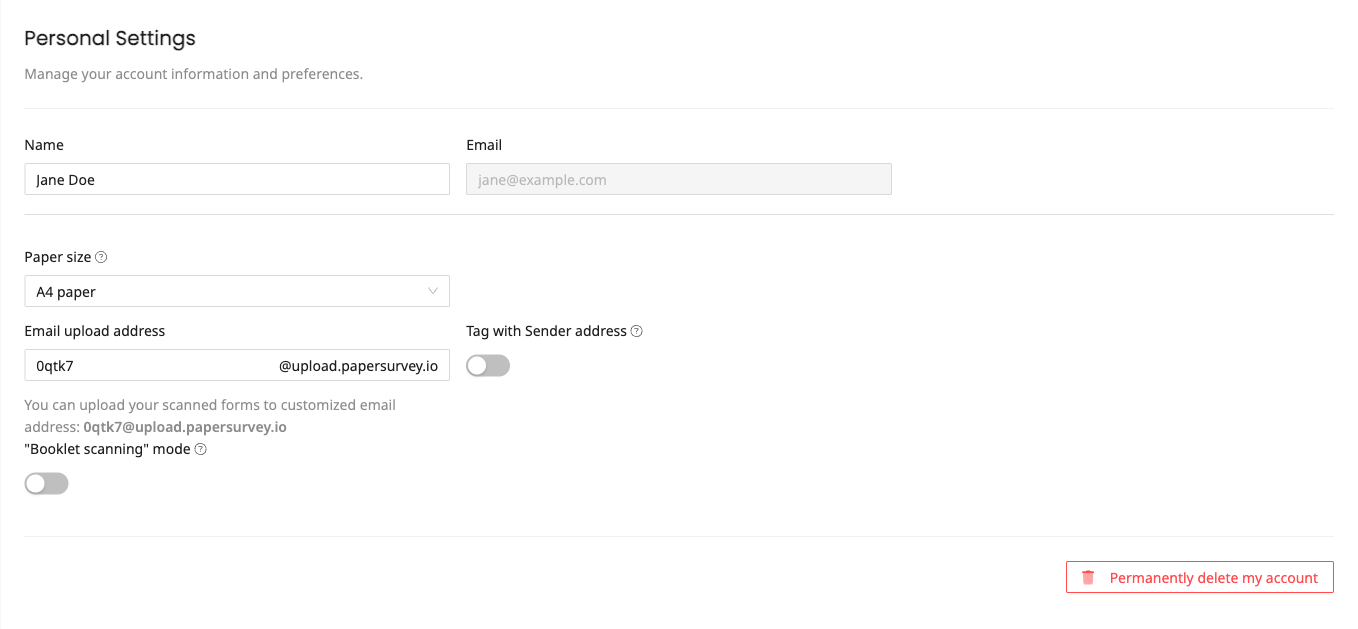
- Go to Settings and open the Personal page
- Scroll to the bottom of the page
- Click Permanently delete my account
- Confirm your identity with your password or a passkey
- Click Confirm
What happens immediately
- Your access ends and you are signed out
- Any active subscription is cancelled straight away, with no refund for the remainder of the paid period
- Every web survey owned by your account stops accepting responses, so your survey links no longer collect data
What we keep, and for how long
- Invoices and accounting records: for as long as Lithuanian accounting law requires. These are outside the erasure request, because we are legally required to keep them
- Encrypted offsite backups: purged within three months, so data erased from our production systems can still exist in a backup copy until then
- Authentication logs: 24 months. Security logs: 90 days
Before you delete
Consider these alternatives before closing your account:
- Cancel your subscription to stop billing while keeping your account and data
- Export your data to download all surveys and responses first
- Delete individual surveys you no longer need. Deleted surveys stay in the trash bin for 90 days, so you can restore them if you change your mind