<?xml version="1.0" encoding="UTF-8"?>
<?xml-stylesheet href="/vendor/feed/atom.xsl" type="text/xsl"?>
<feed xmlns="http://www.w3.org/2005/Atom" xml:lang="en-US">
                        <id>https://www.papersurvey.io/feed</id>
                                <link href="https://www.papersurvey.io/feed" rel="self"></link>
                                <title><![CDATA[PaperSurvey.io blog]]></title>
                    
                                <subtitle></subtitle>
                                                    <updated>2026-04-09T06:38:07+00:00</updated>
                        <entry>
            <title><![CDATA[Text formatting guide for paper-based surveys]]></title>
            <link rel="alternate" href="https://www.papersurvey.io/blog/markdown-survey-formatting-paper-based-surveys" />
            <id>https://www.papersurvey.io/1</id>
            <author>
                <name><![CDATA[PaperSurvey.io]]></name>
            </author>
            <summary type="html">
                <![CDATA[<h1>Text formatting guide for paper-based surveys</h1>
<p><a href="https://www.papersurvey.io">PaperSurvey.io</a> supports a small subset of <a href="https://en.wikipedia.org/wiki/Markdown">markdown</a> syntax for adjusting text formatting as well as some papersurvey.io specific commands. These may be beneficial for emphasizing certain words in the survey or changing the layout.</p>
<h2>Text formatting</h2>
<h3>Color</h3>
<p>To change color you just need to use <code>[color=color_code]text[/color]</code> shortcode. <code>color_code</code> is a HEX color code. You may use <a rel="nofollow" target="_blank" href="https://htmlcolorcodes.com/color-picker/">this color picker</a> to find a color you want to use.</p>
<p>You may also use <code>[color=primary]</code> and <code>[color=secondary]</code>, which will be "Heading/Divider color" and "Secondary color" accordingly configured in your survey settings.</p>
<div class="text--formatting">
    <div>
        <b>EXAMPLE</b>
        <code>
        [color=ffbc06]Text in yellow[/color]<br />
        [color=3AE50C]Text in green[/color]<br />
        [color=FF0C00]Text in red[/color]<br />
        </code>
    </div>
    <div>
        <b>RESULT</b>
        <code>
        <span style="color:#ffbc06;">Text in yellow</span><br />
        <span style="color:#3AE50C;">Text in green</span><br />
        <span style="color:#FF0C00;">Text in red</span>
        </code>
    </div>
</div>
<h3>Highlight background</h3>
<p>To change background color you just need to use <code>[highlight=color_code]text[/highlight]</code> shortcode. <code>color_code</code> is a HEX color code. You may use <a rel="nofollow" target="_blank" href="https://htmlcolorcodes.com/color-picker/">this color picker</a> to find a color you want to use.</p>
<p>You may also use <code>[highlight=primary]</code> and <code>[highlight=secondary]</code>, which will be "Heading/Divider color" and "Secondary color" accordingly configured in your survey settings.</p>
<div class="text--formatting">
    <div>
        <b>EXAMPLE</b>
        <code>
        [highlight=ffbc06][color=black]Background in yellow, text in black[/color][/highlight]<br />
        [highlight=3AE50C][color=white]Background in black, text in white[/color][/highlight]<br />
        [highlight=FF0C00][color=yellow]Background in red, text in yellow[/color][/highlight]<br />
        </code>
    </div>
    <div>
        <b>RESULT</b>
        <code>
        <span style="background-color:#ffbc06;color: black;">Background in yellow, text in black</span><br />
        <span style="background-color:black; color: white;">Background in black, text in white</span><br />
        <span style="background-color:#FF0C00;color: yellow;">Background in red, text in yellow</span>
        </code>
    </div>
</div>
<h3>Bold</h3>
<p>To make the text bolder you may wrap the text in two <strong>asterisks</strong>.</p>
<div class="text--formatting">
    <div>
        <b>EXAMPLE</b>
        <code>
        Bold text with **asterisks**.
        </code>
    </div>
    <div>
        <b>RESULT</b>
        <code>
        Bold text with <b>asterisks</b>.
        </code>
    </div>
</div>
<h3>Italics</h3>
<p>To make the text written in italics you may wrap the text in one <em>asterisk</em> or <em>underscore</em>:</p>
<div class="text--formatting">
    <div>
        <b>EXAMPLE</b>
        <code>
            italicize text with *asterisks* or _underscores_.
        </code>
    </div>
    <div>
        <b>RESULT</b>
        <code>
            italicize text with <i>asterisks</i> or <i>underscores</i>
        </code>
    </div>
</div>
<h3>Strikethrough</h3>
<p>To add strike-through you may wrap the text in two <del>tildes.</del></p>
<div class="text--formatting">
    <div>
        <b>EXAMPLE</b>
        <code>
            Strikethrough text with ~~tildes.~~.
        </code>
    </div>
    <div>
        <b>RESULT</b>
        <code>
            Strikethrough text with <span style="text-decoration: line-through;">tildes</span>.
        </code>
    </div>
</div>
<h3>Underline</h3>
<p>To add the underline below the text, use two <strong>underscores</strong>.</p>
<div class="text--formatting">
    <div>
        <b>EXAMPLE</b>
        <code>
            Underline text with two __underscores__.
        </code>
    </div>
    <div>
        <b>RESULT</b>
        <code>
            Underline text with two <u>underscores</u>.
        </code>
    </div>
</div>
<h3>Headings</h3>
<p>To add headings, start the line with one or more <code>#</code> characters followed by a space.</p>
<div class="text--formatting">
    <div>
        <b>EXAMPLE</b>
        <code>
        # Heading 1<br />
        ## Heading 2<br />
        ### Heading 3
        </code>
    </div>
    <div>
        <b>RESULT</b>
        <code>
        <h1 style="margin:0">Heading 1</h1>
        <h2 style="margin:0">Heading 2</h2>
        <h3 style="margin:0">Heading 3</h3>
        </code>
    </div>
</div>
<h3>Unformatted text</h3>
<p>In some cases you may want to unbold or remove italics from a block of text, you may do with a [unformatted] tag.</p>
<div class="text--formatting">
    <div>
        <b>EXAMPLE</b>
        <code>
            **We see bolded text here but [unformatted]here[/unformatted] it isn't**
        </code>
    </div>
    <div>
        <b>RESULT</b>
        <code>
            <b>Bolded text here but</b> here <b>it isn't</b>
        </code>
    </div>
</div>
<h2>Font sizes</h2>
<p>If you would like to change the font size in your text, you may use following short codes:</p>
<div class="text--formatting">
    <div>
        <b>EXAMPLE</b>
        <code>
            [tiny]Text[/tiny]<br/>
            [small]Text[/small]<br/>
            [s]Text[/s]<br/>
            [normal]Text[/normal]<br/>
            [large]Text[/large]<br/>
            [larger]Text[/larger]<br/>
            [xl]Text[/xl]<br/>
            [xxl]Text[/xxl]
        </code>
    </div>
    <div>
        <b>RESULT</b>
        <code>
            <div style="font-size: 8px;">Text</div>
            <div style="font-size: 10px;">Text</div>
            <div style="font-size: 12px;">Text</div>
            <div style="font-size: 14px;">Text</div>
            <div style="font-size: 16px;">Text</div>
            <div style="font-size: 18px;">Text</div>
            <div style="font-size: 20px;">Text</div>
            <div style="font-size: 24px;">Text</div>
        </code>
    </div>
</div>
<h2>Text rotation</h2>
<p>In some cases you would want to rotate the text to fit. You may use the following command to achieve it.</p>
<div class="text--formatting">
    <div>
        <b>EXAMPLE</b>
        <code>
            [rotate=90]Text[/rotate]<br/>
            [rotate=60]Text[/rotate]<br/>
            [rotate=-90]Text[/rotate]<br/>
            [rotate=180]Text[/rotate]
        </code>
    </div>
    <div>
        <b>RESULT</b>
        <code style="flex-direction: row;display: flex;">
            <div style="-webkit-transform: rotate(90deg); -moz-transform: rotate(90deg); width: 40px; height: 40px;">Text</div>
            <div style="-webkit-transform: rotate(60deg); -moz-transform: rotate(60deg); width: 40px; height: 40px;">Text</div>
            <div style="-webkit-transform: rotate(-90deg); -moz-transform: rotate(-90deg); width: 40px; height: 40px;">Text</div>
            <div style="-webkit-transform: rotate(180deg); -moz-transform: rotate(180deg); width: 40px; height: 40px;">Text</div>
        </code>
    </div>
</div>
<h2>Lists</h2>
<p>To display text as a list, just start the line with an asterisk. Currently, only one-level ordered and unordered lists are supported.</p>
<h5>Lists only work in <em>Description</em> type questions!</h5>
<h3>Unordered</h3>
<div class="text--formatting">
    <div>
        <b>EXAMPLE</b>
        <code>
            * One <br />
            * Two  <br />
            * Three <br />
            *this is not in list*           
        </code>
    </div>
    <div>
        <b>RESULT</b>
        <code>
            <ul>
                <li>One</li>
                <li>Two</li>
                <li>Three</li>
            </ul>
            <i>this is not in list</i>
        </code>
    </div>
</div>
<h3>Ordered</h3>
<div class="text--formatting">
    <div>
        <b>EXAMPLE</b>
        <code>
            1. One <br />
            2. Two <br />
            3. Three <br />
            1 this is not in list        
        </code>
    </div>
    <div>
        <b>RESULT</b>
        <code>
            <ol>
                <li>One</li>
                <li>Two</li>
                <li>Three</li>
            </ol>
            this is not in list
        </code>
    </div>
</div>
<h2>Tables</h2>
<p>You can create tables using the pipe (<code>|</code>) character to separate columns. Tables are supported only in <em>Description</em> type questions.</p>
<h3>Basic Table</h3>
<div class="text--formatting">
    <div>
        <b>EXAMPLE</b>
        <code>
| Header 1 | Header 2 | Header 3 |<br/>
|----------|----------|----------|<br/>
| Cell 1   | Cell 2   | Cell 3   |<br/>
| Cell 4   | Cell 5   | Cell 6   |
        </code>
    </div>
    <div>
        <b>RESULT</b>
        <table style="border-collapse: collapse; border: 1px solid black;">
            <thead>
                <tr>
                    <th style="border: 1px solid black; padding: 5px;">Header 1</th>
                    <th style="border: 1px solid black; padding: 5px;">Header 2</th>
                    <th style="border: 1px solid black; padding: 5px;">Header 3</th>
                </tr>
            </thead>
            <tbody>
                <tr>
                    <td style="border: 1px solid black; padding: 5px;">Cell 1</td>
                    <td style="border: 1px solid black; padding: 5px;">Cell 2</td>
                    <td style="border: 1px solid black; padding: 5px;">Cell 3</td>
                </tr>
                <tr>
                    <td style="border: 1px solid black; padding: 5px;">Cell 4</td>
                    <td style="border: 1px solid black; padding: 5px;">Cell 5</td>
                    <td style="border: 1px solid black; padding: 5px;">Cell 6</td>
                </tr>
            </tbody>
        </table>
    </div>
</div>
<h3>Column Alignment</h3>
<p>You can align columns by adding colons (<code>:</code>) to the separator row:</p>
<ul>
<li><code>:---</code> for left alignment (default)</li>
<li><code>:---:</code> for center alignment</li>
<li><code>---:</code> for right alignment</li>
</ul>
<div class="text--formatting">
    <div>
        <b>EXAMPLE</b>
        <code>
| Left | Center | Right |<br/>
|:-----|:------:|------:|<br/>
| A    | B      | C     |<br/>
| 100  | 200    | 300   |
        </code>
    </div>
    <div>
        <b>RESULT</b>
        <table style="border-collapse: collapse; border: 1px solid black;">
            <thead>
                <tr>
                    <th style="border: 1px solid black; padding: 5px; text-align: left;">Left</th>
                    <th style="border: 1px solid black; padding: 5px; text-align: center;">Center</th>
                    <th style="border: 1px solid black; padding: 5px; text-align: right;">Right</th>
                </tr>
            </thead>
            <tbody>
                <tr>
                    <td style="border: 1px solid black; padding: 5px; text-align: left;">A</td>
                    <td style="border: 1px solid black; padding: 5px; text-align: center;">B</td>
                    <td style="border: 1px solid black; padding: 5px; text-align: right;">C</td>
                </tr>
                <tr>
                    <td style="border: 1px solid black; padding: 5px; text-align: left;">100</td>
                    <td style="border: 1px solid black; padding: 5px; text-align: center;">200</td>
                    <td style="border: 1px solid black; padding: 5px; text-align: right;">300</td>
                </tr>
            </tbody>
        </table>
    </div>
</div>
<h3>Example: Pricing Table</h3>
<div class="text--formatting">
    <div>
        <b>EXAMPLE</b>
        <code>
| Monthly Pages | Plans Needed | Monthly Cost | Annual Cost (~20% off) |<br/>
|--------------|--------------|--------------|------------------------|<br/>
| 10,000       | 1 plan       | $125         | $1,250                 |<br/>
| 20,000       | 2 plans      | $250         | $2,500                 |<br/>
| 30,000       | 3 plans      | $375         | $3,750                 |<br/>
| 50,000       | 5 plans      | $625         | $6,250                 |<br/>
| 100,000      | 10 plans     | $1,250       | $12,500                |
        </code>
    </div>
    <div>
        <b>RESULT</b>
        <table style="border-collapse: collapse; border: 1px solid black;">
            <thead>
                <tr>
                    <th style="border: 1px solid black; padding: 5px;">Monthly Pages</th>
                    <th style="border: 1px solid black; padding: 5px;">Plans Needed</th>
                    <th style="border: 1px solid black; padding: 5px;">Monthly Cost</th>
                    <th style="border: 1px solid black; padding: 5px;">Annual Cost (~20% off)</th>
                </tr>
            </thead>
            <tbody>
                <tr>
                    <td style="border: 1px solid black; padding: 5px;">10,000</td>
                    <td style="border: 1px solid black; padding: 5px;">1 plan</td>
                    <td style="border: 1px solid black; padding: 5px;">$125</td>
                    <td style="border: 1px solid black; padding: 5px;">$1,250</td>
                </tr>
                <tr>
                    <td style="border: 1px solid black; padding: 5px;">20,000</td>
                    <td style="border: 1px solid black; padding: 5px;">2 plans</td>
                    <td style="border: 1px solid black; padding: 5px;">$250</td>
                    <td style="border: 1px solid black; padding: 5px;">$2,500</td>
                </tr>
                <tr>
                    <td style="border: 1px solid black; padding: 5px;">30,000</td>
                    <td style="border: 1px solid black; padding: 5px;">3 plans</td>
                    <td style="border: 1px solid black; padding: 5px;">$375</td>
                    <td style="border: 1px solid black; padding: 5px;">$3,750</td>
                </tr>
                <tr>
                    <td style="border: 1px solid black; padding: 5px;">50,000</td>
                    <td style="border: 1px solid black; padding: 5px;">5 plans</td>
                    <td style="border: 1px solid black; padding: 5px;">$625</td>
                    <td style="border: 1px solid black; padding: 5px;">$6,250</td>
                </tr>
                <tr>
                    <td style="border: 1px solid black; padding: 5px;">100,000</td>
                    <td style="border: 1px solid black; padding: 5px;">10 plans</td>
                    <td style="border: 1px solid black; padding: 5px;">$1,250</td>
                    <td style="border: 1px solid black; padding: 5px;">$12,500</td>
                </tr>
            </tbody>
        </table>
    </div>
</div>
<h5>Tables only work in <em>Description</em> type questions!</h5>
<h2>Spacings and alignment</h2>
<h3>Centered text</h3>
<p>You may align text to the center by using <code>[center]my text[/center]</code> tags.</p>
<div class="text--formatting">
    <div>
        <b>EXAMPLE</b>
        <code>
            [center]my centered text[/center] <br/>
            [center]next centered line[/center]
        </code>
    </div>
    <div>
        <b>RESULT</b>
        <code>
            <p style="text-align:center;margin:0">my centered text</p>
            <p style="text-align:center;margin:0">next line</p>
        </code>
    </div>
</div>
<p>Please note that <code>[center]</code> tag may need to be placed on each line if you have line breaks.</p>
<h3>Right-aligned text</h3>
<p>You may align text to the right by using <code>[right]my text[/right]</code> tags.</p>
<div class="text--formatting">
    <div>
        <b>EXAMPLE</b>
        <code>
            [right]my right-aligned text[/right] <br/>
            [right]next right-aligned line[/right]
        </code>
    </div>
    <div>
        <b>RESULT</b>
        <code>
            <p style="text-align:right;margin:0">my right-aligned text</p>
            <p style="text-align:right;margin:0">next right-aligned line</p>
        </code>
    </div>
</div>
<p>Please note that <code>[right]</code> tag may need to be placed on each line if you have line breaks.</p>
<h3>Horizontal &amp; Vertical spacing</h3>
<p>You can use <code>[verticalspace=0.5]</code> and <code>[horizontalspace=0.5]</code> short codes to adjust the spacings. <code>0.5</code> is the length in centimeters (cm) which you can adjust. The length may also be negative if you would like to reduce the spacings instead. Please do not make space between the question name and text box very small - this could impact the recognition as question name could be recognized as text/number as well.</p>
<p>Also, <code>[smallspace]</code>, <code>[space]</code>, <code>[midspace]</code>, <code>[bigspace]</code> will add <strong>0.1cm</strong>, <strong>0.5cm</strong>, <strong>1.5cm</strong> and <strong>3cm</strong> horizontal spacing accordingly. You can also use shorter versions <code>[vspace=0.5]</code> and <code>[hspace=0.5]</code></p>
<div class="text--formatting">
    <div>
        <b>EXAMPLE</b>
        <code>
            My text [space] with [horizontalspace=2.5] is here.
        </code>
    </div>
    <div>
        <b>RESULT</b>
        <code>
            My text &nbsp;&nbsp;&nbsp;&nbsp;&nbsp; with &nbsp;&nbsp;&nbsp;&nbsp;&nbsp; &nbsp;&nbsp;&nbsp;&nbsp;&nbsp;  &nbsp;&nbsp;&nbsp;&nbsp;&nbsp;  is here.
        </code>
    </div>
</div>
<p><strong>Note:</strong> <code>[smallspace]</code>, <code>[space]</code>, <code>[midspace]</code>, <code>[bigspace]</code> will be hidden in web surveys. Where <code>[verticalspace=0.5]</code>, <code>[horizontalspace=0.5]</code>, <code>[vspace=0.5]</code> and <code>[hspace=0.5]</code> short codes functions the same as in paper surveys.</p>
<h3>Align text to right</h3>
<p>If you would like to align text to the right, just use <code>[fill]</code> tag before the start of the text.</p>
<div class="text--formatting">
    <div>
        <b>EXAMPLE</b>
        <code>
            My left-aligned text [fill] My right-aligned text.
        </code>
    </div>
    <div>
        <b>RESULT</b>
        <code>
            My left-aligned text <span style="float:right">My right-aligned text.</span>
        </code>
    </div>
</div>
<h3>Fixed width or height box</h3>
<p>For more advanced layouts you may set the height and width of the text block allowing to align text areas using <code>[width=3cm]3 cm (1.18in) width[/width]</code> or <code>[height=3cm]3 cm (1.18in) height[/height]</code> or both <code>[height=3cm][width=3cm]3 cm (1.18in) box[/width][/height]</code>.</p>
<p><code>[height]</code> should always be used with the Prefill Forms dynamic variables to prevent dynamically added text from changing the survey layout.</p>
<p><code>[width]</code> shortcode is particularly useful when aligning text with "Inline text" and "Inline checkboxes".</p>
<div class="text--formatting">
    <div>
        <b>EXAMPLE</b>
        <code>[width=3cm]3 cm (1.18in) width[/width] [width=3cm]3 cm (1.18in) width[/width] [width=3cm]3 cm (1.18in) width[/width]</code>
        <code>[width=5cm][center]centered 5cm[/center][/width] [width=5cm][center]centered 5cm[/center][/width]</code>
        <code>
            [height=3cm][width=3cm][center]3cm x 3cm[/center][/height][height=3cm][width=3cm][center]3cm x 3cm[/center][/height]<br/><br/>
            [height=3cm][width=3cm][center]3cm x 3cm[/center][/height][height=3cm][width=3cm][center]3cm x 3cm[/center][/height]
        </code>
    </div>
    <div>
        <b>RESULT</b>
        <code>
            <span style="width: 3cm;display: inline-block;">3 cm (1.18in) width</span> <span style="width: 3cm;display: inline-block;">3 cm (1.18in) width</span> <span style="width: 3cm;display: inline-block;">3 cm (1.18in) width</span>
        </code>
        <code>
            <span style="width: 5cm;height: 3cm; display: inline-block;text-align: center;">centered 5cm</span> <span style="width: 5cm;display: inline-block;text-align: center;">centered 5cm</span>
        </code>
        <code>
            <span style="width:3cm;height: 3cm; display: inline-block;text-align: center;">3cm x 3cm</span>
            <span style="width:3cm;height: 3cm; display: inline-block;text-align: center;">3cm x 3cm</span><br/>
            <span style="width:3cm;height: 3cm; display: inline-block;text-align: center;">3cm x 3cm</span>
            <span style="width:3cm;height: 3cm; display: inline-block;text-align: center;">3cm x 3cm</span>
        </code>
    </div>
</div>
<h3>Page break</h3>
<p>To move section down to the next page you could use <code>[pagebreak]</code> shortcode.  This shortcode may not work in 'Heading' type questions.
Alternatively, you may add a new question and select its type as "Page break".</p>
<div class="text--formatting">
    <div>
        <b>EXAMPLE</b>
        <code>
            My first page 
            [pagebreak] 
            This text will appear in the next page
        </code>
    </div>
    <div>
        <b>RESULT</b>
        <code>
            My first page 
            <br>
            <br>
            <br>
            <br>
            This text will appear in the next page
        </code>
    </div>
</div>
<h3>Line break</h3>
<p>To make a small line break may just press the <strong>[Enter] button</strong> in your keyboard to add as many line breaks as you need. You may also use <code>[br]</code> or  <code>[newline]</code> short codes in your text to add a line break.</p>
<div class="text--formatting">
    <div>
        <b>EXAMPLE</b>
        <code>
            My first paragraph [br] Another paragraph
        </code>
    </div>
    <div>
        <b>RESULT</b>
        <code>
            My first paragraph
            <br>
            Another paragraph
        </code>
    </div>
</div>
<h3>Large Line break</h3>
<p>If you wish to make a large line break you may insert <code>[linebreak]</code> tag in your text.</p>
<div class="text--formatting">
    <div>
        <b>EXAMPLE</b>
        <code>
            My first paragraph
            [linebreak]
            Another paragraph
        </code>
    </div>
    <div>
        <b>RESULT</b>
        <code>
            My paragraph
            <br>
            <br>
            <br>
            Another paragraph
        </code>
    </div>
</div>
<h3>Horizontal line</h3>
<p>If you would like to add a horizontal line, just use <code>[hr]</code> in your text</p>
<div class="text--formatting">
    <div>
        <b>EXAMPLE</b>
        <code>
            My first paragraph
            [hr]
            Another paragraph
        </code>
    </div>
    <div>
        <b>RESULT</b>
        <code>
            My paragraph
            <hr /> 
            Another paragraph 
        </code>
    </div>
</div>
<h3>Line</h3>
<p>If you would like to add a  line, just type six underscores <code>______</code> in your text. Line will be extended to automatically fit in paragraph.</p>
<div class="text--formatting">
    <div>
        <b>EXAMPLE</b>
        <code>
            ______
        </code>
    </div>
    <div>
        <b>RESULT</b>
        <code>
            <div style="border-bottom: 1px solid #000;"></div>
        </code>
    </div>
</div>
<h3>Dotted line</h3>
<p>If you would like to add a dotted line, just type six dots <code>......</code> in your text. Line will be extended to automatically fit in paragraph.</p>
<div class="text--formatting">
    <div>
        <b>EXAMPLE</b>
        <code>
            ......
        </code>
    </div>
    <div>
        <b>RESULT</b>
        <code>
            <div style="border-bottom: 1px dotted #000;"></div>
        </code>
    </div>
</div>
<h3>Pagination</h3>
<p>There are several shortcodes for displaying page numbers.</p>
<p><code>[currentpage]</code> - shows current page number.
<code>[lastpage]</code> - shows the last page.</p>
<p>For example, you may use the above shortcodes to get a dynamically changing text of "This is a page 1 of 5" ("This is a page [currentpage] of [lastpage]).</p>
<p>Additionally, if you only want to display certain text on a specific page only, you may use this shortcode: <code>[page=PAGE]My text[/page]</code>. Replace <code>PAGE</code> with the page number you want the 'My text' to de displayed.</p>
<h3>Other short-codes</h3>
<p>Fixed paragraph height: <code>[height=3cm]my paragraph has max height of 3cm[/height]</code>. <strong>NOTE</strong>: This is extremely useful with Prefill Forms to prevent dynamically added text to change the survey layout.</p>
<p>Fixed paragraph width: <code>[width=3cm]my paragraph has max width of 3cm[/width]</code>. <strong>NOTE</strong>: This command is particularly useful when aligning text with "Inline text" and "Inline checkboxes".</p>
<p>This is a list of other short-codes that are available to use.</p>
<p>Unique identifier: <code>[id]</code></p>
<p>Link to web survey: <code>[link]</code></p>
<p>QR code to web survey: <code>[websurvey_qrcode height=2cm]</code>. <strong>IMPORTANT</strong>: DO NOT place this code at the top-left and bottom-right of the survey.</p>
<p>Smiles: <code>[sad]</code>, <code>[neutral]</code>, <code>[smile]</code></p>
<p>Checked checkbox: <code>[check]</code>, <code>[multicheck]</code>, <code>[singlecheck]</code></p>
<p>Filled checkbox: <code>[filled]</code>, <code>[multifilled]</code>, <code>[singlefilled]</code></p>
<p>Corrected checkbox: <code>[correct]</code></p>
<p>Math equations: <code>[equation]100+999[/equation]</code> <code>[equation]100-10[/equation]</code></p>
<p>For multilingual surveys, if a letter is displayed as a square box, it means the font in use doesn't contain the glyph for that character. In these cases you could use <code>[latin]</code> and <code>[arabic]</code> shortcodes.
Arabic typesetting (Allows using Arabic script, where the primary language is e.g., English): <code>Sentence in English language [arabic]استطلاع رأي[/arabic]</code>
Latin typesetting (Allows using Latin script when the primary language is e.g., Arabic): <code>[latin]Sentence in English language[/latin]استطلاع رأي</code></p>
<h2>Images</h2>
<p>You may upload your images to be included in the paper survey. This feature is only available in  the <strong>Enterprise</strong> plan.</p>
<p>However, you may try it out in your demo survey, by inserting the image of our logo: <code>[img]logo[/img]</code></p>
<div>
<ul>
    <li>If you would like to <b>center the image</b>, additionally provide center parameter, (e.g. <span>[img width=5 height=3 center]logo[/img]</span>)</li>
    <li>If you would like to include a <b>full-width</b> image, do not provide any parameters, (e.g. <span>[img]logo[/img]</span>)</li>
    <li>If you would like to set image to <b>half page width</b>, set width parameter to half (e.g. <span>[img width=half]logo[/img]</span>)</li>
    <li>If you would like to set image to <b>third page width</b>, set width parameter to third (e.g. <span>[img width=third]logo[/img]</span>)</li>
</ul>
</div>]]>
            </summary>
                                    <updated>2026-04-09T06:38:07+00:00</updated>
        </entry>
            <entry>
            <title><![CDATA[The best document scanners for data entry in paper-based surveys and optical mark recognition]]></title>
            <link rel="alternate" href="https://www.papersurvey.io/blog/recommended-scanners-for-paper-based-survey-processing" />
            <id>https://www.papersurvey.io/2</id>
            <author>
                <name><![CDATA[PaperSurvey.io]]></name>
            </author>
            <summary type="html">
                <![CDATA[<h1>The best document scanners for data entry in paper-based surveys and optical mark recognition</h1>
<p>Note: <strong>PaperSurvey.io software supports the recognition of documents scanned on any scanners.</strong> However, you may want to improve the efficiency of the scanning process. Take a look at the scanners we recommend for the use of paper-based surveys.</p>
<p>You may also scan the documents using a mobile phone scanning app and upload it or email it to us. This collection method is much slower as the scanner may be able to scan 60 pages per minute, where, on the other hand, using the phone you may only scan up to 6 pages per minute.</p>
<p>Many consumer-level scanners do not have a <em>document feeder</em> feature which makes the scanning process much slower as you would need to change the pages every so often.
To make the scanning process as efficient as possible you should consider purchasing a scanner with a <strong>document-feeder</strong>. The best scanners are capable of scanning up to 60 pages per minute.</p>
<p>We have reviewed several scanners ourselves that we would like to recommend for you. However, if you do not find these available to purchase, you may buy a similar model as we noticed that in different geographical regions the available to purchase scanners slightly vary.</p>
<h1>Best Budget</h1>
<p>Budget scanners with document feeders often include printing capacity and in exchange, you also get to buy expensive ink cartridges. </p>
<p>In this category, we review the scanners that are cheap and are suitable for both printing and scanning paper-based surveys. </p>
<p>Choose this device if you have a relatively small budget and planning to both <strong>print and scan</strong> up to 500 pages/month. </p>
<p>On average, the ink cartridges last for about 1000 pages and the cost to replace is slightly less than what it costs to buy the device.</p>
<p>You may scan an unlimited number of pages using this multifunction device and choose a more cost-efficient way (e.g. laser printer) to print the pages to avoid the costly cartridges.</p>
<h3>HP OfficeJet Pro (8610 , 8710, or any similar model)</h3>
<iframe width="480" height="240" src="https://www.youtube.com/embed/7Dd4K48n6zY" frameborder="0" allow="accelerometer; autoplay; encrypted-media; gyroscope; picture-in-picture" allowfullscreen></iframe>
<iframe style="width:120px;height:240px;" marginwidth="0" marginheight="0" scrolling="no" frameborder="0" src="//ws-na.amazon-adsystem.com/widgets/q?ServiceVersion=20070822&OneJS=1&Operation=GetAdHtml&MarketPlace=US&source=ss&ref=as_ss_li_til&ad_type=product_link&tracking_id=papersurveys-20&marketplace=amazon&region=US&placement=B01CJNMRG0&asins=B01CJNMRG0&linkId=495a1631490b02ea35e39f03053401ad&show_border=true&link_opens_in_new_window=true"></iframe>
<ul>
<li>Scans up to 10-20 pages per minute (depending on model)</li>
<li>Can print pages too</li>
<li>Scans A3 format pages too</li>
<li>Scan to email feature is available <strong>*</strong></li>
<li>Very cheap</li>
<li>Rather bad reviews on Amazon</li>
</ul>
<h3>Epson WorkForce (WF-7710, WF-7720 or any similar model)</h3>
<iframe width="480" height="240" src="https://www.youtube.com/embed/UYXp-kWKYIg" frameborder="0" allow="accelerometer; autoplay; encrypted-media; gyroscope; picture-in-picture" allowfullscreen></iframe>
<iframe style="width:120px;height:240px;" marginwidth="0" marginheight="0" scrolling="no" frameborder="0" src="//ws-na.amazon-adsystem.com/widgets/q?ServiceVersion=20070822&OneJS=1&Operation=GetAdHtml&MarketPlace=US&source=ss&ref=as_ss_li_til&ad_type=product_link&tracking_id=papersurveys-20&language=en_US&marketplace=amazon&region=US&placement=B077BGMZZS&asins=B077BGMZZS&linkId=97391e9b895fac1d564b002bd828a72c&show_border=true&link_opens_in_new_window=true"></iframe>
<ul>
<li>Scans up to 18 pages per minute</li>
<li>Can print pages too</li>
<li>Scans A3 format pages too</li>
<li>Scan to email feature is available <strong>*</strong></li>
<li>Very cheap</li>
<li>Rather bad reviews on Amazon</li>
</ul>
<h1>Best Quality</h1>
<p>In this category, we list the devices that are more expensive, faster and produce better quality scans. The scanners in this list do not have printing capacity and are well suited to scan a large number of paper surveys.</p>
<h3>Epson WorkForce ES-400</h3>
<iframe width="480" height="240" src="https://www.youtube.com/embed/jDyMM9F9tPg" frameborder="0" allow="accelerometer; autoplay; encrypted-media; gyroscope; picture-in-picture" allowfullscreen></iframe>
<iframe style="width:120px;height:240px;" marginwidth="0" marginheight="0" scrolling="no" frameborder="0" src="//ws-na.amazon-adsystem.com/widgets/q?ServiceVersion=20070822&OneJS=1&Operation=GetAdHtml&MarketPlace=US&source=ss&ref=as_ss_li_til&ad_type=product_link&tracking_id=papersurveys-20&marketplace=amazon&region=US&placement=B01M4NANZ6&asins=B01M4NANZ6&linkId=3007b2b3409bb47e0ddd4eef83c6fac4&show_border=true&link_opens_in_new_window=true"></iframe>
<ul>
<li>Scans 35 pages per minute</li>
<li>Scan to email feature is available <strong>*</strong></li>
</ul>
<h3>Fujitsu ScanSnap iX500</h3>
<iframe width="480" height="240" src="https://www.youtube.com/embed/l04V6IW28K4" frameborder="0" allow="accelerometer; autoplay; encrypted-media; gyroscope; picture-in-picture" allowfullscreen></iframe>
<iframe style="width:120px;height:240px;" marginwidth="0" marginheight="0" scrolling="no" frameborder="0" src="//ws-na.amazon-adsystem.com/widgets/q?ServiceVersion=20070822&OneJS=1&Operation=GetAdHtml&MarketPlace=US&source=ss&ref=as_ss_li_til&ad_type=product_link&tracking_id=papersurveys-20&marketplace=amazon&region=US&placement=B01G3JYVYM&asins=B01G3JYVYM&linkId=763c9967ef152644c8d4e694f1b51d83&show_border=true&link_opens_in_new_window=true"></iframe>
<ul>
<li>Scans 25 pages per minute</li>
<li>Scan to email feature is available <strong>*</strong></li>
</ul>
<h1>Enterprise level</h1>
<p>The scanners here are suitable for processing over 5 thousand pages per day. Choose this if you want the best performing and want to take the paper survey scanning to the next level.</p>
<h3>Epson DS-860</h3>
<iframe width="480" height="240" src="https://www.youtube.com/embed/ZVtdkZ0Mpc0" frameborder="0" allow="accelerometer; autoplay; encrypted-media; gyroscope; picture-in-picture" allowfullscreen></iframe>
<iframe style="width:120px;height:240px;" marginwidth="0" marginheight="0" scrolling="no" frameborder="0" src="//ws-na.amazon-adsystem.com/widgets/q?ServiceVersion=20070822&OneJS=1&Operation=GetAdHtml&MarketPlace=US&source=ss&ref=as_ss_li_til&ad_type=product_link&tracking_id=papersurveys-20&language=en_US&marketplace=amazon&region=US&placement=B00IHCK56C&asins=B00IHCK56C&linkId=963d0a52069ede795be3b3b6f6e59c9c&show_border=true&link_opens_in_new_window=true"></iframe>
<ul>
<li>Scans 65 pages per minute</li>
<li>Very expensive </li>
<li>Designed for high performance</li>
</ul>
<h3>Panasonic KV KV-S1027C</h3>
<iframe width="480" height="240" src="https://www.youtube.com/embed/rJN0WszXyJU" frameborder="0" allow="accelerometer; autoplay; encrypted-media; gyroscope; picture-in-picture" allowfullscreen></iframe>
<iframe style="width:120px;height:240px;" marginwidth="0" marginheight="0" scrolling="no" frameborder="0" src="//ws-na.amazon-adsystem.com/widgets/q?ServiceVersion=20070822&OneJS=1&Operation=GetAdHtml&MarketPlace=US&source=ss&ref=as_ss_li_til&ad_type=product_link&tracking_id=papersurveys-20&marketplace=amazon&region=US&placement=B00SQG5E4M&asins=B00SQG5E4M&linkId=1ffd54b8575a362f58d91a640f886ed1&show_border=true&link_opens_in_new_window=true"></iframe>
<ul>
<li>Scans 45 pages per minute</li>
<li>Very expensive </li>
<li>Designed for high performance</li>
</ul>
<h4>* - Scan to email feature</h4>
<p>We found scan to email function useful as you can immediately send the scanned documents by typing your uniquely generated my-address@upload.papersurvey.io email address.</p>
<p>This way, you do not need to transfer the files back to your computer or go to papersurvey.io to upload.</p>]]>
            </summary>

                                    <updated>2026-04-09T06:38:07+00:00</updated>
        </entry>
            <entry>
            <title><![CDATA[How to create a paper-based survey]]></title>
            <link rel="alternate" href="https://www.papersurvey.io/blog/how-to-create-paper-based-survey" />
            <id>https://www.papersurvey.io/3</id>
            <author>
                <name><![CDATA[PaperSurvey.io]]></name>
            </author>
            <summary type="html">
                <![CDATA[<h1>How to create a paper-based survey</h1>
<p>Using the PaperSurvey.io data entry platform you may easily create and manage your paper-based questionnaires.</p>
<p>The platform provides an end-to-end solution from creating surveys to processing scanned documents and analyzing the recognized data.</p>
<p>This is a short guide on how to use PaperSurvey.io software and to set up your first survey. We are going to go through all the steps from the registration to the data export.</p>
<p>Want to speed up survey creation? You can start from an existing template and build upon it, choose a pre-built survey from our <a href="/templates">template library</a>.</p>
<h1>Table of Contents</h1>
<ol>
<li><a href="#register-an-account">Register an account</a></li>
<li><a href="#create-a-survey">Create a survey</a></li>
<li><a href="#add-questions-to-a-survey">Add questions to a survey</a><ul>
<li><a href="#question-types">Question types</a><ul>
<li><a href="#multiple-choice">Multiple choice</a></li>
<li><a href="#single-choice">Single choice</a></li>
<li><a href="#multiple-choice-grid--single-choice-grid">Multiple choice (grid) / Single choice (grid)</a></li>
<li><a href="#short-text-answer">Short text answer</a></li>
<li><a href="#range">Range</a></li>
<li><a href="#number">Number</a></li>
<li><a href="#heading">Heading</a></li>
<li><a href="#description">Description</a></li>
</ul>
</li>
<li><a href="#layout-settings">Layout settings</a></li>
</ul>
</li>
<li><a href="#print-paper-survey">Print paper survey</a></li>
<li><a href="#distribute">Distribute</a></li>
<li><a href="#scan-paper-forms">Scan paper forms</a></li>
<li><a href="#upload--process">Upload &amp; Process</a></li>
<li><a href="#verify-responses">Verify responses</a></li>
<li><a href="#analyze-results">Analyze results</a></li>
<li><a href="#export-data">Export data</a></li>
</ol>
<h2>Register an account</h2>
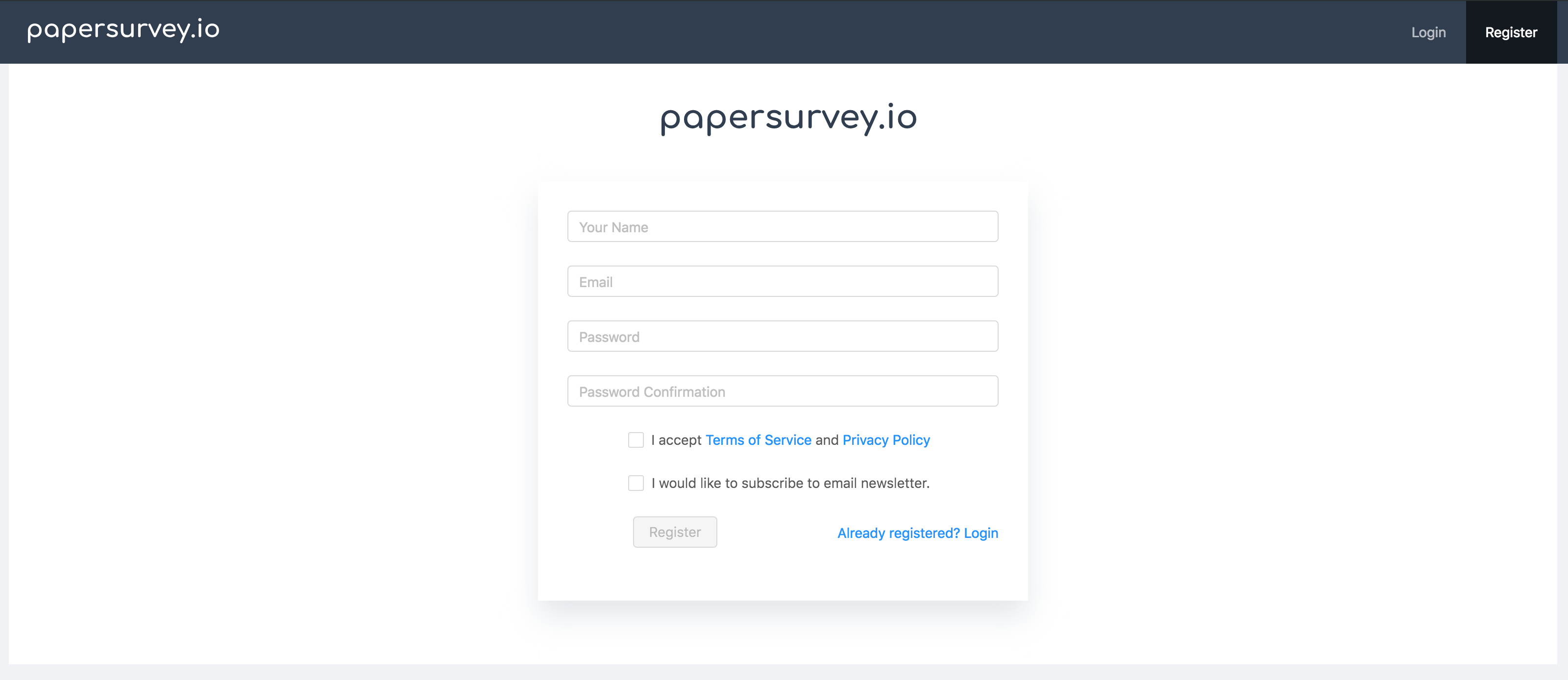
<p>You should first <a href="/app/auth/register">register</a> a new account if you don't have an account already. You may try the service for 14 days, no credit card details required. </p>
<p><img src="/images/blog/register.png" alt="register" /></p>
<h2>Create a survey</h2>
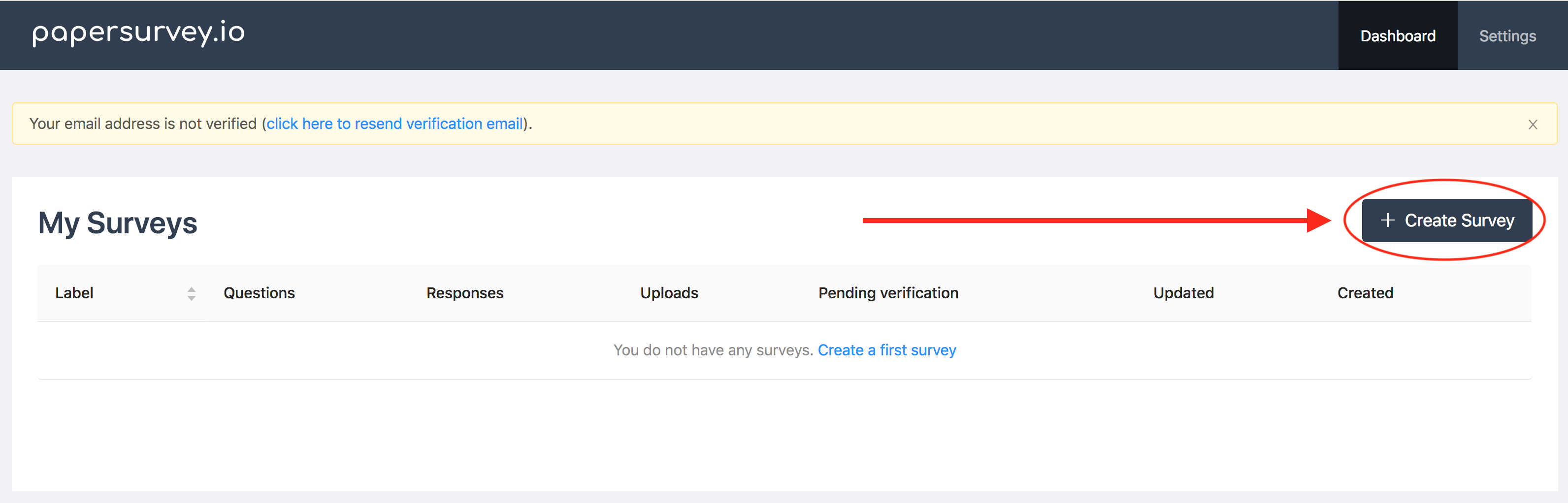
<p>To create a new survey, click <a href="/app/surveys/create">Create Survey</a> in the upper-right corner in your dashboard and choose the survey name and language.</p>
<p><img src="/images/blog/my-surveys.png" alt="my surveys" /></p>
<h3>Add questions to a survey</h3>
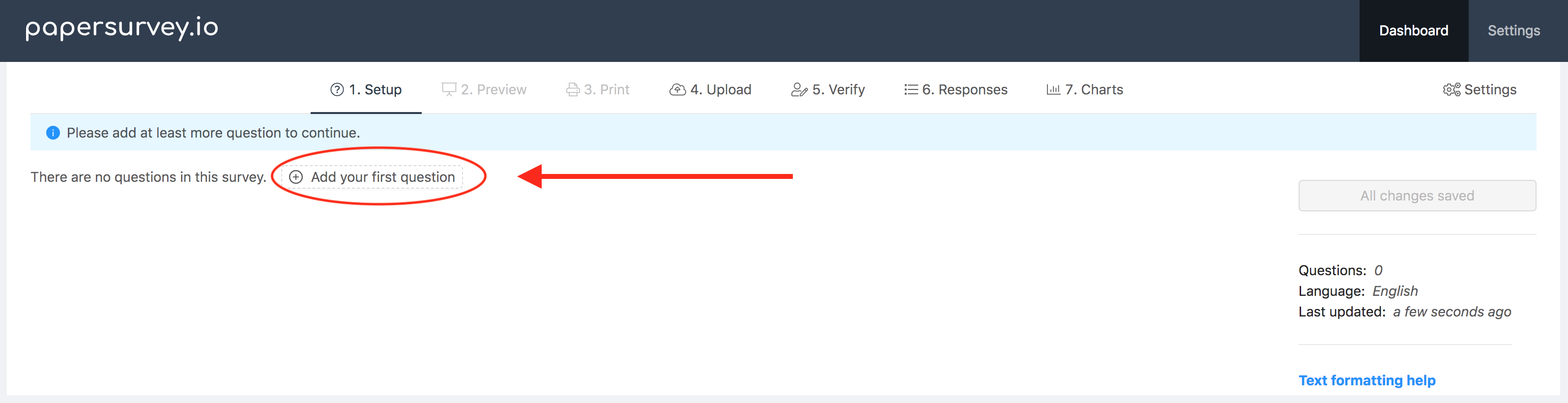
<p>Now you may add questions to the survey. To add your first question click "Add your first question" and set the question type you want</p>
<p><img src="/images/blog/add-questions.png" alt="add questions" /></p>
<h4>Question types</h4>
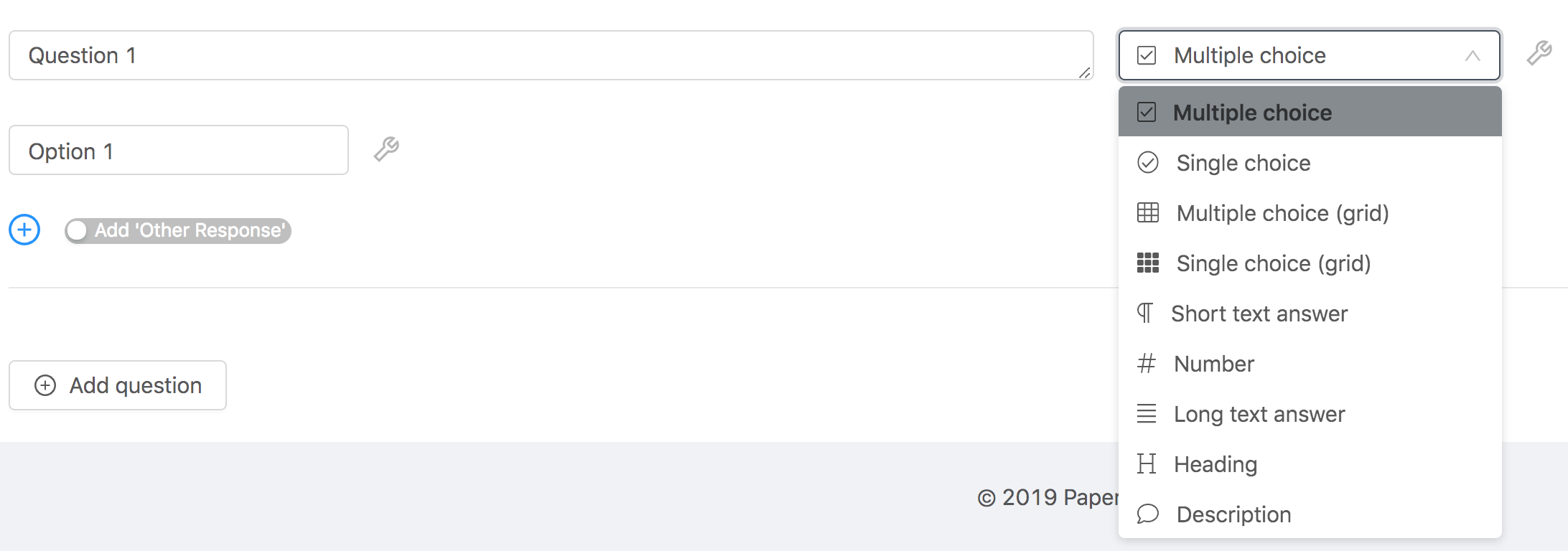
<p>At the time of writing this article, there were 12 question types available, there may be more right now. You may download a <a href="/templates/custom/example-paper-survey-layout">sample survey</a> to see how each question type looks like.</p>
<p>Below is a list of the question types and short descriptions of each type.
<img src="/images/blog/question-types.png" alt="question types" /></p>
<h5>Multiple choice</h5>
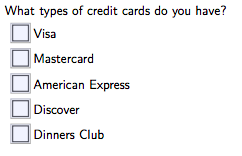
<p>This question type is suitable for questions where the respondent can pick more than one response:
<img src="/images/blog/multiple-choice.png" alt="medium" /></p>
<hr />
<h5>Single choice</h5>
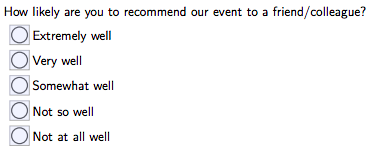
<p>This question type is suitable for questions where the respondent can only pick a single answer. If the respondent checked multiple boxes, the response will be flagged for additional verification:
<img src="/images/blog/single-choice.png" alt="medium" /></p>
<hr />
<h5>Multiple choice (grid) / Single choice (grid)</h5>
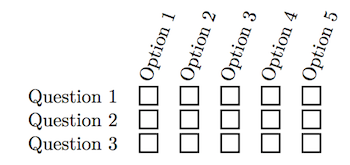
<p>This question type is very similar to <strong>Multiple choice/Single choice</strong> question type. 
However, the layout is different allowing to fit more questions on the page and is mostly suitable when all question options are identical.</p>
<p><img src="/images/blog/grid.png" alt="small" /></p>
<hr />
<h5>Inline Text</h5>
<p>This question allows us to write a text response. You are able to set the width of the square box:</p>
<p><img src="/images/blog/text.png" alt="small" /></p>
<hr />
<h5>Number</h5>
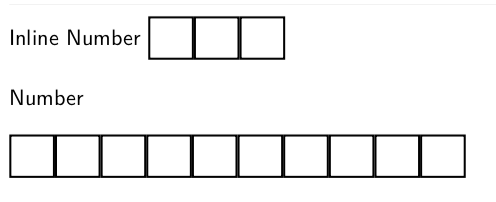
<p>In the paper survey, the question looks similar to <em>Inline Text</em>. However, this question type only recognizes numeric responses. 
You may choose to have a free-text response box or a field with a specified number of boxes, writing each digit in separate box. We highly recommend the latter as it is much simpler accurately detect and read the numbers written such way.</p>
<p><img src="/images/blog/numbers.png" alt="small" /></p>
<hr />
<h5>Long Text</h5>
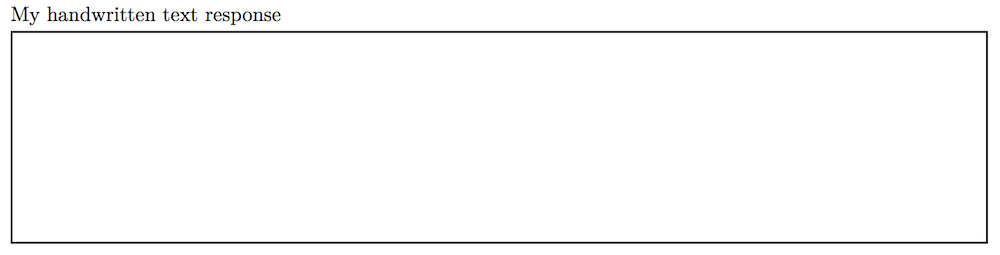
<p>Similarly, as an <em>Inline Text</em>, this question allows writing a longer text response to allow entering more text. You may set the box height as long as you want.</p>
<p><img src="/images/blog/text-block.png" alt="small" /></p>
<hr />
<h5>Range</h5>
<p>The range question type allows us to configure a question with a specified number of checkboxes, left and right labels.</p>
<p><img src="/images/blog/range.png" alt="small" /></p>
<hr />
<h4>Heading</h4>
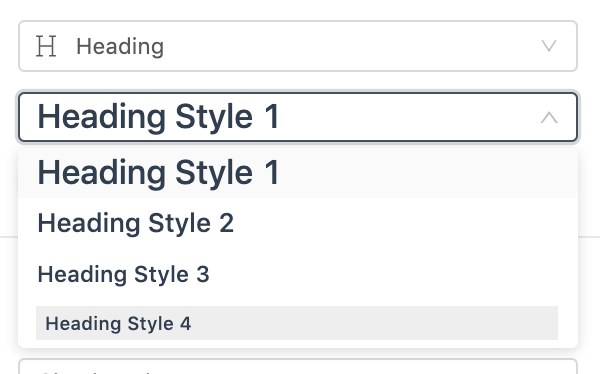
<p>Headings allow to emphasize and separate blocks of questions. There are four different styles/sizes you can choose with an ability to customize the colors</p>
<p><img src="/images/blog/headings.png" alt="small" /></p>
<hr />
<h4>Divider</h4>
<p>Adds a simple horizontal line to separate blocks of questions.</p>
<hr />
<h4>Page break</h4>
<p>Adds a page break and shift all questions to the next page. Useful when you would like to add the following questions on the next page.</p>
<hr />
<h4>Description</h4>
<p>Using this question type you may add some informational text in any part of the survey. You may wish to <a href="/blog/markdown-survey-formatting-paper-based-surveys">view text formatting options</a> to further customize the text.</p>
<hr />
<h3>Survey settings</h3>
<p>There are several settings available that allow customizing how the layout looks like. You may click on the "Settings" tab to customize how your survey looks like.</p>
<h4>Remove informational header</h4>
<p>By default, we include information on how to respond (see below). If you would like to remove it. Just enable this setting.</p>
<p><img src="/images/blog/information.png" alt="small" /></p>
<h4>Remove default help text</h4>
<p>By default, we include default help text that you can customize or completely remove with this setting.</p>
<p><img src="/images/blog/help-text.png" alt="small" /></p>
<h2>Preview</h2>
<p>Open the "Preview" tab to instantly preview how your survey would look like. It may take several seconds to generate it, depending on how long is your survey. </p>
<h2>Print paper survey</h2>
<p><img src="/images/blog/printing.png" alt="tiny" /></p>
<p>Once you have added all the questions you need and you are happy how the survey looks like, it is time to print it. Depending on how many pages you have in the survey, one or two barcodes will be included on the footer of the survey.</p>
<p>If the survey has only <strong>one page</strong>, we will include one QR code on the bottom-right side of the page. This allows us to easily identify which survey you are uploading.</p>
<p>If there are <strong>two or more pages</strong>, an additional barcode on the bottom-left side of the page will be generated. This additional QR code ensures you are not uploading the same survey twice and simplify the uploading process.</p>
<blockquote>
<p>For instance, if you have a 3-page survey with 10 respondents, there will be 30 pages to scan. You may drop the sheets on the ground, shuffle it several times and upload the scanned documents in any order. We will still match all pages in the correct order.</p>
</blockquote>
<p><em>If you wish, you may enable the additional barcode to be included in one-page surveys too. For multiple-page surveys, you can disable the bottom-left barcode, but you will need to upload each set of pages in a separate PDF/TIFF file.</em></p>
<h2>Scan paper forms</h2>
<p><img src="/images/blog/scanner.png" alt="tiny" /></p>
<p>Once you have some responses collected you may scan them for recognition. We advise on making a few test scans to test your printer and scanner. Sometimes with budget printers, there are problems where printers crop the bottom part of the survey.</p>
<p>If you don't have a scanner already or planning to upgrade, please take a look at our <a href="/blog/recommended-scanners-for-paper-based-survey-processing">Best document scanners for paper-based surveys recognition</a> guide.</p>
<h2>Upload &amp; Process</h2>
<p><img src="/images/blog/upload.png" alt="tiny" /></p>
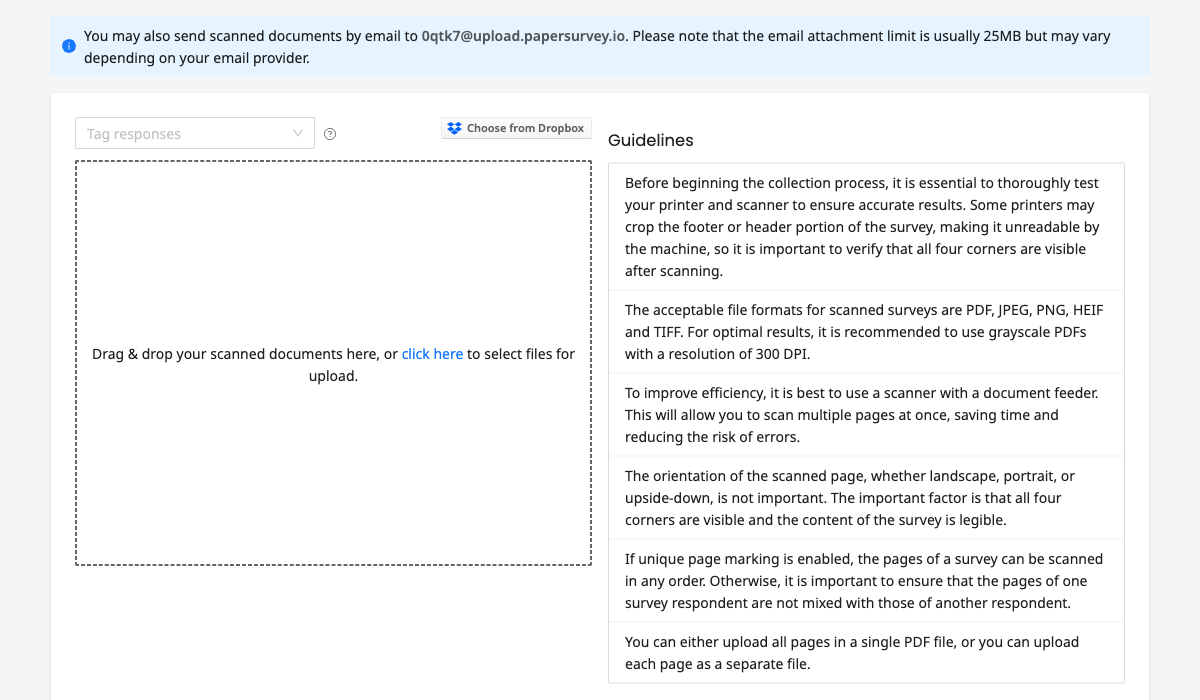
<p>After you have scanned the files, you may finally upload them.</p>
<p>We provide several ways to upload scanned documents:</p>
<ol>
<li><strong>Upload</strong> - go to the website and select the files to upload.</li>
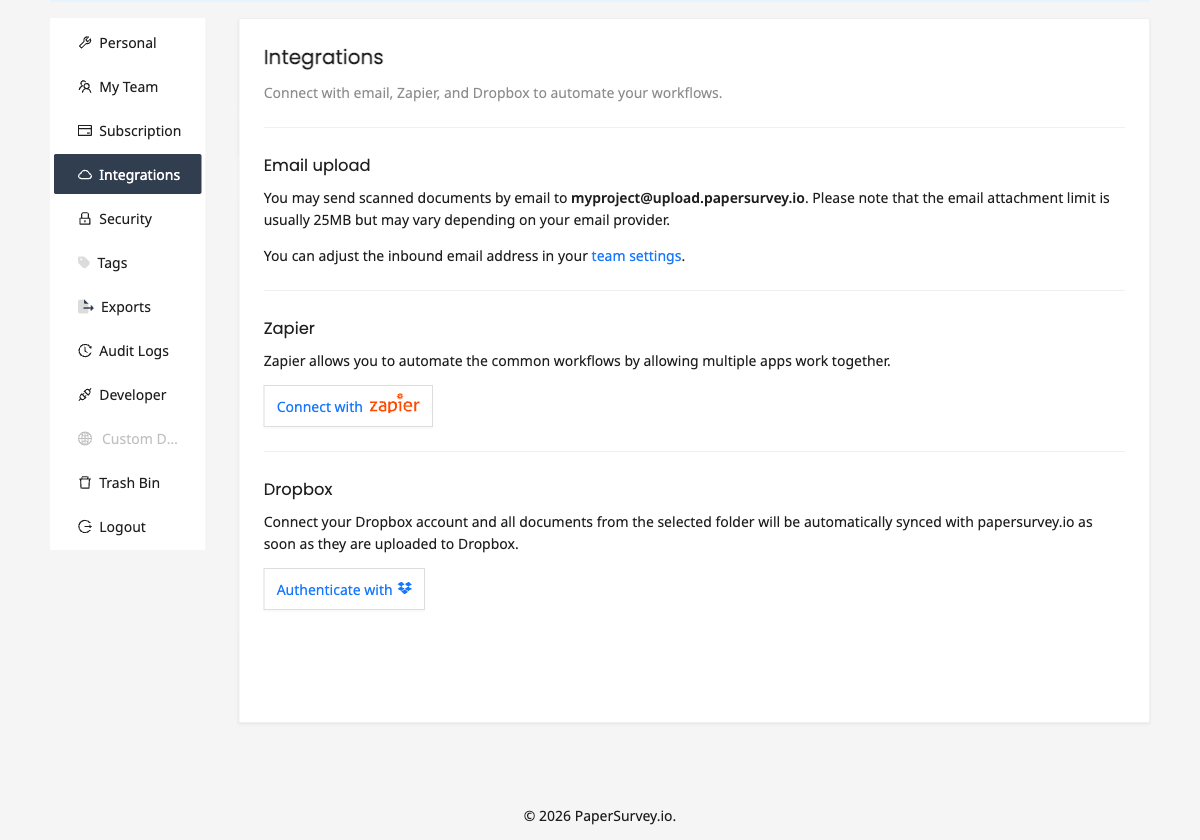
<li><strong>Email</strong> - send an email and it will be automatically processed.</li>
<li><strong>Zapier</strong> - connect other applications to papersurvey.io and streamline uploads<ul>
<li>This allows optimizing the workflow in any way you want without needing to code:<ol>
<li>Send Gmail attachments to PaperSurvey.io for processing</li>
<li>Do something when uploaded documents are recognized (e.g. to send data to your database)</li>
</ol>
</li>
</ul>
</li>
<li><strong>Dropbox</strong> integrations -  upload scanned files to a selected folder and we will automatically sync it when a file is added to Dropbox.</li>
<li><strong>Android application</strong> - (coming soon) Scan and automatically crop documents using an Android app and instantly upload documents to PaperSurvey.io.</li>
<li><strong>Programmatic access (API)</strong> - (requires Enterprise Plus plan) develop custom integrations to interact and upload files to PaperSurvey.io from your CRM or app.</li>
</ol>
<h2>Verify responses</h2>
<p><img src="/images/blog/verify.png" alt="tiny" /></p>
<p>In certain cases, checkboxes may not be recognized (very rarely). We will flag these responses for you to double-check and pick the correct response. </p>
<p>Open response questions such as <em>Long text answers</em> and <em>Short text answers</em> are recognized automatically, but we ask you to double-check if it was read correctly.</p>
<h2>Analyze results</h2>
<p><img src="/images/blog/report.png" alt="tiny" /></p>
<p>Although, at the moment quite limited, you may able to see the basic statistics in word clouds and bar charts to analyze the collected data. </p>
<p>Please reach out to us if you like to see different analysis methods and we will try to add them.</p>
<h2>Export Data</h2>
<p><img src="/images/blog/folder.png" alt="tiny" /></p>
<p>The software allows exporting data to two most common formats for the additional data analysis: </p>
<ul>
<li>CSV</li>
<li>Excel</li>
<li>Excel with images - Includes text responses as images</li>
<li>SPSS</li>
</ul>
<p>Currently, we cannot export your uploaded files in bulk, but you can download the uploaded files, one by one.</p>]]>
            </summary>
                                    <updated>2026-04-09T06:38:07+00:00</updated>
        </entry>
            <entry>
            <title><![CDATA[Non-profit sponsorships]]></title>
            <link rel="alternate" href="https://www.papersurvey.io/blog/non-profit-sponsorships" />
            <id>https://www.papersurvey.io/4</id>
            <author>
                <name><![CDATA[PaperSurvey.io]]></name>
            </author>
            <summary type="html">
                <![CDATA[<h1>Non-profit sponsorships</h1>
<p><strong><span style="color:tomato">Due to high demand, we temporarily paused accepting new organizations in our free Non-profit program. Please consider subscribing to our paid plans instead.</span></strong></p>
<p>Are you working in a non-profit organization? We provide our paper survey solution for free for non-profit organizations on a case by case basis.</p>
<h3>How can my organization get a discount?</h3>
<ol>
<li>
<p><a href="/app/auth/register">Create an account</a> and verify the email address.</p>
</li>
<li>
<p>Contact us at <a href="mailto:hello@papersurvey.io">hello@papersurvey.io</a> and describe the following information:</p>
<ul>
<li>Name of your non-profit</li>
<li>Proof of your nonprofit status with your local government</li>
<li>Describe your use case and what data you plan to collect</li>
<li>The number of responses per month (approximately) you plan to collect.</li>
</ul>
</li>
</ol>
<h3>Limitations</h3>
<ul>
<li>
<p>As the handwriting recognition is expensive for us, open-ended (e.g. Short text answer, Long text answer) questions are <strong>not</strong> going to be automatically transcribed. Thus, you will need to manually enter the text by looking at the scanned fields or you can just keep it in an image format.</p>
<p><em>Close-ended (e.g. single/multiple-choice) questions and Character/Number/Date fields will be recognized automatically</em></p>
</li>
<li>
<p>Includes Standard plan features only (plus Team Access).</p>
</li>
<li>
<p>Not valid for academic institutions.</p>
</li>
<li>
<p>In exchange for free service, we will ask to mention us on your website.</p>
</li>
</ul>]]>
            </summary>
                                    <updated>2026-04-09T06:38:07+00:00</updated>
        </entry>
            <entry>
            <title><![CDATA[Looking for a Moodle Quiz OMR Alternative?]]></title>
            <link rel="alternate" href="https://www.papersurvey.io/blog/moodle-quiz-omr-alternative" />
            <id>https://www.papersurvey.io/5</id>
            <author>
                <name><![CDATA[PaperSurvey.io]]></name>
            </author>
            <summary type="html">
                <![CDATA[<h1>Looking for a Moodle Quiz OMR Alternative?</h1>
<p align="center">
<img src="/images/blog/moodle.jpg" />
</p>
Moodle Quiz OMR is a Moodle (open-source learning management system) that allows us to conduct assessments on paper and synchronize results in the grading system. Unfortunately, it has not been maintained and the last update has been made in 2010.
<br />
<br />
Try PaperSurvey.io software to replace Moodle Quiz OMR in your institution.
<br />
<br />
PaperSurvey.io offers an OMR (optical mark recognition) and HTR (handwritten text recognition) quiz solution suitable for small to medium businesses and academic institutions.
<h3>Optical Mark Recognition and Handwritten text recognition</h3>
<p>PaperSurvey.io recognizes checkboxes and radio boxes automatically from scanned surveys with a 99.99% accuracy. </p>
<p>Handwritten text from open response questions is recognized using a powerful AI handwriting recognition model.</p>
<h3>A cloud-based software</h3>
<p>PaperSurvey.io is a cloud-based software. Therefore, you may create and process paper surveys on any platform. You may even upload scanned files from your phone.</p>
<p><strong>Do you not need:</strong></p>
<ul>
<li>Install any additional software</li>
<li>Be limited to a single device for recognizing scans</li>
<li>Deal with hardware and software updates</li>
<li>Renew licenses</li>
<li>Backup data</li>
<li>Think about scaling issues </li>
</ul>
<h3>Your branding</h3>
<p>Upload your branding logo and customize colors, change the font to make the survey look professional and align with your branding style.</p>
<h3>Monthly/Yearly pricing</h3>
<p>Only need to use the survey platform just for a few months? Simply cancel when you no longer need it and resubscribe when you want to use it again.</p>
<h3>Unique identifiers for multi-page surveys</h3>
<p>Each page includes a unique identifier. This reduces errors, eliminates duplicates and simplifies form scanning and processing.</p>
<p><em>You will receive a single PDF file containing a requested number of copies for printing.</em></p>
<h3>Zapier automation</h3>
<p>Automate document uploads with Zapier actions and receive recognized data with recognition triggers. </p>
<h3>View Results Online</h3>
<p>You can always check your survey results Online immediately on any device and browser and always compare recognized information with actual document images. </p>
<h3>Digitally fillable PDF Forms</h3>
<p>Survey forms can also be completed digitally, without printing and scanning. Just open PDF, fill the form and upload.</p>
<h3>Web forms</h3>
<p>As an additional collection source, collect responses on the web and have all the data in one place.</p>]]>
            </summary>
                                    <updated>2026-04-09T06:38:07+00:00</updated>
        </entry>
            <entry>
            <title><![CDATA[Looking for a Remark Office OMR Alternative?]]></title>
            <link rel="alternate" href="https://www.papersurvey.io/blog/remark-office-omr-alternative" />
            <id>https://www.papersurvey.io/6</id>
            <author>
                <name><![CDATA[PaperSurvey.io]]></name>
            </author>
            <summary type="html">
                <![CDATA[<h1>Looking for a Remark Office OMR Alternative?</h1>
<p><img src="/images/blog/data-analytics.png" alt="" style="
width: 300px;
"></p>
<p>Remark OMR is one of the oldest OMR software solutions available commercially. </p>
<p><em>Are you are looking for a simpler alternative to Remark OMR? Try PaperSurvey.io.</em></p>
<p>PaperSurvey.io offers an OMR (optical mark recognition) and HTR (handwritten text recognition) survey solution suitable for small to medium businesses.</p>
<p>Collect responses from the paper-based forms and automatically extract data by sending the scanned documents to us. Create research surveys, questionnaires, registration, HR, feedback or application forms, quizzes, tests or anything else you can think of.</p>
<p>Easy to use user interface makes the form creation and paper-based data collection simple and straight-forward for anyone.</p>
<h3>Optical Mark Recognition and Handwritten text recognition</h3>
<p>PaperSurvey.io recognizes checkboxes and radio boxes automatically from scanned surveys with a 99.99% accuracy. </p>
<p>Handwritten text from open response questions is recognized using a powerful AI handwriting recognition model.</p>
<h3>Cloud-based software</h3>
<p>Differently than Remark OMR, PaperSurvey.io is a cloud-based software. Therefore, you may create and process paper surveys on any platform. You may even upload scanned files from your phone.</p>
<p><strong>Do you not need:</strong></p>
<ul>
<li>Install any additional software</li>
<li>Be limited to a single device for recognizing scans</li>
<li>Deal with hardware and software updates</li>
<li>Renew licenses</li>
<li>Backup data</li>
<li>Think about scaling issues </li>
</ul>
<h3>Simple pricing</h3>
<p>Only need to use the survey platform just for a few months? Simply cancel when you no longer need it and resubscribe when you want to use it again.</p>
<h3>Digitally fillable PDF Forms</h3>
<p>Survey forms can also be completed digitally, without printing and scanning. Just open PDF, fill the form and upload.</p>
<h3>Your branding</h3>
<p>Upload your branding logo and customize colors, change the font to make the survey look professional and align with your branding style.</p>
<h3>Unique identifiers for multi-page surveys</h3>
<p>Each page includes a unique identifier. This reduces errors, eliminates duplicates and simplifies form scanning and processing.</p>
<p><em>You will receive a single PDF file containing a requested number of copies for printing.</em></p>
<h3>View Results Online</h3>
<p>You can always check your survey results Online immediately on any device and browser and always compare recognized information with actual document images. </p>
<h3>Zapier automation</h3>
<p>Automate document uploads with Zapier actions and receive recognized data with recognition triggers. </p>]]>
            </summary>
                                    <updated>2026-04-09T06:38:07+00:00</updated>
        </entry>
            <entry>
            <title><![CDATA[Automated data processing with paper-based forms]]></title>
            <link rel="alternate" href="https://www.papersurvey.io/blog/automated-form-processing-paper-forms" />
            <id>https://www.papersurvey.io/7</id>
            <author>
                <name><![CDATA[PaperSurvey.io]]></name>
            </author>
            <summary type="html">
                <![CDATA[<h1>Automated data processing with paper-based forms</h1>
<p>Are you currently collecting data on paper forms and entering data manually? There is a better way. In this post, I'll describe how you can minimize manual data entry costs by automating form capture and processing. </p>
<p><a href="https://www.papersurvey.io">papersurvey.io</a> provides an easy and cost-effective technology for creating paper-based forms with a checkmark and handwritten text recognition:</p>
<ul>
<li>Scan an unlimited number of documents.</li>
<li>Create surveys with an unlimited number of questions and pages.</li>
<li>Recognize documents from photos, deskew images and automatically rotate pages.</li>
<li>Scan duplex of simplex questionnaires.</li>
<li>Uniquely mark each paper copy to avoid duplicate scans and automatically sort the pages.</li>
</ul>
<h2>Data Entry from paper-based forms</h2>
<p>Setup your questionnaire on <a href="https://www.papersurvey.io">papersurvey.io</a> for collecting data via paper forms. Once you are ready and happy how the survey looks like, just print your survey forms and distribute them to your respondents or the data collector staff. </p>
<p>You do not need to worry about the design of the form. Our survey builder creates an optimized layout so the forms are readable by machine and do not require any adjusting.</p>
<p>The data entry is automated. You only need to scan the filled sheets and upload to our cloud platform. Within minutes of uploading, you will be able to analyze the quantitative data. </p>
<h2>Cloud-based software</h2>
<p>Unlike most of the alternatives such as ABBYY OCR or Remark Office OMR, the software is available as a web service and does not require you to install any type of software or buy compatible hardware to scan the surveys. 
This allows you to start creating the survey for your research immediately. </p>
<p>You never need to worry about backing up your data as we automatically back it up several times a day and store in encrypted storage. Read our <a href="https://www.papersurvey.io/security">security statement</a> to learn more about it.</p>
<p>Our advanced image processing allows capturing responses from forms scanned </p>
<p>Getting started is easy as you only need to register and create a survey form online and print it. Once you have several responses collected just scan the pages and upload the scanned documents. </p>
<h2>Easy to use survey designer</h2>
<p>We built the survey designer to be as simple as possible for users setup their first paper survey. The generated paper layout is automatically optimized for the automatic form processing and includes all required marks to help with image processing and field recognition.</p>
<h2>Scanning paper-based forms</h2>
<p>You may use any type of scanner to scan the completed documents. You may as well capture paper forms using your mobile phone. Generally, scanning with a document feeder is much more efficient. However, our software is designed to recognize documents from the photos as well.</p>
<h2>Handle any scale</h2>
<p>Our data processing software is designed to handle a large number of documents and can scale dynamically. Therefore, we are able to process thousands of scans per hour. </p>
<h2>Accurate optical mark recognition</h2>
<p>Our software correctly identifies 99.99% of the checkmarks. If the calculated accuracy is lower than a certain threshold, a response will be flagged for you to review and manually verify the answer.</p>
<p>You may choose between two recognition modes to suit your requirements:</p>
<ul>
<li>Check or fill the box to respond (default mode)</li>
<li>Check to respond, fill to unmark</li>
</ul>
<h2>Online survey collector</h2>
<p>Do you need to collect the surveys from both paper-based forms as well as web surveys? Or would you like to enter the data into the system manually on certain occasions? Web surveys may be optionally enabled allowing you to collect data from multiple sources and store in one location.</p>
<h2>Analyzing results online</h2>
<p>You may analyze your results online as soon as you upload and data is processed. Exporting results from our database is simple and fast.</p>
<p>Are you ready to create your first form to automate your data processing? <a href="https://www.papersurvey.io/app/auth/register">Click here</a> to register and try out our data capturing software today.</p>]]>
            </summary>
                                    <updated>2026-04-09T06:38:07+00:00</updated>
        </entry>
            <entry>
            <title><![CDATA[Looking for FormScanner OMR Alternative?]]></title>
            <link rel="alternate" href="https://www.papersurvey.io/blog/formscanner-alternative" />
            <id>https://www.papersurvey.io/8</id>
            <author>
                <name><![CDATA[PaperSurvey.io]]></name>
            </author>
            <summary type="html">
                <![CDATA[<h1>Looking for FormScanner OMR Alternative?</h1>
<p>You’re in the right place. PaperSurvey.io offers an OMR (optical mark recognition) and HTR (handwritten text recognition) survey solution suitable for small to large businesses.</p>
<h3>Cloud-based software</h3>
<p>PaperSurvey.io is a cloud-based software. Therefore, you may create and process paper surveys on any platform (Windows, Mac or Linux) or device. You may even upload scanned files from your phone.</p>
<h4>No software upgrades and maintenance</h4>
<p>Traditional software installable in computers licensing fees are not cheap, and the IT infrastructure costs, training, and support costs and upgrade fees. This can make the total cost of software prohibitive for many businesses.</p>
<p>As PaperSurvey is a software as a service, all upgrades are managed by us.</p>
<h3>Email scanned documents</h3>
<p>You may also send the scanned documents to an email address (e.g. <strong>myaddress@upload.papersurvey.io</strong>) and get them processed automatically.</p>
<h3>Monthly/Yearly billing</h3>
<p>Only need to use the survey platform for a few months? Simply cancel when you no longer need it. </p>]]>
            </summary>
                                    <updated>2026-04-09T06:38:07+00:00</updated>
        </entry>
            <entry>
            <title><![CDATA[Paper Surveys with Scanning]]></title>
            <link rel="alternate" href="https://www.papersurvey.io/blog/paper-surveys-with-scanning" />
            <id>https://www.papersurvey.io/9</id>
            <author>
                <name><![CDATA[PaperSurvey.io]]></name>
            </author>
            <summary type="html">
                <![CDATA[<h1>Paper Surveys with Scanning</h1>
<p>Collect data on paper forms to reach your target audience. <a href="https://www.papersurvey.io">PaperSurvey.io</a> specializes solely in paper-based survey questionnaires creation and recognition. </p>
<h2>Data validation &amp; verification</h2>
<p>Mistakes can happen an do happen in manual data entry.</p>
<p><a href="https://www.papersurvey.io">PaperSurvey.io</a> uses advanced algorithms and machine learning to recognize scanned paper surveys. This reduces data entry errors to a minimum level. All checkboxes are recognized with 99.99% accuracy.</p>
<p>However, if the machine is not certain about the correctness of the answer (incorrectly filled, bad scan quality, etc), the response will be flagged for additional verification by you.</p>
<p>At the moment, all recognized handwritten text fields require additional verification, but you may choose yourself how accurate your text needs to be.</p>
<h2>Open response questions</h2>
<p>Respondents are presented with a box to write text.</p>
<p>Unlike other data entry solutions, we ask to write the text in free text boxes.</p>
<h2>Page stamping</h2>
<p>For paper surveys with two or more pages, by default, we enable page stamping - uniquely mark each page with a barcode on the bottom-left side of the page.</p>
<p>The barcode on the bottom-right side is used to  a respondent and the other barcode is to determine survey and page.</p>
<p>This feature ensures we match the pages correctly even if all responses are scanned in a single or separate files.</p>
<p>Type a number of copies you need and we will email you a single PDF file for printing.</p>
<p>If you wish, you can also enable this feature on single page surveys.</p>]]>
            </summary>
                                    <updated>2026-04-09T06:38:07+00:00</updated>
        </entry>
            <entry>
            <title><![CDATA[How to generate barcodes with Microsoft Word Mail Merge in your paper surveys]]></title>
            <link rel="alternate" href="https://www.papersurvey.io/blog/how-to-use-mailmerge-with-paper-surveys" />
            <id>https://www.papersurvey.io/10</id>
            <author>
                <name><![CDATA[PaperSurvey.io]]></name>
            </author>
            <summary type="html">
                <![CDATA[<h1>How to generate barcodes with Microsoft Word Mail Merge in your paper surveys</h1>
<p>For multi-page surveys, created with <a href="https://www.papersurvey.io">papersurvey.io</a> you must have an additional unique barcode on each page bottom-left corner. One-page surveys may also be uniquely marked but only if you would like to include some identification number: </p>
<ul>
<li><em>The barcode on the bottom-left side is used to identify a respondent.</em></li>
<li><em>The barcode on the bottom-right side is used to identify the survey and page.</em> 
<img src="/images/blog/barcodes.png" alt="barcodes" /></li>
</ul>
<p>If you for some reason can't print unique barcodes on each page, you have an ability to disable the barcodes in the survey settings. If you do so, you must upload each copy as a separate PDF file (Suppose you have a survey with three pages and 5 people that have written their responses. You will need to upload 5 pdf files, each having three pages)</p>
<blockquote>
<p>Having unique barcodes on survey pages allows you to simplify paper scanning and ensure the scanned pages are assigned to the correct entry.</p>
</blockquote>
<ul>
<li><em>You will not need to care about the order of scanned pages.</em></li>
<li><em>You may scan all pages from multiple respondents in a single file and simply upload it. We'll take care of it automatically.</em></li>
<li><em>Duplicated scans will not create duplicate responses.</em></li>
</ul>
<h3><strong>Two methods</strong> to insert the barcode at the bottom-left corner:</h3>
<p><img src="/images/blog/print-copies-modal.png" alt="medium" /></p>
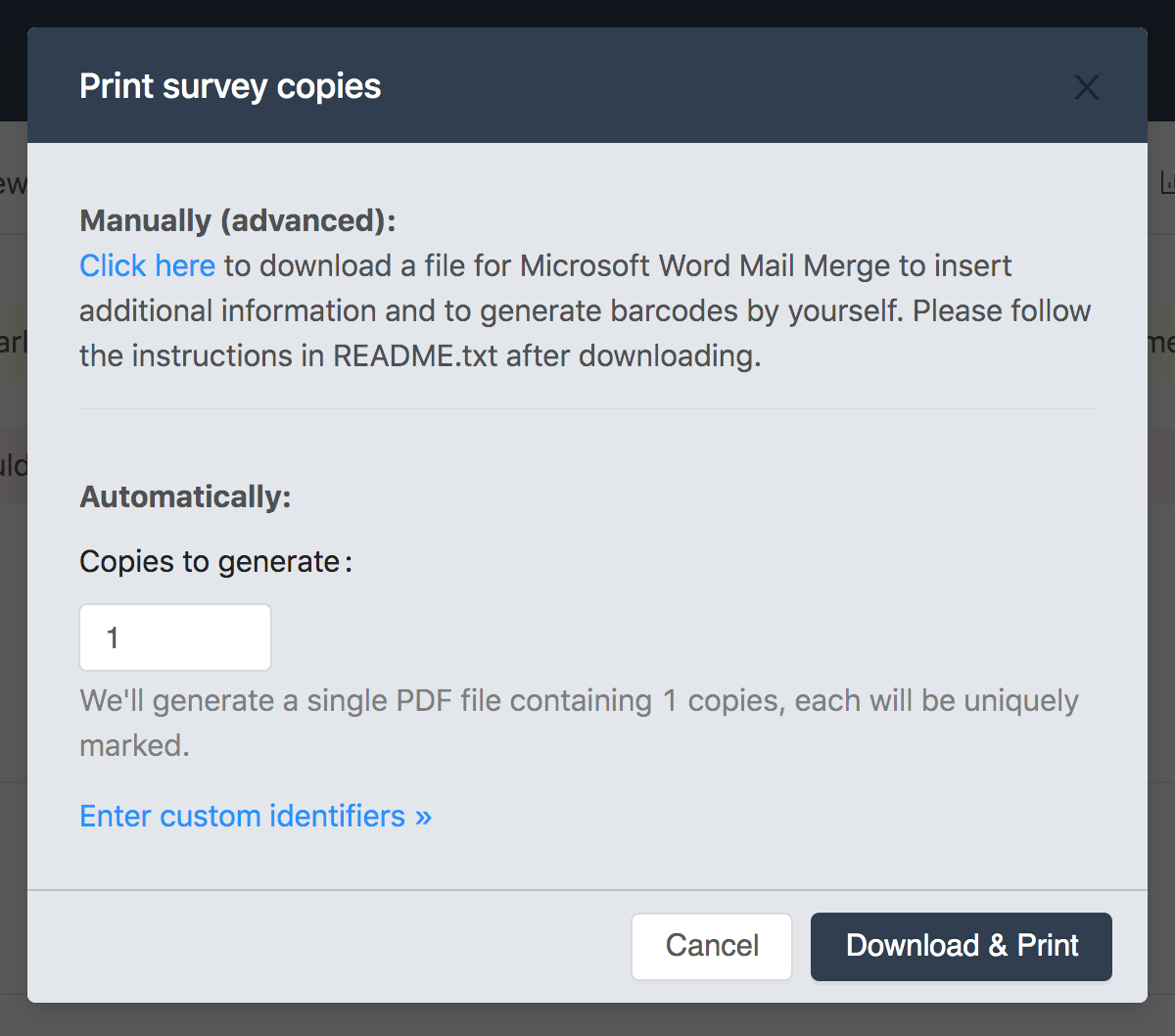
<ol>
<li>Automatically<ul>
<li>Useful when you don't need to insert any additional information.</li>
<li>You may provide your list of identifiers to be inserted as the bottom-left barcode.</li>
<li>You may select how many copies you need and we will generate a file with the requested number of copies.</li>
</ul>
</li>
<li>Manually (with Microsoft Word mail merge)<ul>
<li>Useful when you would like to insert the additional information such as names, addresses, print cover pages or generate barcodes by yourself.</li>
<li>Slightly more complicated.</li>
</ul>
</li>
</ol>
<h2>Automatically create.</h2>
<p>As mentioned above, this method is rather easy and simple and you only need to provide the number of copies you need or paste a list of identifiers you would like to use.</p>
<p>If you requested more than 5 copies, we will send the PDF file to your email address. </p>
<p>If you only need 5 or fewer copies, you will be able to download the PDF file instantly.</p>
<h2>Microsoft Word mail merge</h2>
<p>This method is a slightly more advanced method as you will need to follow several steps to finalize your survey setup. Also, it is quite error-prone, so please follow all steps to avoid the errors. </p>
<h3>Download the file</h3>
<p><img src="/images/blog/print-page.png" alt="medium" /></p>
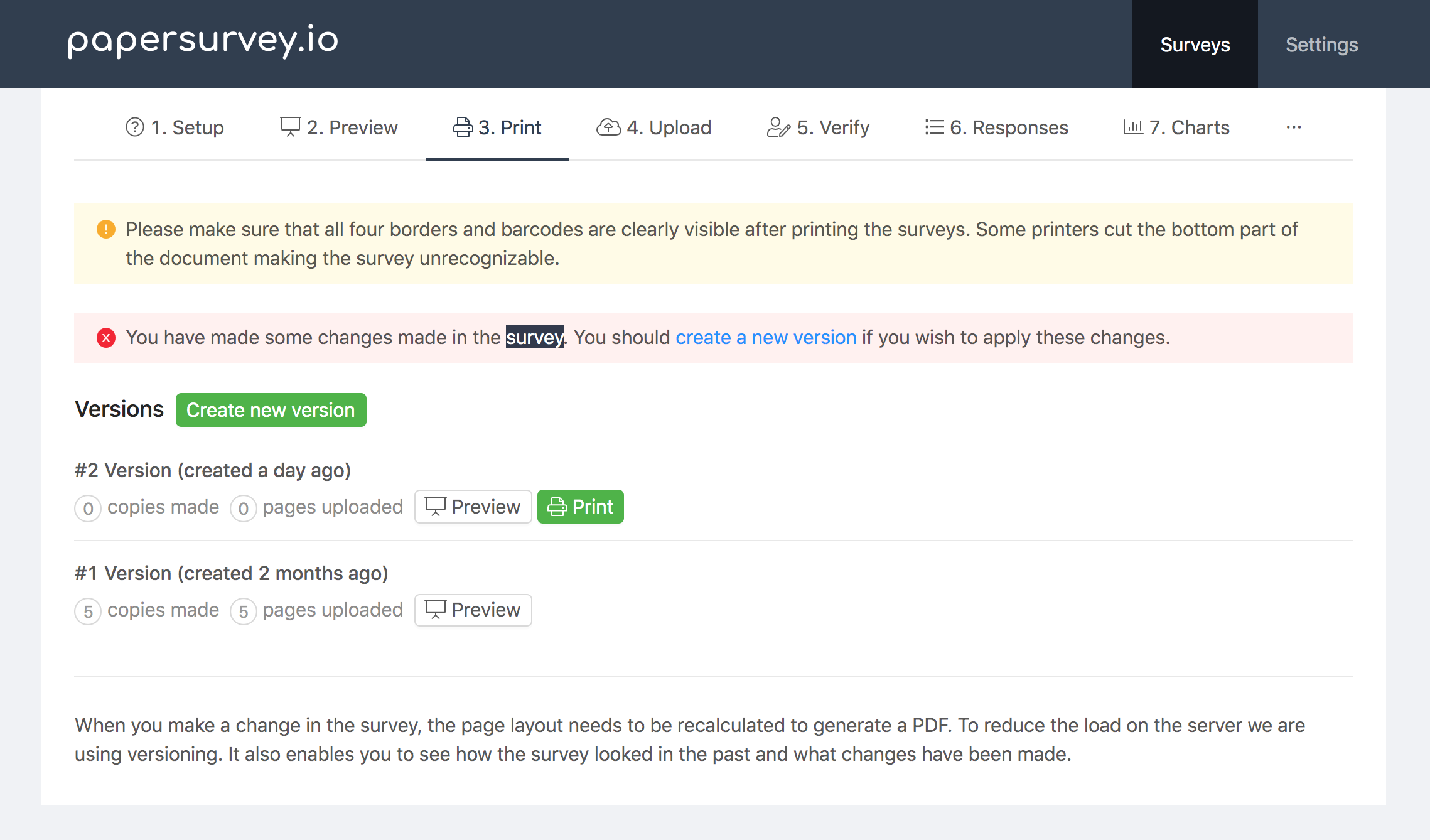
<p>Once you have a survey ready to be printed, go to the "Print" section of your survey and click a green "Print" button. The modal window will open allowing you to download a ZIP file.</p>
<h3>Extract the file.</h3>
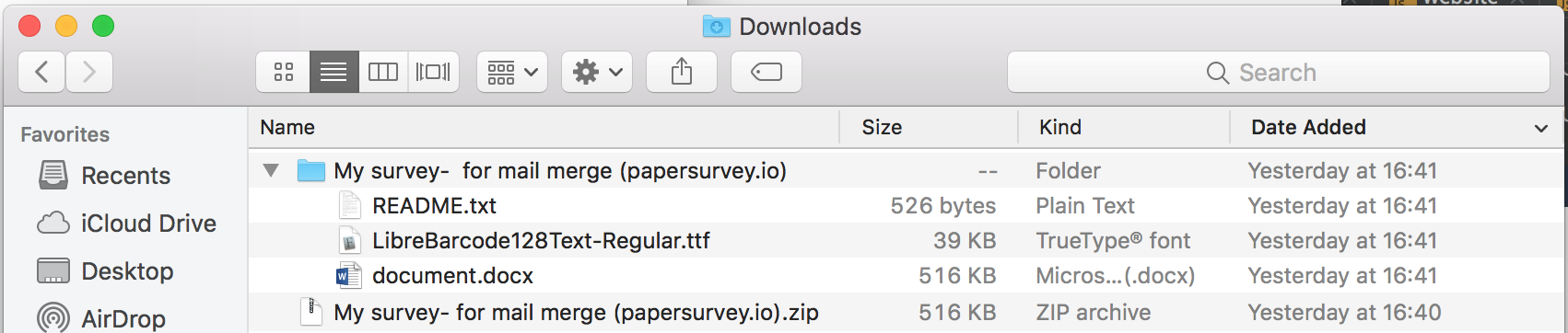
<p><img src="/images/blog/mailmerge-download.png" alt="medium" /></p>
<p>You should extract the downloaded ZIP file where you will find three files:</p>
<ol>
<li><strong>README.txt</strong> - a short guide on how to use the mail merge.</li>
<li><strong>document.docx</strong> - Microsoft Word file for the mail merge. </li>
<li><strong>LibreBarcode39Text-Regular.ttf</strong> - Barcode 39 font. </li>
</ol>
<h3>Install the Barcode 39 font</h3>
<p>Open <strong>LibreBarcode39Text-Regular.ttf</strong> file and install this font in your system. This will allow you to generate barcodes with mail merge.</p>
<p><strong>You should restart Microsoft Word after installing the font for it to appear in available fonts.</strong></p>
<h3>Insert a barcode field</h3>
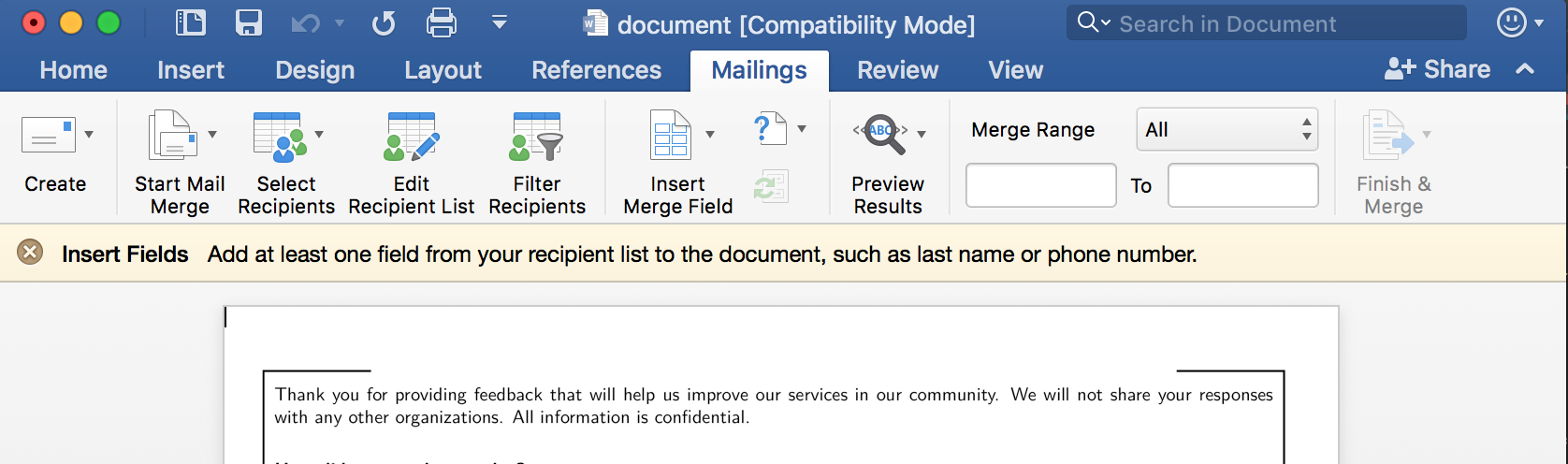
<p><img src="/images/blog/microsoft-word-mailmerge.png" alt="medium" /></p>
<ol>
<li>Open the <strong>document.docx</strong> with Microsoft Word.</li>
<li>Create or import your Recipient list by clicking on the "Edit recipient list".</li>
<li>Click on the "Insert merge field" to insert a barcode.</li>
<li>Position the field at the bottom-left corner of the page:
<img src="/images/blog/identifier.png" alt="small" /></li>
<li>Right-click on the field to change the font:
<img src="/images/blog/change-font.png" alt="small" /></li>
<li>Select "Libre Barcode 39 Text" with 26 font-size:
<img src="/images/blog/select-font.png" alt="small" /></li>
<li>The resulting field should look similar to this:
<img src="/images/blog/selected-font.png" alt="small" /></li>
<li>You may also click "Preview Results" to see how it looks with actual data:
<img src="/images/blog/sample-field.png" alt="small" /></li>
<li>You should copy these fields to all of your pages.</li>
</ol>
<h2>Barcode encoding - The most important part</h2>
<p>The barcode texts must be encoded to generate a valid and recognizable barcode.</p>
<p><strong>Barcode 39</strong> text must be wrapped in asterisks. e.g. <code>123</code>  must be encoded as <code>*123*</code> 
Other barcodes have different encoding requirements. We chose <em>Barcode 39</em> as it is simplest. You may as well use any other barcode type (QR, Codabar, Code 128, EAN-13/UPC-A, UPC-E, EAN-8) if you like. Just do not forget to correctly encode it.</p>
<p><strong>Your ID must start with <code>*</code> and end with <code>*</code></strong></p>
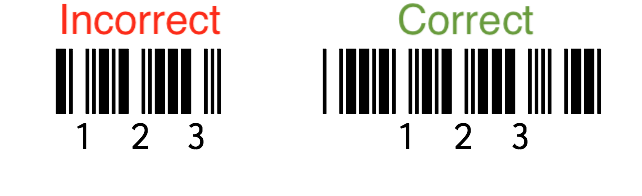
<p>Below are two barcodes. The left one is not-encoded and will not be readable. On the right, a barcode is correctly encoded. 
If your barcode is very short, it is likely you have forgotten to put the asterisks at the start and end.</p>
<p><img src="/images/blog/barcode-invalid.png" alt="small" /></p>
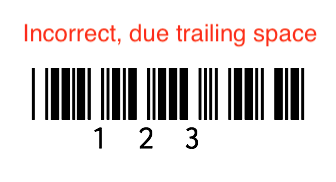
<p>Another common problem is to also apply barcode font to the whitespace characters. Suppose we have text as <code>*123*_</code> (where _ is white space and * is the encoding). As it ends with a trailing space, a barcode will not be recognized:</p>
<p><img src="/images/blog/barcode-with-spaces.png" alt="small" /></p>
<p>To double-check the barcode was generated correctly we would highly recommend you to download a barcode scanner app (e.g. <a href="https://play.google.com/store/apps/details?id=com.google.zxing.client.android">for Android</a>, <a href="https://itunes.apple.com/us/app/qr-code-reader-barcode/id903799541?mt=8">for iOS</a>) on your phone and check if the printed barcode can be read by the app. If it is, your barcode is encoded correctly. </p>
<h3>Finalize</h3>
<p>Add any additional information you need and print the pages!</p>
<p>That's it!</p>
<p>Hope you found this guide useful. If you are having some trouble, feel free to contact us at <a href="mailto:hello@papersurvey.io">hello@papersurvey.io</a>.</p>]]>
            </summary>
                                    <updated>2026-04-09T06:38:07+00:00</updated>
        </entry>
            <entry>
            <title><![CDATA[PAPI: Pen-and-Paper Personal Interview Questionnaires]]></title>
            <link rel="alternate" href="https://www.papersurvey.io/blog/papi-pen-and-paper-personal-interviews" />
            <id>https://www.papersurvey.io/11</id>
            <author>
                <name><![CDATA[PaperSurvey.io]]></name>
            </author>
            <summary type="html">
                <![CDATA[<h1>PAPI: Pen-and-Paper Personal Interview Questionnaires</h1>
<p>The Pen-and-Paper Personal Interview (PAPI) approach describes any survey type that uses pen-and-paper rather than digital devices to collect the information. While numerous surveys now often utilize CAPI (Computer-Assisted Personal Interviews), pen-and-paper methods offer several significant advantages over electronic methods that are likely to be important to the researcher.</p>
<h3>Advantages of Pen-and-Paper interviews</h3>
<p>Contrary to computer-aided interviews, pen and paper and methods require almost no technical expertise to be carried out. The implementation of the survey design can be very flexible.</p>
<p>This means that pen and paper surveys can be iterated very quickly on a small scale. It makes them ideal for data collection pilots, where continuous redevelopment or reorganization of surveys is needed. CAPI surveys may cause the whole survey to fail, with even little modification, which means that small iterative changes can take a lot of work.</p>
<p>With Pen-and-Paper questionnaires you are likely able to collect more responses as you won't be limited to a number of tablets/computers you have. You may print as many copies as your research team requires. </p>
<h3>Disadvantages of Pen-and-Paper interviews</h3>
<p>The main disadvantage of Pen-and-Paper interviews is data entry. If the data is being entered manually, it takes a lot of time to enter the data into the sheets or databases. </p>
<p>The majority of the automatic data processing solutions are expensive and require platform-specific software to be installed on the computer, which makes the Pen-and-Paper data collection less convenient.</p>
<h2>Technology-assisted solution for Pen-and-Paper interviews</h2>
<p><a href="https://www.papersurvey.io">papersurvey.io</a> provides technology for creating Pen-and-Paper forms with an automatic checkmark and handwritten text recognition.</p>
<p>As the software is cloud-based, so you may scan and upload your Pen-and-Paper forms to be processed automatically. The results can then be analyzed almost instantly.</p>
<p>Our cost-effective pricing structure is suitable for small to large organizations. Custom solutions are available for enterprise clients to support your data collection requirements by closely working with our experienced research team.  </p>
<p>Read more about <a href="https://www.papersurvey.io">paper form data entry</a> and create your new Pen-and-Paper form in minutes.</p>]]>
            </summary>
                                    <updated>2026-04-09T06:38:07+00:00</updated>
        </entry>
            <entry>
            <title><![CDATA[OCR Survey software]]></title>
            <link rel="alternate" href="https://www.papersurvey.io/blog/ocr-surveys-software" />
            <id>https://www.papersurvey.io/12</id>
            <author>
                <name><![CDATA[PaperSurvey.io]]></name>
            </author>
            <summary type="html">
                <![CDATA[<h1>OCR Survey software</h1>
<p>Are you looking for a modern software solution to capture data from the paper questionnaires? </p>
<p><a href="https://www.papersurvey.io">papersurvey.io</a> provides an easy and cost-effective technology for creating paper-based forms with a checkmark and handwritten text recognition:</p>
<ul>
<li>Scan an unlimited number of documents.</li>
<li>Create surveys with an unlimited number of questions and pages.</li>
<li>Recognize documents from photos, deskew images and automatically rotate pages.</li>
<li>Scan duplex or simplex questionnaires.</li>
<li>Uniquely mark each paper copy to avoid duplicate scans and automatically sort the pages.</li>
</ul>
<h2>Data Entry from paper-based forms</h2>
<p>Setup your questionnaire on <a href="https://www.papersurvey.io">papersurvey.io</a> for collecting data via paper forms. Once you are ready and happy how the survey looks like, just print your survey forms and distribute them to your respondents or the staff. </p>
<p>The data entry is automated. You only need to scan the filled sheets and upload to our cloud platform. Within minutes of uploading, you will be able to analyze the quantitative data.</p>
<p>You may automatically sync responses from your Dropbox folder or use Zapier to handle your specific workflow. Finally, you may just send the scanned sheets over the email. </p>
<h2>Cloud-based software</h2>
<p>Unlike most of the alternatives such as ABBYY OCR or Remark Office OMR, the software is available as a web service and does not require you to install any type of software or buy compatible hardware to scan the surveys. 
This allows you to start creating the survey for your research immediately. </p>
<p>Getting started is easy as you only need to register and create a survey form online and print it. Once you have several responses collected just scan the pages and upload the scanned documents. </p>
<h2>Easy to use survey designer</h2>
<p>We built the survey designer to be as simple as possible for the user to set up their first paper survey. The generated paper layout is automatically optimized for the automatic form processing and includes all required marks to help with image processing and field recognition.</p>
<h2>Handle any scale</h2>
<p>Our data processing software is designed to handle large research projects and we are able to process an unlimited number of pages.</p>
<h2>Online survey collector</h2>
<p>Do you need an ability to collect responses via web surveys? Or would you like to enter the data into the system by typing manually? Web surveys may be optionally enabled allowing you to collect data from multiple sources and store all data in one location.</p>
<h2>Analyzing results online</h2>
<p>You may analyze your results online as soon as you upload and data is processed (Usually within 20 minutes). Exporting results from our platform is simple and fast.</p>
<p>Are you ready to create your first form to automate your data processing? <a href="https://www.papersurvey.io/app/auth/register">Click here</a> to register and try out our data capturing software today.</p>]]>
            </summary>
                                    <updated>2026-04-09T06:38:07+00:00</updated>
        </entry>
            <entry>
            <title><![CDATA[Optical Mark Recognition (OMR) software]]></title>
            <link rel="alternate" href="https://www.papersurvey.io/blog/optical-mark-recognition-software" />
            <id>https://www.papersurvey.io/13</id>
            <author>
                <name><![CDATA[PaperSurvey.io]]></name>
            </author>
            <summary type="html">
                <![CDATA[<h1>Optical Mark Recognition (OMR) software</h1>
<p>Optical mark recognition (OMR in short) is a process to identify and extract data from paper forms by analyzing marked fields such as checkboxes or "bubble" fields. Optical mark recognition dates back to the 1930s where it was first used for test scoring. The software and techniques used for data processing are much improved nowadays and the accuracy and error handling is much better.</p>
<p>The fields may be filled-in, ticked or marked-in to record an answer. Often optical mark recognition is used with other recognition technologies (OCR, ICR, HTR, and others) that allow recording and recognizing data in other formats such as text, handwritten text, machine-printed text, numbers. </p>
<h2>Where is Optical Mark Recognition used?</h2>
<p>Optical mark recognition is widely used in business, education, and research. The forms with optical mark recognition can be used for surveys, tests, quizzes, application forms, evaluations and many other types of forms. Take a look of sample forms generated with papersurvey.io software:</p>
<ul>
<li><a href="https://www.papersurvey.io/templates/feedback/course-feedback-form">Course feedback form</a></li>
<li><a href="https://www.papersurvey.io/templates/event/event-satisfaction-survey">Event satisfaction survey</a></li>
<li><a href="https://www.papersurvey.io/templates/customer-satisfaction/customer-satisfaction-paper-survey">Customer satisfaction survey</a></li>
<li><a href="https://www.papersurvey.io/templates/hotel/resort-evaluation-paper-survey">Resort evaluation survey</a></li>
</ul>
<h2>How to get started?</h2>
<p>Are you looking for a quick and easy way to start a project with optical mark recognition? You may <a href="https://www.papersurvey.io/app/auth/register">register</a> on our platform and create your first form online right now.</p>
<p>Once you feel it is ready, just print it, ask your respondents to answer and upload the scanned sheets to our platform. The generated surveys are automatically optimized for reading the data and you do not need to worry whether your survey layout is suitable for machine recognition.</p>
<h2>How easy it is to use it?</h2>
<p>Setting up paper form with optical mark recognition is easy, fast and does not require. Using our online survey designer you may implement your survey design and get a printable PDF file that you can send to a printing department.</p>
<p>Once you have the forms printed and filled in, you may scan them via </p>
<h2>Different Recognition modes</h2>
<p>Using our paper survey software you are able to choose from two recognition modes:</p>
<ul>
<li><strong>Check or fill the box to respond</strong><ul>
<li>Using this recognition mode both filled-in and checked fields will be recognized as an answer</li>
<li>There is no way to unmark the answer if a person made a mistake, therefore, this mode is not suitable in exam conditions.</li>
</ul>
</li>
<li><strong>Check to respond, fill to unmark</strong><ul>
<li>The checked box will be recognized as an answer.</li>
<li>Filled in teh box will unmark the response, allowing you to choose a correct answer.</li>
</ul>
</li>
</ul>
<h2>Handwritten text recognition</h2>
<p>Additionally, you may add open response fields to your questionnaire. The handwritten text will be automatically read by our software (handwritten text recognition). </p>
<h2>Other recognition types</h2>
<p>Several other recognition methods include:</p>
<ul>
<li><strong>OCR</strong> (Optical character recognition)<ul>
<li>Optical character recognition is used to recognize the machine-printed text. It will not read the handwritten text correctly.</li>
<li>This is best if you are inserting text before printing the forms.</li>
<li>Machine-printed text is much easier to read than OCR.</li>
</ul>
</li>
<li><strong>ICR</strong> (Intelligent character recognition)<ul>
<li>This type of software allows reading handwritten characters. The software can only process one character at the time and requires training to match. ICR is most often used </li>
</ul>
</li>
<li><strong>HTR</strong> (Handwritten text recognition) /  <strong>HWR</strong> (Handwriting recognition)<ul>
<li>The technology to read handwritten responses. The software uses machine learning techniques to recognize the handwritten text. The software is usually trained on millions of labeled handwritten text samples.</li>
<li>As some handwriting is difficult to read, you will require to </li>
</ul>
</li>
</ul>
<p>You may choose to use any recognition technology above to read the answer. By default, handwritten text recognition is used to read the text responses.</p>]]>
            </summary>
                                    <updated>2026-04-09T06:38:07+00:00</updated>
        </entry>
            <entry>
            <title><![CDATA[5 Methods That Innovative Companies Use OCR Survey Software]]></title>
            <link rel="alternate" href="https://www.papersurvey.io/blog/5-methods-that-innovative-companies-use-ocr-software" />
            <id>https://www.papersurvey.io/14</id>
            <author>
                <name><![CDATA[PaperSurvey.io]]></name>
            </author>
            <summary type="html">
                <![CDATA[<h1>5 Methods That Innovative Companies Use OCR Survey Software</h1>
<p>Businesses today, whether big or small, have adopted a data-driven mindset. Many of us believe that the success of an enterprise depends largely on how they analyze and interpret the data available. The problem lies in the amount of data to analyze and digest, which is why the advent of OCR technology has become a welcome addition to companies.</p>
<p>The most well-known use case of OCR technology is converting paper documents into machine-readable text documents. Surveys are one of the marketing tools that OCR technology helped simplify. Instead of manually checking all the paper questionnaires from the survey respondents, with the help of <a href="https://www.papersurvey.io/blog/ocr-surveys-software">OCR survey software</a>, scanning survey forms is easier and not as time-consuming as before. Moreover, it can scan an unlimited number of paper documents, and analyze the results thereafter. </p>
<h2>Advantages of OCR Survey Softwares</h2>
<p>Many businesses are now opting for online surveys because of the rising cost of paper, printing, as well as postage. However, there is a target population that is still not receptive to online surveys, so the dilemma on whether to switch to online surveys or stick to paper surveys continues.</p>
<p>This is where the advantage of paper survey scanning software comes into play. With the advanced features that this software offers, it comes in handy in making the once daunting task of paper survey look easy. When thousands of collected data needs to be processed from thousands of surveys every day, survey scanners can be a lifesaver. </p>
<p>Luckily, surveys are not the only task that OCR survey software can help simplify. There are innovative enterprises, big or small, that use the technology for some other useful purpose, here are some of them:</p>
<p><img src="/images/blog/ocr-survey-software.png" alt="OCR Survey software" /></p>
<h2>Methods That Innovative Companies Use OCR Survey Software</h2>
<h3>1. Document Management</h3>
<p>There was a time when you can see big old filing cabinets filled with paper documents in the office, but that was a thing of the past. Aside from being too much of a burden, manual filing is vulnerable to document losses caused by improper storage and human error. Nowadays, <a href="https://www.papersurvey.io/blog/automated-form-processing-paper-forms">electronic document management</a> is the new trend. Not only is it efficient, but it is cost-effective and can help streamline the operation. Innovative companies use the OCR survey scanning software to simplify and bring unbridled consistency to their filing system.</p>
<h3>2. Personal Identification</h3>
<p>With the OCR <a href="https://financesonline.com/survey-software-comprehensive-guide-benefits-features-types-pricing/">survey</a> software, institutions like the police, airports, department of motor vehicles, and other offices can scan passports, car number plates, driver’s licenses, and all other personal information quickly and more accurately. This can help these offices obtain accurate data and avoid human error. It will likewise reduce the transaction time of each institution.</p>
<h3>3. Preservation of Historical and Cultural Scripts</h3>
<p>Most historical organizations, libraries, and NGOs archive historical books, manuscripts, and cultural documents. They normally process this by copying the paper forms into digital files. Without OCR technology, manually retyping all of them would be next to impossible. With the use of OCR scanning systems, the process is simplified. We will never have to fear to lose our heritage and culture.</p>
<h3>4. Sorting Letters in Post Office</h3>
<p>Just imagine if the United States Postal Service sort their letters manually, with over 493 million letters being processed each day. Delays would be inevitable if the employees are tasked to manually sort each piece of mail. But thanks to the OCR software, they are used to help decode computer-generated labels and zip codes.</p>
<h3>5. Processing Invoices and Other Documents</h3>
<p>Many small businesses are now starting to realize the importance of process automation. Data needed for financial reports, payments, and document exchange needed to be in a digital text rather than paper invoices. Manually entering it into the system is very difficult, often resulting in time wastage, tons of paperwork, and far too many human errors. Software solutions equipped with OCR help simplify the task, making <a rel="nofollow" target="_blank" href="https://innovationmanagement.se/2018/07/11/innovation-and-process-automation-for-small-businesses/">small business process automation</a> achieve optimal efficacy.</p>
<h2>OCR Survey Software for Your Business</h2>
<p>According to a <a rel="nofollow" target="_blank" href="https://www.artsyltech.com/company/PressRelease23112017.html">survey conducted by Paystream Advisors</a>, the majority of the companies in North America, regardless of size, says that manual data entry and inefficient processes are common causes of process pain. Apart from that, the survey also revealed that 62% of small to medium enterprises still struggle with paper invoices.</p>
<p>The OCR survey software helps reduce both problems stated above. Furthermore, it saves time since the automatic digitization of data is much faster than manual processing. It also reduces costs in the long run because it prevents human error and reduces labor costs. The OCR systems will definitely improve your business processes, and eliminate storage problems. Another upside of using the OCR software in your business is that it provides security of your documents, improved customer service, and is good for the environment. With that, you can start exploring various tools such as PaperSurvey to streamline your document management processes.</p>]]>
            </summary>
                                    <updated>2026-04-09T06:38:07+00:00</updated>
        </entry>
            <entry>
            <title><![CDATA[Looking for a ABBYY FlexiCapture Alternative?]]></title>
            <link rel="alternate" href="https://www.papersurvey.io/blog/abby-flexicapture-alternative" />
            <id>https://www.papersurvey.io/15</id>
            <author>
                <name><![CDATA[PaperSurvey.io]]></name>
            </author>
            <summary type="html">
                <![CDATA[<h1>Looking for a ABBYY FlexiCapture Alternative?</h1>
<p><em>Are you are looking for a simpler alternative to ABBYY FlexiCapture? Try PaperSurvey.io.</em></p>
<p>PaperSurvey.io offers an OMR (optical mark recognition) and HTR (handwritten text recognition) recognition software that allows to easily create and read forms generated by our software.</p>
<p>Collect responses from the paper-based forms and automatically extract the data by sending the scanned documents to us. Create research surveys, questionnaires, registration, HR, feedback or application forms, quizzes, tests or anything else you can think of.</p>
<h3>Cloud-based software</h3>
<p>Differently than ABBYY FlexiCapture, PaperSurvey.io is a cloud-based software. Therefore, you may create and process paper forms on any platform.</p>
<p><strong>Do you not need:</strong></p>
<ul>
<li>Install any additional software</li>
<li>Deal with hardware and software updates</li>
<li>Renew licenses</li>
<li>Backup data</li>
<li>Think about scaling issues </li>
</ul>
<h3>No Setup</h3>
<p>Our forms are machine-readable by default and do not require a time-consuming process to set up the survey and configure each checkmark or text field. This is done automatically! You may set up your survey in minutes instead of days.</p>
<h3>Simple pricing</h3>
<p>Only need to use the survey platform just for a few months? Simply cancel when you no longer need it and resubscribe when you want to use it again.</p>
<h3>View Results Online</h3>
<p>You can always check your form Online immediately on any device and browser and always compare recognized information with actual document images. </p>
<h3>Automate &amp; Integrate with other platforms</h3>
<p>Easily integrate papersurvey.io software with your database. You may use a no-code solution — Zapier or code the integration yourself by interacting with Webhooks and API.</p>]]>
            </summary>
                                    <updated>2026-04-09T06:38:07+00:00</updated>
        </entry>
            <entry>
            <title><![CDATA[What is Optical Mark Recognition (OMR)?]]></title>
            <link rel="alternate" href="https://www.papersurvey.io/blog/what-is-omr" />
            <id>https://www.papersurvey.io/16</id>
            <author>
                <name><![CDATA[PaperSurvey.io]]></name>
            </author>
            <summary type="html">
                <![CDATA[<h1>What is Optical Mark Recognition (OMR)?</h1>
<p>Optical Mark Recognition (OMR) is a technology that enables a machine to recognize marks made on a paper form, such as ticks, bubbles, or checkmarks. OMR is used to quickly and accurately capture information from paper forms, making it ideal for high-volume data collection.</p>
<p>OMR technology works by using a scanner or camera to take an image of the form, and then analyzing the image to identify the marks. Once the marks have been recognized, the information can be automatically transferred to a computer system for processing and analysis.</p>
<p>OMR is commonly used in a variety of applications, including:</p>
<ul>
<li>
<p><strong>Surveys and assessments:</strong> OMR is often used to collect data from large-scale surveys and assessments, such as school exams and employee evaluations.</p>
</li>
<li>
<p><strong>Election ballots:</strong> OMR is used to count votes in many elections, as it allows for quick and accurate vote counting.</p>
</li>
<li>
<p><strong>Job applications:</strong> OMR can be used to quickly collect information from job applications, such as personal details and qualifications.</p>
</li>
<li>
<p><strong>Medical forms:</strong> OMR can be used to capture information from medical forms, such as patient information and treatment records.</p>
</li>
</ul>
<p>OMR is a highly accurate method of data collection, as it reduces the risk of human error and ensures that the data is collected consistently. OMR forms can be designed to automatically check for errors, such as multiple marks in the same field, and can alert the user to any errors.</p>
<p>In addition to its accuracy, OMR is also highly efficient. The technology allows for the rapid capture of large volumes of data, making it ideal for large-scale data collection projects. OMR forms can also be designed to be self-contained, so that the data can be captured on-site, without the need for manual data entry.</p>
<p>One of the main benefits of OMR is that it is a non-intrusive method of data collection. Unlike other data collection methods, such as online surveys or interviews, OMR does not require the respondent to actively participate. This makes it ideal for use with populations that may be difficult to reach, such as children or people with disabilities.</p>
<p>Another benefit of OMR is that it is cost-effective. OMR forms are often less expensive to produce than other forms, as they do not require manual data entry. In addition, the technology can reduce the cost of data collection by reducing the need for manual data entry and reducing the risk of human error.</p>
<h2>Optical Mark Recognition Pros</h2>
<ul>
<li>
<p><strong>High Accuracy:</strong> OMR is a highly accurate method of data collection, as it reduces the risk of human error and ensures consistent data capture.</p>
</li>
<li>
<p><strong>Efficiency:</strong> OMR allows for rapid data capture, making it ideal for large-scale data collection projects.</p>
</li>
<li>
<p><strong>Cost-Effective:</strong> OMR forms are often less expensive to produce than other forms and can reduce the cost of data collection by reducing the need for manual data entry and reducing the risk of human error.</p>
</li>
<li>
<p><strong>Versatile:</strong> OMR can be used for a variety of applications, including surveys and assessments, election ballots, job applications, and medical forms.</p>
</li>
</ul>
<h2>Optical Mark Recognition Cons</h2>
<ul>
<li>
<p><strong>Limited Data Types:</strong> OMR is limited to capturing marks made on a form, and cannot capture other types of data, such as handwritten text.</p>
</li>
<li>
<p><strong>Limited Customization:</strong> OMR forms are limited in their design and customization options, which may not meet the needs of all users.</p>
</li>
</ul>
<p>In conclusion, Optical Mark Recognition (OMR) is a highly accurate and efficient method of data collection that is ideal for high-volume data collection projects. OMR is a non-intrusive method of data collection that is cost-effective and reduces the risk of human error. Whether you are conducting a survey, counting votes, or collecting medical records, OMR is a technology that can help you quickly and accurately capture the information you need.</p>]]>
            </summary>
                                    <updated>2026-04-09T06:38:07+00:00</updated>
        </entry>
            <entry>
            <title><![CDATA[Paper based surveys advantages and disadvantages]]></title>
            <link rel="alternate" href="https://www.papersurvey.io/blog/paper-based-survey-advantages-and-disadvantages" />
            <id>https://www.papersurvey.io/17</id>
            <author>
                <name><![CDATA[PaperSurvey.io]]></name>
            </author>
            <summary type="html">
                <![CDATA[<h1>Paper based surveys advantages and disadvantages</h1>
<p align="center">
<img src="/images/blog/bench-marking-survey.jpg" />
</p>
<p>Unsure which method of data collection to use? Take a look into a list of advantages/disadvantages and decide the optimal method for your research project.</p>
<p>PaperSurvey.io offers mixed (paper and web) survey data collection (self-service) solution. Create a paper survey and print it in minutes. <a href="https://www.papersurvey.io/app/auth/register">Click here to try it 14 days for free</a></p>
<h3>Advantages</h3>
<p>One of the main advantages of paper surveys is that they can generate much higher response rates than web questionnaires. <sup>[1]</sup> Additionally, the majority of respondents often believe that printed surveys are more anonymous than online surveys, which leads to the belief that respondents may be more honest on printed surveys. <sup>[2]</sup> Furthermore, printed surveys have the same formatting. This ensures that all respondents receive the same format and setting survey.</p>
<p><strong>Further advantages compared to web surveys include:</strong></p>
<ul>
<li>Does not require tablets/mobile phones to complete the survey which reduces technological investment needed.</li>
<li>Easy to distribute the survey across large pool of respondents.</li>
<li>Surveys can be mailed by post.</li>
<li>Suitable for respondents that are not technology savvy (e.g. older people, disabled people, children) and surveying people in developing countries where technologies are not widely accessible</li>
</ul>
<h3>Disadvantages</h3>
<p>The primary disadvantage of paper surveys is that it requires higher labor and financial investments. This is especially true if your organization is fully managing the survey process in-house. However, you can avoid this downside by working with reputable survey companies. For example, at Papersurvey.io, we handle the majority of the labor involved and minimize the manual work required - we help you to collect and analyze responses much faster - just create a paper survey online, print it and fill it out. Paper survey responses will be automatically recognized and digitized for you to analyze it further. PaperSurvey.io is self-service software therefore it is low-cost.</p>
<p><strong>Other disadvantages include:</strong></p>
<ul>
<li>Difficult to use logic branches/skip logic based on participant responses as the paper survey can't dynamically change.</li>
<li>Requires human labour to review responses that have low confidence (e.g. illegible handwriting, invalid responses) or responses are not valid based on the set rules.</li>
</ul>
<h2>Mixed paper and web surveys approach</h2>
<p>If you would like to used mixed approach of collecting data by both paper and web surveys, you can do that by using papersurvey.io. Once you create a paper survey, you can activate web survey with just a click of a button and start collecting data using both methods. Web surveys do not require any additional setup and you can see and export both web and paper responses in the same sheet.</p>
<p>This way you can eliminate web/paper disadvantages and use the best collection method as you see it fit. For instance, some employees that work from office may prefer web survey but for some field workers, paper surveys would be better suited.</p>
<h2>Is the paper based data collection is the right choice for your organization?</h2>
<p>This depends on your use case and  if you would like to discuss it with us, you may contact us at hello@papersurvey.io to arrange a call or email conversation.</p>
<h2>How to get started with paper survey data collection?</h2>
<p>PaperSurvey.io offers a paper-based solution for your data collection needs. It is a cloud-based platform where you can design your survey using easy to use interface and print out the copies.</p>
<p>Below is an overview video how our platform works, from designing the survey and printing it to scanning and reviewing the results.</p>
<center><iframe width="560" height="315" src="https://www.youtube.com/embed/0El-1jHOyEU" frameborder="0" allow="accelerometer; autoplay; encrypted-media; gyroscope; picture-in-picture" allowfullscreen></iframe></center>
<p>Would like to try it by yourself and see if it works for you? We offer 14-day trial, no credit card needed.</p>
<hr>    
<p>
    <sup>[1]</sup>
    Nulty, Duncan D. “The adequacy of response rates to online and paper surveys: what can be done?” Assessment & Evaluation in Higher Education: Vol. 33, No. 3, June 2008, 301-314.
</p>
<p>
    <sup>[2]</sup>
    Dommeyer, C.J., P., Baum, K. Chapman, and R.W. Hanna, 2002. Attitudes of business faculty towards two methods of collecting teaching evaluations: paper vs. online. Assessment and Evaluation in Higher Education 27, no. 5: 455–462
</p>]]>
            </summary>
                                    <updated>2026-04-09T06:38:07+00:00</updated>
        </entry>
            <entry>
            <title><![CDATA[Anonymous Employee Surveys on Paper and Web]]></title>
            <link rel="alternate" href="https://www.papersurvey.io/blog/anonymous-employee-surveys" />
            <id>https://www.papersurvey.io/18</id>
            <author>
                <name><![CDATA[PaperSurvey.io]]></name>
            </author>
            <summary type="html">
                <![CDATA[<h1>Anonymous Employee Surveys on Paper and Web</h1>
<p><img src="/images/blog/surveys.jpg" alt="Anonymous paper surveys" /></p>
<p>Are you looking for a solution on how to collect anonymous feedback from your employees without breaching confidentiality? You have come to the right place.</p>
<p>Our solution allows you to collect responses both on paper and the web. Primarily the software is tailored for paper surveys but you can also access the same survey on the web.</p>
<h2>Truly Anonymous Surveys</h2>
<p>Our software does not track personally identifiable information. With standard survey tools usually you are able to see the Browser, IP, Referrer information using which you can accidentally find out the person behind the submission.</p>
<p>Using PaperSurvey.io software your employees may be confident that their response will remain anonymous and untraceable completing survey on the web. Surveys on paper are not traceable either, especially if you will not include open-response fields. Having open-response fields, you could theoretically find out who wrote the answer by analyzing the handwriting and comparing with other samples but that could be a long and tedious task.</p>
<h2>Easy Setup</h2>
<p>You can set up your survey easily and you do not need any technical or niche knowledge about the paper surveys. We automatically map the question field locations so you would not need to do that manually. Our surveys are automatically optimized for optimal data recognition and you will not need to worry about the scanned forms being not readable. </p>
<p>Finally, if you would also want to collect some of the responses on the web (e.g. to send the survey for remote workers), with a click of a button you can enable the web surveys.</p>
<h2>Higher response rate</h2>
<p>With surveys on paper, you can get much more responses than using web surveys.  Using our survey tool, you will spend a minimal amount of time digitizing the responses.</p>
<h2>Use Letterbox To Collect Responses</h2>
<p>For added anonymity, we recommend telling your employees to put the completed paper survey responses to a letterbox located in common areas. This way, your employees will be more open with their survey responses.</p>
<h2>Employee survey examples</h2>
<p>Looking to find an example survey template for your employee survey? Take a look a our <a href="/templates">survey template gallery</a> and pick a survey to start with.</p>]]>
            </summary>
                                    <updated>2026-04-09T06:38:07+00:00</updated>
        </entry>
            <entry>
            <title><![CDATA[Mailing surveys by post]]></title>
            <link rel="alternate" href="https://www.papersurvey.io/blog/postal-survey-page.layout" />
            <id>https://www.papersurvey.io/19</id>
            <author>
                <name><![CDATA[PaperSurvey.io]]></name>
            </author>
            <summary type="html">
                <![CDATA[<h1>Mailing surveys by post</h1>
<p>If you're searching for an efficient and cost-effective way to conduct surveys through postal services, <a href="https://www.papersurvey.io">papersurvey.io</a> offers a premium solution. Our platform provides a user-friendly experience for creating and sending paper-based surveys, enabling you to gather valuable insights from your target audience. With our reliable and convenient approach, you can take advantage of the many benefits that paper-based surveys offer.</p>
<h2>How it works?</h2>
<p>In short, you will create a survey using papersurvey.io, print it and put in an envelope with the prepaid return. Once the respondent returns the survey, you will only need to scan and upload it to papersurvey.io.</p>
<h2>Can I fold pages in half?</h2>
<p><a href="https://www.papersurvey.io/help/recognition/article/can-i-fold-or-staple-paper-surveys">Generally, it is not recommended</a>, but if you have no choice, you can, just please make sure it does not happen to be on the actual question. You could simply leave the area empty, where you expect the folding lines to appear. </p>
<h2>End-to-end mailed surveys</h2>
<p>Generally, we only supply software to create and recognize paper survey questionnaires and you handle the printing/scanning on your own. If you would like to get a quote for printing, shipping, collection and scanning, please <a href="mailto:hello@papersurvey.io">get in touch</a> to discuss your requirements.</p>
<h2>What is more</h2>
<p>We recommend to use <a href="/help/printing/booklet-surveys">booklet survey layout</a> when sending surveys by post. This looks a bit more professional and you can also eliminate the problem of <a href="https://www.papersurvey.io/help/recognition/article/can-i-fold-or-staple-paper-surveys">folding pages</a>.</p>]]>
            </summary>
                                    <updated>2026-04-09T06:38:07+00:00</updated>
        </entry>
            <entry>
            <title><![CDATA[Importance of Mental Health Surveys During COVID-19 Pandemic]]></title>
            <link rel="alternate" href="https://www.papersurvey.io/blog/importance-of-mental-health-surveys-during-covid-19-pandemic" />
            <id>https://www.papersurvey.io/20</id>
            <author>
                <name><![CDATA[PaperSurvey.io]]></name>
            </author>
            <summary type="html">
                <![CDATA[<h1>Importance of Mental Health Surveys During COVID-19 Pandemic</h1>
<p><img src="/images/blog/mental-health.jpg" alt="Mental Health" /></p>
<p>The coronavirus (COVID-19) pandemic is having an enormous impact on all the aspects of our lives, and it will have both short and long-lasting effects. Schools and universities are closed down, exams and events postponed, health care services are partially, or completely disrupted, we have to isolate ourselves from family and friends and some of us started to work remotely or even lost our jobs due to the pandemic. However, not everyone can cope with these changes happening so fast. Therefore, many people are facing mental health challenges. Fear about the future, stress, financial uncertainty, depression, and anxiety are some of the problems growing rapidly during the coronavirus pandemic.</p>
<h2>Why mental health surveys are important during the COVID-19 pandemic?</h2>
<h3>Mental Health and Economic recovery</h3>
<p>While all nonessential businesses are shutting down due to the pandemic there were millions of job losses in the U.S. However, essential businesses, which provide groceries, health or financial support, or utilities are still open and some people still have to go to work, even if they are afraid of catching the virus. Sadly not everyone has a choice.</p>
<p>These people are facing various mental health issues including uncertainty about the future, fear, anxiety, depression, and overall reduced quality of life. This leads to lost productivity and profits in the workplace.</p>
<p>Businesses need to ensure employee well-being and conducting employee mental health surveys is the first step to a more healthy and productive population. This will benefit both companies, people, and faster economic recovery.</p>
<h3>Monitoring Behavioral Changes</h3>
<p>Without a doubt, the coronavirus pandemic has created huge chaos in our lives, and our old definition of normal has changed forever. These changes have inevitably lead to a huge rise in mental health problems.</p>
<p>In a <a href="https://www.kff.org/coronavirus-covid-19/report/kff-health-tracking-poll-july-2020/">Health Tracking Poll</a> many adults have reported difficulty sleeping (36%) or eating (32%), increases in alcohol consumption or substance use (12%), and worsening chronic conditions (12%), due to worry and stress over the coronavirus, social isolation, or job loss and income insecurity.</p>
<p>Mental health surveys give insight into the population’s well-being and help to track behavioral changes during the crisis. This data is crucial in reducing mental health problems and monitoring the progress we are making every day.</p>
<h3>Communication with Authorities</h3>
<p>Data gathered on conducting mental health surveys is essential for better communication with authorities. This data will help health care providers, government agencies, scientists, and researchers to understand more about mental issues caused by the pandemic. This will lead to more efficient and faster economic recovery. </p>
<h3>Future Insights</h3>
<p>As mentioned before, our mental well-being has a direct impact on our productivity and performance at work. That is why it is important to monitor the emotional state of every worker, especially during psychologically difficult times. Conducting mental health surveys will help tremendously to businesses, health care systems, and authorities to plan strategies to control COVID-19 and make plans for the future.</p>
<p>Eventually, schools and universities will reopen, and to move forward as efficiently as possible, student mental health screening will be essential. This will help in understanding the impact of the pandemic on children and young adults and what has to be done to support them.</p>
<p>Altogether, mental health surveying will benefit our society greatly, starting from the faster and more efficient economic recovery, ending to better well-being of the population. </p>
<h2>Hard-to-Reach Populations and Mental health Surveying</h2>
<p>It is crucial to not forget about the hard-to-reach populations with limited or no internet access. According to a <a href="https://www.pewresearch.org/fact-tank/2019/04/22/some-americans-dont-use-the-internet-who-are-they/">Research Study</a>, 10% of the U.S. population do not use the Internet. Interestingly, this is not because of the limited Internet access -  according to the <a href="https://broadbandmap.fcc.gov/#/area-comparison?version=dec2017&amp;tech=acfosw&amp;speed=25_3&amp;searchtype=county">Federal Communications Commission</a>, 99.99% of Americans have access to it. Hence, people have decided not to use the Interned on purpose. Reasons could be various such as old age, lifestyle, education level, location, or ethnicity.</p>
<p>Paper surveying is one of the options to conduct surveys on hard-to-reach populations. This data gathered on paper surveys could be vital in understanding how the coronavirus pandemic affects different societies and people groups. </p>]]>
            </summary>
                                    <updated>2026-04-09T06:38:07+00:00</updated>
        </entry>
            <entry>
            <title><![CDATA[Surveying the Ageing Population]]></title>
            <link rel="alternate" href="https://www.papersurvey.io/blog/surveying-aging-population" />
            <id>https://www.papersurvey.io/21</id>
            <author>
                <name><![CDATA[PaperSurvey.io]]></name>
            </author>
            <summary type="html">
                <![CDATA[<h1>Surveying the Ageing Population</h1>
<p><img src="/images/blog/elderly.jpg" alt="Senior" /></p>
<p>As life expectancy continues to increase and birth rates decline, the world's population is growing older at an unprecedented rate. By 2050, it is estimated that one in five people will be over the age of 65. This demographic shift has far-reaching consequences for society, including health, social services, and the economy. To better understand the needs and experiences of the ageing population, surveying is a crucial tool.</p>
<h2>Why survey the ageing population?</h2>
<p>Surveys of the ageing population provide valuable insights into the health, well-being, and attitudes of this demographic. They help policymakers and researchers to identify the specific needs and challenges faced by older people and to develop targeted interventions that address these issues.</p>
<p>In addition to informing policy, surveys can also help to improve services for the ageing population. For example, surveys can be used to assess the quality of healthcare and social services for older people and to identify areas for improvement. Surveys can also provide information about the use of technology by older people, including the adoption of new technologies and the barriers to their use.</p>
<h2>Designing a survey for the ageing population</h2>
<p>When designing a survey for the ageing population, it is important to consider the following factors:</p>
<ul>
<li>
<p><strong>Response rate:</strong> Older people may be less likely to respond to surveys due to physical or cognitive limitations. Therefore, it is important to design a survey that is easy to complete and accessible to all.</p>
</li>
<li>
<p><strong>Question format:</strong> Questions should be simple and straightforward, with clear instructions for answering. Avoid complex questions and technical language that may confuse older respondents.</p>
</li>
<li>
<p><strong>Mode of delivery:</strong> Surveys can be delivered in a variety of ways, including by mail, phone, or online. It is important to consider the preferred mode of delivery for older people, taking into account factors such as accessibility and technological proficiency.</p>
</li>
<li>
<p><strong>Privacy and confidentiality:</strong> Older people may be concerned about privacy and confidentiality when responding to surveys. It is important to ensure that survey responses are anonymous and that personal information is protected.</p>
</li>
</ul>
<h2>How to increase response rates to surveys of older people?</h2>
<h3>High Contrast Colors</h3>
<p>To ensure that surveys are accessible to all individuals, it is important to use high contrast colors. High contrast color combinations, such as black text on a white background, make it easier for participants with visual impairments to distinguish between different elements in the survey. This helps to increase the visibility of questions and answers and makes the survey easier to read. Avoid using light or low contrast color combinations, such as yellow on a light green background, as they can be difficult to distinguish, especially for people with limited vision.</p>
<h3>Large Font Sizes</h3>
<p>The font size used in the survey should be large enough to be easily read by all participants. A minimum font size of 19 pixels (14 points) is recommended to ensure readability, especially for seniors. Smaller font sizes can make the survey difficult to read, causing frustration and reducing response rates. It is important to consider that as people age, their eyesight may deteriorate, making it necessary to use larger font sizes.</p>
<h3>Simple Font Styles</h3>
<p>The font style used in the survey should be simple and easy to read. Avoid using complex or ornate fonts, as they can be challenging for seniors to read. Choosing a font that is legible and commonly used will help to increase the response rate of the survey. A font style that is commonly used, such as Arial or Times New Roman, is a good choice as it will be familiar to participants and easy to read.</p>
<h3>Additional Tips</h3>
<p>To increase response rates to surveys of older individuals, it is important to consider the needs and preferences of this demographic. In addition to using high contrast colors, large font sizes, and simple font styles, other strategies that can be employed include:</p>
<ul>
<li>
<p>Providing clear and simple instructions for completion, including instructions on how to skip questions if necessary.</p>
</li>
<li>
<p>Ensuring privacy and confidentiality, by using secure data collection methods and communicating this to participants.</p>
</li>
<li>
<p>Providing support and assistance, such as having someone available to answer questions and assist with the completion of the survey.</p>
</li>
<li>
<p>Following up with non-responders, either by sending a reminder letter or making a follow-up phone call.</p>
</li>
</ul>
<p>By using these strategies, it is possible to increase response rates to surveys of older individuals, providing valuable insights into the needs and experiences of this demographic.</p>
<h2>Conclusion</h2>
<p>As the world's population grows older, surveying the ageing population is becoming increasingly important. Surveys provide valuable insights into the health, well-being, and attitudes of older people and inform the development of policies and services that address the needs of this demographic. By considering the unique needs and characteristics of older people, it is possible to design surveys that accurately represent the ageing population and provide meaningful insights.</p>]]>
            </summary>
                                    <updated>2026-04-09T06:38:07+00:00</updated>
        </entry>
            <entry>
            <title><![CDATA[Comparing online and paper survey response rates]]></title>
            <link rel="alternate" href="https://www.papersurvey.io/blog/comparing-online-and-paper-surveys-response-rates" />
            <id>https://www.papersurvey.io/22</id>
            <author>
                <name><![CDATA[PaperSurvey.io]]></name>
            </author>
            <summary type="html">
                <![CDATA[<h1>Comparing online and paper survey response rates</h1>
<p align="center">
<img style="height: 320px; margin-bottom: 40px;" src="/images/blog/paper-survey.png" />
</p>
<p>Surveys are an essential tool in collecting data and gathering information from a large population. They can be conducted in various forms, including online surveys and paper surveys. In this article, we will compare the response rates of both types of surveys and highlight their respective advantages and disadvantages.</p>
<h2>Online Surveys</h2>
<p>Online surveys are becoming increasingly popular due to their ease of use and cost-effectiveness. Participants can complete an online survey from the comfort of their own homes, and the data collected is immediately processed and analyzed. Online surveys are also more convenient for the surveyor, as they do not need to spend time and resources printing and distributing paper surveys.</p>
<p>One of the main advantages of online surveys is their high response rate. Participants are more likely to complete an online survey, as it is quick and straightforward. Online surveys can be distributed to a large number of participants, and the results can be collected in real-time. This means that surveyors can receive a high volume of responses in a short period, making online surveys an efficient method of data collection.</p>
<p>However, online surveys also have some disadvantages. The first is the issue of response bias. Online surveys are susceptible to bias, as participants may not be truthful in their answers. This can lead to inaccurate results and negatively impact the validity of the survey.</p>
<p>Another disadvantage of online surveys is that they are not suitable for individuals who do not have access to the internet. These individuals are likely to be excluded from the survey, leading to a biased sample. Furthermore, some participants may not feel comfortable completing an online survey, as they may not be confident in their ability to use technology.</p>
<h2>Paper Surveys</h2>
<p>Paper surveys are traditional methods of data collection and have been used for many years. Participants receive a paper survey in the post, and they complete it by hand and return it to the surveyor. Paper surveys are a convenient method of data collection, as they do not require access to the internet.</p>
<p>One of the main advantages of paper surveys is that they reduce the risk of response bias. Participants are more likely to be truthful in their answers when completing a paper survey, as they are not influenced by the technology. Additionally, participants may feel more comfortable completing a paper survey, as they are not required to use technology.</p>
<p>However, paper surveys have a lower response rate compared to online surveys. Participants may not complete the survey or return it to the surveyor, leading to a lower response rate. Furthermore, paper surveys are more time-consuming and costly for the surveyor, as they need to print and distribute the surveys.</p>
<p>Another disadvantage of paper surveys is that they are less efficient. The surveyor must wait for the participants to return the surveys, and the data must be manually processed and analyzed. This can lead to a longer turnaround time for the results, and the data may not be as up-to-date as that collected from an online survey.</p>
<h2>Conclusion</h2>
<p>In conclusion, both online and paper surveys have their respective advantages and disadvantages. Online surveys have a high response rate, are convenient for the surveyor, and the results can be collected in real-time. However, online surveys are susceptible to response bias and not suitable for individuals without internet access.</p>
<p>Paper surveys are less susceptible to response bias and are suitable for individuals without internet access. However, they have a lower response rate, are time-consuming and costly, and the data is not as up-to-date as that collected from an online survey.</p>
<p>When choosing between online and paper surveys, surveyors must consider the purpose of the survey and the target audience. If the survey is aimed at a tech-savvy population and a high response rate is desired, then an online survey may be the preferred method. However, if the survey is aimed at individuals without internet access or if the accuracy of the responses is a concern, then a paper survey may be a better option.</p>
<p>In summary, both online and paper surveys have their benefits and limitations, and the choice between the two will depend on the specific needs of the survey. Surveyors should carefully consider their target audience, the purpose of the survey, and the desired outcome before making a decision. Regardless of the chosen method, it is essential to ensure that the survey is designed and implemented in a manner that is ethical, valid, and reliable.</p>
<p>If you are looking to conduct a paper survey, consider using papersurvey.io, a platform that makes it easy and convenient to create, distribute, and manage paper surveys. With papersurvey.io, you can design your survey and print it without any hassle. The platform also provides tools to process and analyze the results, giving you insights into your data in real-time.</p>]]>
            </summary>
                                    <updated>2026-04-09T06:38:07+00:00</updated>
        </entry>
            <entry>
            <title><![CDATA[Postal Surveys]]></title>
            <link rel="alternate" href="https://www.papersurvey.io/blog/post-mailing-paper-surveys" />
            <id>https://www.papersurvey.io/23</id>
            <author>
                <name><![CDATA[PaperSurvey.io]]></name>
            </author>
            <summary type="html">
                <![CDATA[<h1>Postal Surveys</h1>
<img src="/images/blog/mail.jpg" />
<p><br /></p>
<p>The advancements in technology have had a profound impact on the methods used for conducting surveys and collecting data. While online surveys have become a preferred option for collecting information due to their ease, efficiency, and cost-effectiveness, postal surveying continues to play a vital role in the field of surveying.</p>
<p>Postal surveying allows researchers to reach populations that cannot be accessed through online or telephone methods, particularly in cases where the target audience lacks access to technology or has a low response rate. It also offers a more personal and tangible experience for participants, as they receive a physical survey in the mail, which they can complete at their own pace and return in a pre-paid envelope.</p>
<p>Despite the higher costs and longer timelines associated with postal surveying, it remains an essential tool for researchers. It provides a means of reaching populations that cannot be reached through other methods and offers a personal touch that is difficult to achieve through online methods.</p>
<h2>Improving Mail Survey Response Rate</h2>
<p>A mail survey response rate refers to the percentage of people who respond to a survey that was sent via mail. The response rate is a crucial metric for evaluating the success of a survey and ensuring that the data collected is representative of the target population. Here's how:</p>
<ul>
<li>
<p><strong>Personalization:</strong> Add a personal touch to the survey by addressing the recipient by name and tailoring the content to their interests.</p>
</li>
<li>
<p><strong>Incentives:</strong> Offer an incentive for completing the survey, such as a chance to win a prize or a discount on future purchases.</p>
</li>
<li>
<p><strong>Clear Communication:</strong> Provide clear instructions on how to complete the survey and the purpose behind it.</p>
</li>
<li>
<p><strong>Timing:</strong> Choose an appropriate time to send out the survey, when recipients are most likely to have the time to complete it.</p>
</li>
<li>
<p><strong>Follow-up:</strong> Send a follow-up email or letter to remind recipients of the survey and encourage them to complete it.</p>
</li>
<li>
<p><strong>Simplicity:</strong> Keep the survey as short and simple as possible, to minimize the time it takes to complete and increase the likelihood of response.</p>
</li>
<li>
<p><strong>Trust:</strong> Ensure the confidentiality and security of the recipient's personal information, to build trust and increase response rates.</p>
</li>
<li>
<p><strong>Diversity:</strong> Offer a variety of ways to complete the survey, such as online or by mail, to accommodate different preferences and increase response rates.</p>
</li>
</ul>
<p>In addition to these strategies, it is also important to ensure that the mailing list is accurate and up-to-date, and to send the survey to a large enough sample size to ensure that the results are statistically significant.</p>
<p>In conclusion, the response rate is an important aspect of a successful mail survey, and it's important to carefully consider and monitor it throughout the process. With the right strategies in place, mail surveys can provide valuable information and reach populations that other methods can't.</p>]]>
            </summary>
                                    <updated>2026-04-09T06:38:07+00:00</updated>
        </entry>
            <entry>
            <title><![CDATA[How to write good survey questions]]></title>
            <link rel="alternate" href="https://www.papersurvey.io/blog/how-to-write-good-survey-questions" />
            <id>https://www.papersurvey.io/24</id>
            <author>
                <name><![CDATA[PaperSurvey.io]]></name>
            </author>
            <summary type="html">
                <![CDATA[<h1>How to write good survey questions</h1>
<p><img src="/images/blog/opinion-poll.png" alt="Senior" /></p>
<p>Surveys are a valuable tool for gathering information and opinions from a large number of people. Whether you're conducting market research, gathering feedback from customers, or trying to understand the attitudes and preferences of your target audience, surveys can provide valuable insights. However, the success of your survey depends heavily on the quality of the questions you ask. If your questions are unclear, leading, or irrelevant, you may not get the information you need, or worse, you may get inaccurate or biased information.</p>
<p>Writing effective survey questions requires careful consideration and planning. You need to know what information you're trying to gather, how you want to gather it, and who you want to gather it from. You also need to be mindful of the way you phrase your questions and the type of questions you ask. A well-designed survey will have clear, concise, and relevant questions that are easy for respondents to answer.</p>
<p>In this article, we'll explore some best practices for writing good survey questions. We'll cover the types of questions to use, how to avoid common pitfalls, and tips for making your questions effective and engaging for your respondents.</p>
<h2>Types of questions</h2>
<p>There are several types of survey questions you can use, each with its own strengths and weaknesses. Some of the most common types of questions include:</p>
<ul>
<li>
<p><strong>Multiple choice questions:</strong> These questions offer a set of pre-determined response options, allowing respondents to select one or more answers. This type of question is useful for gathering basic information or data that can be easily categorized.</p>
</li>
<li>
<p><strong>Open-ended questions:</strong> These questions allow respondents to provide a free-form answer in their own words. This type of question is useful for gathering in-depth information or exploring complex topics.</p>
</li>
<li>
<p><strong>Rating scale questions:</strong> These questions ask respondents to rate a statement or item on a scale, such as 1 to 5 or 1 to 10. This type of question is useful for measuring opinions, attitudes, or levels of satisfaction.</p>
</li>
<li>
<p><strong>Likert scale questions:</strong> These questions are a type of rating scale question that ask respondents to indicate their level of agreement or disagreement with a statement.</p>
</li>
<li>
<p><strong>Ranking questions:</strong> These questions ask respondents to rank a set of items in order of preference or importance. This type of question is useful for exploring preferences and priorities.</p>
</li>
<li>
<p><strong>Demographic questions:</strong> These questions ask respondents to provide information about their background, such as age, gender, education level, or income.</p>
</li>
</ul>
<h2>How to Avoid Common Pitfalls:</h2>
<p>When writing survey questions, it's important to avoid common pitfalls that can skew the results or make your questions ineffective. Some of the most common pitfalls to watch out for include:</p>
<ul>
<li>
<p><strong>Leading questions:</strong> Leading questions are questions that suggest a particular answer or bias the respondent towards a particular answer. For example, “Do you think our company should focus more on profits or on social responsibility?” is a leading question. Avoid leading questions in order to get the most accurate data possible.</p>
</li>
<li>
<p><strong>Double-barreled questions:</strong> Double-barreled questions are questions that ask about two or more topics in one question. For example, “Do you like our company’s products and services?” This type of question can be confusing for respondents and may lead to inaccurate data.</p>
</li>
<li>
<p><strong>Overly complex questions:</strong> Avoid using jargon or overly complex language in your questions. Make sure each question is easy to understand and straightforward.</p>
</li>
<li>
<p><strong>Personal information:</strong> Avoid asking for personal information that is not necessary to the survey. This includes sensitive information such as social security numbers, financial information, and private health information.</p>
</li>
</ul>
<h2>Tips for Making Your Questions Effective and Engaging:</h2>
<p>In order to make your questions effective and engaging for your respondents, consider the following tips:</p>
<ul>
<li>
<p><strong>Know your purpose:</strong> Before writing any questions, it’s important to understand why you are conducting the survey. What information are you hoping to gather? Knowing the purpose of the survey will guide you in creating questions that are relevant and useful.</p>
</li>
<li>
<p><strong>Keep questions clear and concise:</strong> Avoid using jargon or overly complex language. Make sure each question is easy to understand and straightforward.</p>
</li>
<li>
<p><strong>Avoid leading questions:</strong> Leading questions are those that suggest a particular answer or bias the respondent towards a particular answer. For example, “Do you think our company should focus more on profits or on social responsibility?” is a leading question. Avoid leading questions in order to get the most accurate data possible.</p>
</li>
<li>
<p><strong>Use appropriate question types:</strong> Choose the type of question that best suits the information you are trying to gather.</p>
</li>
<li>
<p><strong>Be specific:</strong> When asking questions, be as specific as possible. For example, instead of asking “Are you happy with our company?”, ask “On a scale of 1 to 10, how satisfied are you with our company’s products/services?”.</p>
</li>
<li>
<p><strong>Make questions relevant:</strong> Make sure each question is relevant to the survey and the information you are trying to gather. Avoid including questions that are not necessary or relevant to the survey’s purpose.</p>
</li>
<li>
<p><strong>Pilot test your questions:</strong> Before distributing the survey, test it out on a small group of people to see if the questions are clear and elicit the information you are looking for. This can also help you identify any potential issues or biases in your questions.</p>
</li>
</ul>
<h2>Conclusion</h2>
<p>In conclusion, writing effective survey questions is crucial to getting the information you need to make informed decisions. By using the right type of question, avoiding common pitfalls, and making questions clear, concise, and relevant, you can ensure that your surveys get results. Whether you're conducting market research, gathering feedback from customers, or exploring the attitudes and preferences of your target audience, a well-designed survey can provide valuable insights. However, it's important to remember that the success of your survey ultimately depends on the quality of the questions you ask. With careful planning, consideration, and attention to detail, you can create surveys that get results and provide valuable insights into the needs, opinions, and preferences of your target audience.</p>]]>
            </summary>
                                    <updated>2026-04-09T06:38:07+00:00</updated>
        </entry>
            <entry>
            <title><![CDATA[A Guide to Optical Mark Recognition (OMR) for Schools and Universities]]></title>
            <link rel="alternate" href="https://www.papersurvey.io/blog/guide-to-optical-mark-recognition-omr-for-schools-and-universities" />
            <id>https://www.papersurvey.io/25</id>
            <author>
                <name><![CDATA[PaperSurvey.io]]></name>
            </author>
            <summary type="html">
                <![CDATA[<p>Schools and universities process enormous volumes of paper forms every year. Exam answer sheets, course evaluations, enrollment forms, feedback surveys, and attendance records all generate stacks of paper that someone has to turn into usable data.</p>
<p>Optical Mark Recognition (OMR) automates this process by reading marks on paper, such as filled bubbles, checkboxes, and handwritten responses, and converting them into structured digital data. This guide covers how educational institutions can use OMR effectively, what to look for in a solution, and how to get started.</p>
<h3>What is OMR and How Does It Work?</h3>
<p>OMR technology detects the presence or absence of marks in predefined areas of a printed form. When a student fills in a bubble on an answer sheet, darkens a checkbox on an evaluation form, or writes a response in a designated field, the OMR system reads the scanned image and records the result.</p>
<p>Traditional OMR required specialized hardware, dedicated scanners with optical sensors, and pre-printed forms on specific paper stock. Modern cloud-based OMR works differently. You design your form in a web application, print it on standard paper, scan completed forms with any scanner or smartphone, and upload the images for processing. The software handles the rest.</p>
<h3>Common OMR Use Cases in Education</h3>
<h4>Exam Grading</h4>
<p>Multiple-choice and true/false exams are the most common application. Students mark their answers on a printed sheet, teachers collect and scan the forms, and the system grades every response automatically. Results can be exported to a spreadsheet or grade book within minutes, even for hundreds of students.</p>
<p>This is particularly valuable for large lecture courses where manual grading would take days. A single upload can process an entire class worth of exams in under a minute.</p>
<h4>Course Evaluations</h4>
<p>End-of-semester course evaluations are a fixture of higher education. Paper-based evaluations consistently achieve higher response rates than emailed survey links, often 80% or higher compared to 30-40% for online alternatives. Students complete the form in class before the final lecture ends, and the entire cohort is captured.</p>
<p>OMR processes Likert-scale ratings, multiple-choice questions, and even open-ended comments (via handwriting capture or designated text fields). Results are anonymized and aggregated automatically.</p>
<h4>Enrollment and Registration Forms</h4>
<p>Admissions offices, registrars, and student services departments handle thousands of forms during enrollment periods. Application forms, course registration sheets, and housing preference forms can all be designed for OMR processing, eliminating manual data entry and reducing transcription errors.</p>
<h4>Attendance Tracking</h4>
<p>Some institutions use OMR-scannable attendance sheets where students mark their ID number and section. This is common in large lecture halls where digital check-in systems are impractical or where internet connectivity is unreliable.</p>
<h4>Institutional Research and Surveys</h4>
<p>Student satisfaction surveys, campus climate assessments, and alumni questionnaires all benefit from paper distribution. OMR allows institutional research offices to gather representative data from populations that may not respond to email surveys.</p>
<h3>What to Look for in an OMR Solution for Education</h3>
<h4>No Special Paper or Hardware Required</h4>
<p>Legacy OMR systems required proprietary bubble sheets and dedicated scanners. Modern solutions work with standard A4 or Letter paper and any flatbed scanner, document feeder, or even a smartphone camera. This dramatically reduces cost and eliminates vendor lock-in.</p>
<h4>Flexible Form Design</h4>
<p>You need more than just bubbles. Look for support for multiple question types: multiple choice, checkboxes (select all that apply), Likert scales, short text fields, and open-ended responses. The ability to add instructions, headers, and section breaks makes forms clearer for students.</p>
<h4>Batch Processing</h4>
<p>Education generates volume. A solution needs to handle hundreds of scanned pages in a single upload without slowing down or requiring page-by-page processing.</p>
<h4>Verification and Error Handling</h4>
<p>No scanning system is perfect. Look for built-in verification that flags unclear marks, double selections, or poor scan quality. The ability for staff to review and correct flagged responses before finalizing results saves time and improves accuracy.</p>
<h4>Export Flexibility</h4>
<p>Grading data needs to go into your LMS or grade book. Survey data needs to go into your analytics tools. Look for export options including Excel, CSV, and SPSS. Integration with Google Sheets or a REST API adds automation possibilities.</p>
<h3>Getting Started with OMR at Your Institution</h3>
<p>The process is straightforward:</p>
<ol>
<li>
<p><strong>Design your form.</strong> Use an online form builder to create your exam, evaluation, or survey. Add the question types you need and arrange them on the page.</p>
</li>
<li>
<p><strong>Print.</strong> Print copies on standard paper using any printer. For exams, you can generate unique identifiers on each sheet to match responses to students.</p>
</li>
<li>
<p><strong>Distribute and collect.</strong> Hand out forms in class, mail them to alumni, or leave them at service desks. Collect completed forms as you normally would.</p>
</li>
<li>
<p><strong>Scan.</strong> Feed completed forms through a document scanner, or photograph them with a phone. Most flatbed scanners with an automatic document feeder can process a stack of 50 pages in under two minutes.</p>
</li>
<li>
<p><strong>Upload and process.</strong> Upload your scans to the OMR platform. Processing happens automatically. Review any flagged responses and approve the results.</p>
</li>
<li>
<p><strong>Export.</strong> Download your data in the format you need, or sync it directly to Google Sheets for real-time access.</p>
</li>
</ol>
<h3>Cost Considerations</h3>
<p>Paper-based OMR is remarkably cost-effective for education. The primary costs are printing (pennies per page on standard paper) and scanning time (minutes per batch). There are no proprietary bubble sheets to purchase and no dedicated hardware to maintain.</p>
<p>Compare this to dedicated scantron systems, which require ongoing purchases of branded answer sheets, or to manual data entry, which requires hours of staff time per batch. Cloud-based OMR pays for itself quickly, especially at scale.</p>
<h3>Privacy and Data Security</h3>
<p>Student data is protected by regulations like FERPA in the United States and GDPR in Europe. When selecting an OMR provider, verify that data is encrypted in transit and at rest, that processing servers are located in appropriate jurisdictions, and that the provider offers data deletion capabilities.</p>
<p>Paper forms themselves can be stored, archived, or shredded according to your institution's records retention policy, providing a clear chain of custody.</p>
<h3>Getting Started</h3>
<p><a href="https://www.papersurvey.io">PaperSurvey.io</a> provides a complete OMR workflow for educational institutions: design forms, print on standard paper, scan with any scanner, and export clean data to Excel, CSV, SPSS, or Google Sheets. Verification tools let staff review unclear responses before finalizing.</p>
<p>For universities that need bulk user accounts with shared page pools, <a href="https://www.papersurvey.io/universities">PaperSurvey for Universities</a> offers institutional plans starting from $7.96 per user per month, with support for multiple departments, SSO authentication, and volume pricing.</p>
<p><a href="https://www.papersurvey.io/app/auth/register">Start your free trial</a> to see how OMR can save your department hours of manual data entry every semester. No credit card required.</p>]]>
            </summary>
                                    <updated>2026-04-09T06:38:07+00:00</updated>
        </entry>
            <entry>
            <title><![CDATA[Paper Surveys vs Digital Surveys: When Paper Still Wins]]></title>
            <link rel="alternate" href="https://www.papersurvey.io/blog/paper-surveys-vs-digital-surveys-when-paper-still-wins" />
            <id>https://www.papersurvey.io/26</id>
            <author>
                <name><![CDATA[PaperSurvey.io]]></name>
            </author>
            <summary type="html">
                <![CDATA[<p>In an increasingly digital world, it is easy to assume that online surveys have replaced paper entirely. Digital tools are faster to deploy, cheaper to distribute, and easier to analyze. But the reality is more nuanced. For certain populations, environments, and research goals, paper surveys consistently outperform their digital counterparts.</p>
<p>This post explores the specific scenarios where paper-based data collection is the better choice, and how modern OCR technology eliminates the traditional downsides of working with paper.</p>
<h3>Higher Response Rates in Key Demographics</h3>
<p>Multiple studies have shown that paper surveys achieve higher response rates than online alternatives, particularly among older adults, rural populations, and groups with limited internet access.</p>
<p>A meta-analysis published in the <em>American Journal of Epidemiology</em> found that postal surveys achieved response rates 10 to 20 percentage points higher than equivalent web-based surveys for health research. The physical presence of a paper form creates a sense of obligation and importance that a link in an email does not.</p>
<p>Paper surveys also avoid spam filters, unopened emails, and the general survey fatigue that plagues digital inboxes. When a printed questionnaire arrives on someone's desk, it gets noticed.</p>
<h3>Reaching Populations Without Reliable Internet</h3>
<p>Approximately 2.6 billion people worldwide still lack internet access. Even in developed countries, connectivity gaps persist in rural areas, remote field sites, and institutional settings like prisons, hospitals, and care homes.</p>
<p>Paper surveys work everywhere. They require no WiFi, no smartphone, and no technical literacy. For organizations doing fieldwork in developing regions, conducting patient satisfaction surveys in hospitals, or gathering data in schools, paper remains the most reliable method of data collection.</p>
<h3>Reducing Survey Bias</h3>
<p>Digital surveys suffer from a well-documented coverage bias. They systematically exclude people who are less comfortable with technology, less likely to have email addresses, or less willing to engage with screens.</p>
<p>This matters enormously in public health research, government census work, and social science studies where representative sampling is critical. Paper surveys ensure that older adults, people with disabilities, and lower-income groups are not excluded from the dataset.</p>
<h3>Better Data Quality for Complex Instruments</h3>
<p>Long, complex survey instruments with skip patterns, matrices, and open-ended questions often perform better on paper. Respondents can see the full questionnaire at a glance, flip back to review earlier answers, and take their time without session timeouts.</p>
<p>Research from the <em>Journal of Mixed Methods Research</em> has found that paper respondents tend to provide longer, more thoughtful open-ended responses compared to online respondents, who are more likely to skip these questions or write minimal answers.</p>
<h3>Compliance and Legal Requirements</h3>
<p>Certain industries and regulatory frameworks require paper-based documentation. Clinical trials, government audits, workplace safety assessments, and election processes often mandate physical records. Paper creates a tangible audit trail that some organizations find easier to archive, retrieve, and present as evidence.</p>
<h3>The Traditional Downside of Paper, Now Solved</h3>
<p>The historical argument against paper surveys has always been data entry. Manually keying in responses from hundreds or thousands of forms is slow, expensive, and error-prone.</p>
<p>Modern OCR (Optical Character Recognition) and OMR (Optical Mark Recognition) technology has eliminated this bottleneck entirely. Tools like <a href="https://www.papersurvey.io">PaperSurvey.io</a> allow you to:</p>
<ul>
<li><strong>Design</strong> your survey with an online form builder</li>
<li><strong>Print</strong> and distribute paper copies</li>
<li><strong>Scan</strong> completed forms with any standard scanner or phone</li>
<li><strong>Upload</strong> scans via drag-and-drop, email, or Dropbox</li>
<li><strong>Process</strong> responses automatically using OCR, with built-in verification for unclear marks</li>
<li><strong>Export</strong> clean data to Excel, CSV, SPSS, or Google Sheets</li>
</ul>
<p>The entire workflow from paper to structured data takes minutes, not days. There is no manual data entry involved.</p>
<h3>When to Choose Paper Over Digital</h3>
<p>Paper surveys are the stronger choice when:</p>
<ul>
<li>Your target population is older, rural, or has limited internet access</li>
<li>You need representative sampling across demographic groups</li>
<li>You are working in environments without reliable connectivity</li>
<li>Your survey instrument is long or complex</li>
<li>Regulatory requirements mandate physical records</li>
<li>You want higher response rates for postal or in-person distribution</li>
</ul>
<h3>When Digital Makes More Sense</h3>
<p>Digital surveys remain the better option when:</p>
<ul>
<li>You need rapid turnaround and real-time results</li>
<li>Your audience is young, urban, and digitally engaged</li>
<li>You are running short, simple surveys with large online audiences</li>
<li>Budget constraints rule out printing and postage</li>
<li>You need branching logic that adapts in real time</li>
</ul>
<h3>The Best of Both Worlds</h3>
<p>Many organizations find that a hybrid approach works best. PaperSurvey.io supports both paper and web responses for the same survey, allowing you to reach different audiences through different channels while collecting all data in a single dataset.</p>
<p>You can distribute paper forms to field teams while simultaneously sharing a web link for online respondents. All responses are merged and available for export in one place.</p>
<p><a href="https://www.papersurvey.io/app/auth/register">Click here to start your free trial</a> and see how paper and digital can work together.</p>]]>
            </summary>
                                    <updated>2026-04-09T06:38:07+00:00</updated>
        </entry>
    </feed>